
Ever wanted to have layers in PixInsight, the way Photoshop or GIMP do, and maybe better? If yes, you’re in the right place!
 Welcome to LayerBlender!
Welcome to LayerBlender!! (Pre-release, βeta) — a PixInsight process module that brings image layer compositing to our astrophotography workflow. If we have ever wished we could stack images in a layer-based editor without leaving PixInsight, this is exactly what LayerBlender is for.
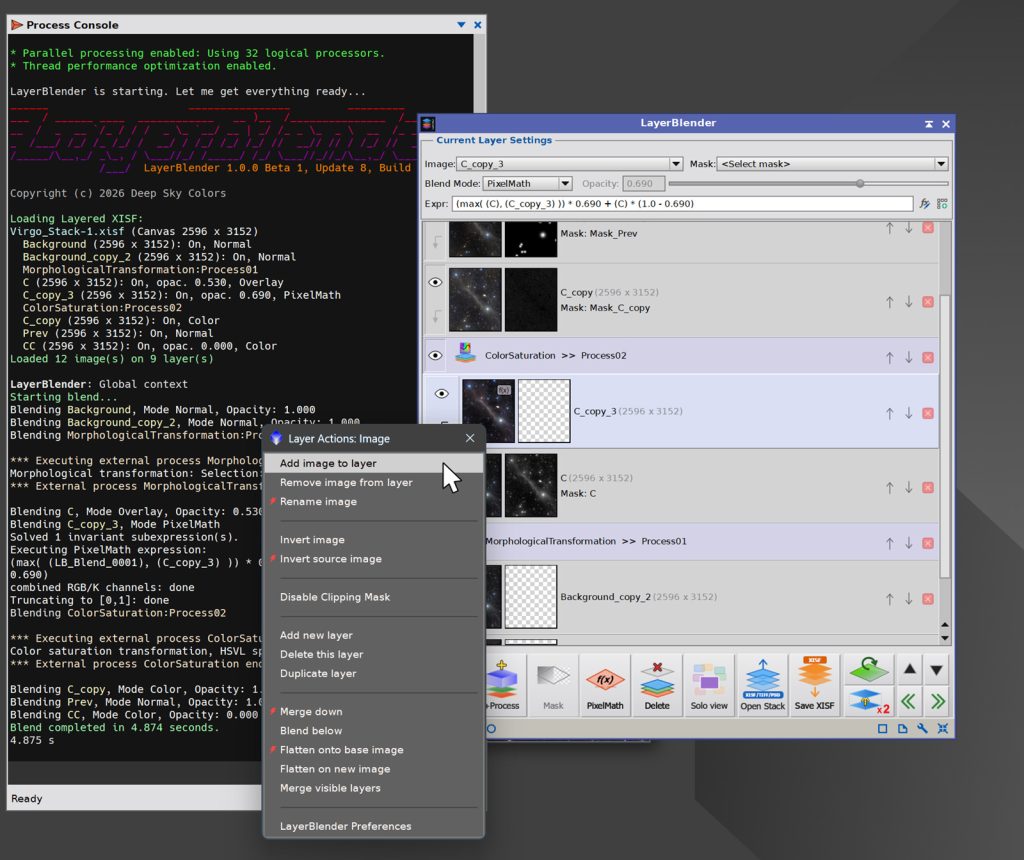
LayerBlender lets us build a stack of images, each on its own layer, and blend them together using a rich set of blend modes, per-layer opacity, and masks. We can work non-destructively, tweak blend parameters, and blend the result at any time.
LayerBlender also goes well beyond simple blending. We are not limited to predefined blending modes like Lighten, Color or Hard Light. We can write our own PixelMath expressions as blend formulas for any layer, and we can also apply any installed PixInsight process to the layers below as a process layer – similar to what other programs call adjustment layers – where any layer can be a PixInsight process (from HistogramTransformation, to MultiscaleGradientCorrection, MorphologicalTransformation and dozens of other processes) that adjusts the images below, turning LayerBlender into a flexible, non-destructive processing pipeline right inside the compositor.
Another great feature is that at any time we can save our entire stack of images with their masks, blending modes or formulas, and even independent process layers, as a single XISF file that when we later open within LayerBlender, it will bring our stack back right where it was, including images, masks, blending modes, formulas, and process layers.
And more!!
Try it for free!
LayerBlender is not free, but you can try a 100% functional copy for 30 days.
If you want to use it after that, it’s a one-time payment of 39.99 US$. No subscription fees: your copy is yours to keep and use forever. You will also receive free upgrades within the major version you purchased.
IMPORTANT: The current version of LayerBlender is in Pre-Release [βeta]. This means that the software is fairly solid and stable, but may still have some minor issues.
LayerBlender is only distributed via a PixInsight repository, as this is the easiest and safest way to install new PixInsight modules.
All we need to do to install our trial copy is add the LayerBlender repository to our PixInsight installation, which we can do in less than two minutes. If you already know how to add a PixInsight repository, this is the URL for LayerBlender:
https://repo.deepskycolors.com/LayerBlender/
If you need complete instructions:
- We open PixInsight, and select the RESOURCES menu.
- In the RESOURCES menu, we select Updates, then Manage Repositories
- In the Manage Update Repositories window, we click Add.
- In the URL box, we enter exactly:https://repo.deepskycolors.com/LayerBlender/
- We click Ok to save it, and it should be listed along other repository URLs. We click Ok to close the Manage Update Repositories window.
- With that done, we now do RESOURCES > Updates > Check for Updates
- The LayerBlender process will appear as a candidate for installation, and will be automatically selected. We click Apply.
- After that, PixInsight will inform us that the install will happen once we restart PixInsight. We do that, and we’re done!
LayerBlender will be under PROCESS > DeepSkyColors and PROCESS > PixelMath.
Using our PixInsight repository as the only official LayerBlender source also comes with the guarantee of our Developer and Repository certificates, required and verified by the PixInsight application from the moment it connects to our repository until it completes installation of the LayerBlender module.
IMPORTANT: LayerBlender is currently available only for Windows and Linux. macOS versions may be available in the near future. Our repository will return nothing if checked from PixInsight installed on macOS.
Also, LayerBlender requires PixInsight v1.9.2 or newer version.
Register your copy, use it forever
No subscriptions, all free v1.xx updates. Your copy is yours and once registered, it will never be deactivated. You can install and use it on any machine you have also installed PixInsight, for any of the available operating systems (your registration is valid for all offered platforms) or number of installations, as long as they are for you to use.
Click on the Buy LayerBlender button below to register your copy at the Pre-launch [βeta] price of just $39.99.
NOTE: After you make your purchase, you will receive an email from PayPal. You may or may not receive an email from us following your order, but if your account was charged, your order was placed and we’ll be sending you the registration key within 3 to 5 days.
LayerBlender Documentation
LayerBlender’s full documentation is accessible from within LayerBlender itself – we just need to click on the Documentation button in LayerBlender and it will appear in the PixInsight’s Documentation browser . We have also made the same documentation available online, here, so you can see all LayerBlender has to offer:
Credits
LayerBlender was developed using the PixInsight Class Library. Any product derived from the PCL, including LayerBlender, must reproduce the following acknowledgment:
This product is based on software from the PixInsight project, developed by Pleiades Astrophoto and its contributors (http://pixinsight.com/).
The above statement refers to our use of the PCL to develop LayerBlender only. LayerBlender is developed independently, without any relation to or contributions from Pleiades Astrophoto.