1 Introduction
[hide]
AstroResolver computes an astrometric solution (a WCS) for the active image and writes it back into the image, so that every other astrometry-aware tool in PixInsight, such as image annotation or a finding chart, knows exactly where each pixel points on the sky.
What sets AstroResolver apart is that it is designed for images that we know nothing about them except the object's name or designation: no focal length, no pixel size, no approximate coordinates in the header, no known scale, possible wild distortions, and obviously, the image has no astrometric or instrumentation metadata at all.
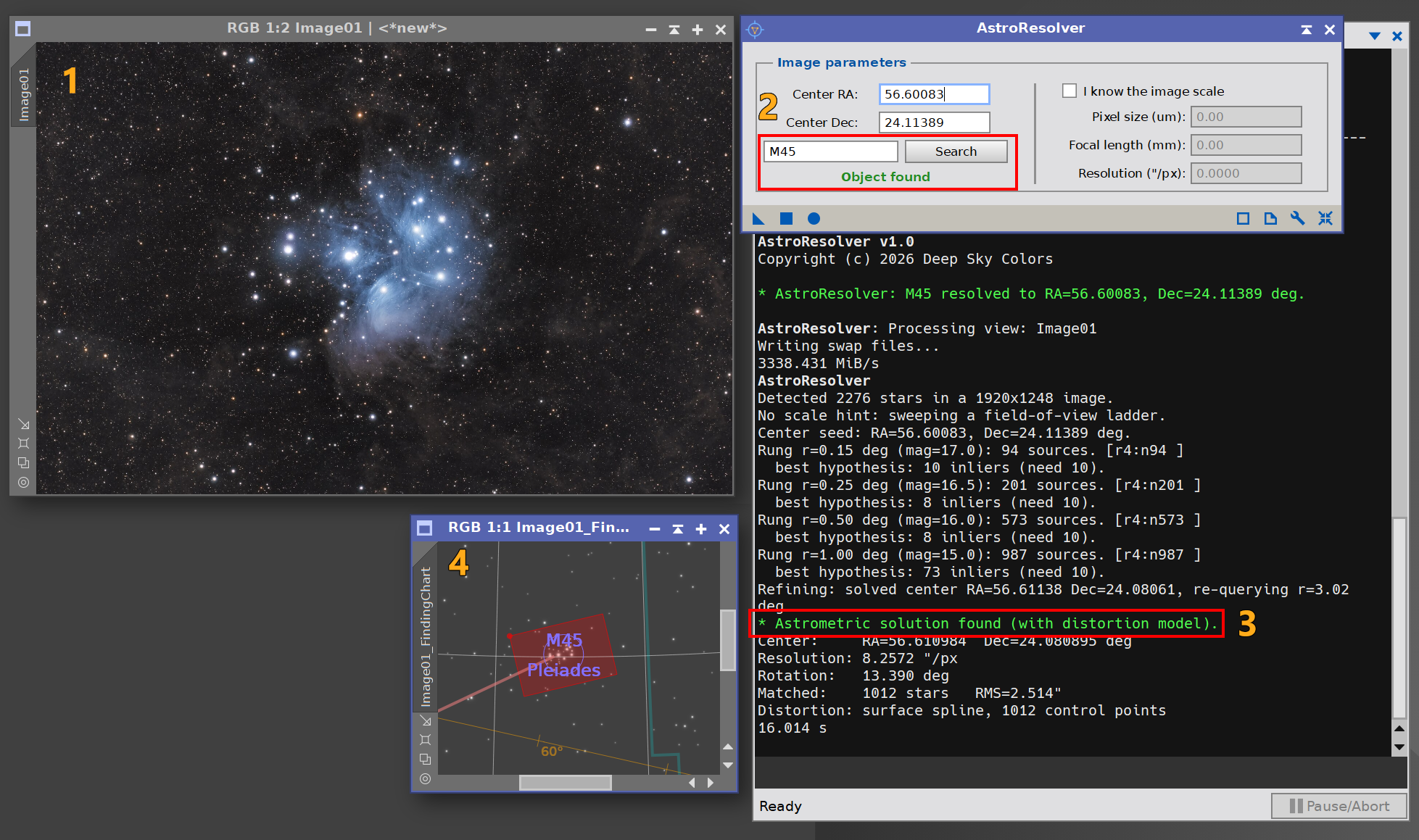
The only thing we provide is an approximate sky position, and even that we can supply by name: we type an object such as M31 and click Solve. AstroResolver looks its coordinates up online and, in that same step, finds the solution on its own, even when the image scale is unknown and the object is not centered in the frame.
AstroResolver is fully self-contained. It does not use the ImageSolver script or the StarAlignment process behind the scenes; it detects stars, queries a star catalog, matches the field, and fits the solution using its own engine. The result is a standard WCS, including an optional distortion model for wide fields, written directly to the target image.
2 Setup and Installation
[hide]
The only official distribution of AstroResolver is via a PixInsight repository. This is the safest way to install a module, since the installation is handled by PixInsight itself, which fetches the module directly from our repository and verifies our Developer and Repository certificates before it completes the installation.
https://repo.deepskycolors.com/AstroResolver/
Make sure the trailing / is part of the URL, and keep our repository in the list of PixInsight repositories to receive timely updates. To check for the latest version we go to PixInsight's RESOURCES > Updates > Check for Updates.
2.1 Launching AstroResolver
Once installed, AstroResolver appears under the PROCESS > DeepSkyColors and PROCESS > Astrometry menus, and in the Process Explorer under the same categories. As with most processes, we open its interface, set its parameters, and apply it to a view. AstroResolver always operates on the active image. There is no file list and no batch mode; we solve one open image at a time.
2.2 Licensing
AstroResolver is free and fully functional. There is no trial period and nothing expires: every feature, including the distortion model, is available to everyone, forever.
The free version shows a small advertisement banner at the bottom of the interface, usually promoting other Deep Sky Colors tools for PixInsight. The banner is a single clickable image; it never interrupts our work and it makes no attempt to track us. If we click on the banner, AstroResolver opens our default browser with the direct destination link, without saving nor tracking any information about the click at all.
Registering AstroResolver removes the banner. To register, we click the wrench (Preferences) button on the process panel, enter the e-mail and license key from our purchase confirmation, and click Register. The banner disappears immediately and stays gone.
3 The AstroResolver Interface
[hide]
The interface is deliberately minimal. Everything that matters fits in a single framed group, Image parameters, with the coordinate controls on the left and an optional scale hint on the right.
The AstroResolver interface:
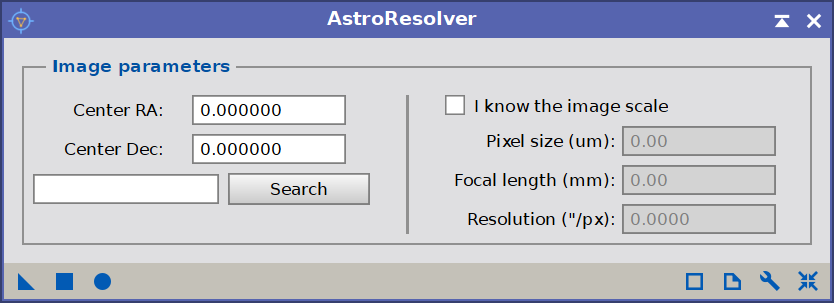
The name box and coordinates on the left; the optional scale hint on the right.
3.1 Image parameters
Center RA and Center Dec are an approximate sky position (ICRS) of any point that falls inside the image. They do not need to be the exact center of the frame; anywhere within the field is enough. Both fields accept plain decimal degrees as well as sexagesimal notation, with or without unit markers: 10 44 2.38, 10h 44m 2.38s, 10:44:02.38 or -59° 30' 29.55" are all understood.
Most of the time, though, we do not type coordinates at all. Beside the Solve button there is a name box: we type the name or identifier of an object in our image, such as M31, NGC 7000, or Pleiades, and either click Solve or simply press Enter. AstroResolver looks the object up through the online SIMBAD service, takes its coordinates as the seed, and solves the image in a single step. Whenever the name box holds a name it takes precedence; if we leave it empty, AstroResolver uses the Center RA and Center Dec fields instead. Because the object name is a process parameter, a saved process icon carries it with it, so an image can be re-solved by name later or from a script.
If SIMBAD cannot be reached, or its server is temporarily down, or the name is simply not recognized, AstroResolver reports it on the console — distinguishing between these cases — and leaves the image untouched.
3.2 The optional scale hint
AstroResolver does not need to know the image scale: by default it discovers it. If we happen to know it, though, supplying it makes the solve faster and a little more robust, because the engine can query the catalog at the correct field size in one shot instead of trying to find out the real scale.
We tick I know the image scale and then provide either the Pixel size (in micrometers) together with the Focal length (in millimeters), or, alternatively, the Resolution directly in arcseconds per pixel. If we leave the resolution at zero, it is derived from the pixel size and focal length. When the box is unticked, all of these fields are ignored and the scale is found automatically.
4 Solving an image
[hide]
4.1 A typical session
The workflow is short:
- Open the image we want to solve and make it the active view.
- Open AstroResolver, type the name of an object in the frame (for example,
M45) in the name box, and click Solve (or press Enter). If instead we know the coordinates, we type them into Center RA and Center Dec and leave the name box empty. - If we know the scale, tick I know the image scale and fill it in before solving. Otherwise, leave it unticked.
That single click both resolves the name and solves: AstroResolver detects the stars, queries the catalog around our position, matches the field, and, on success, writes the solution to the image. (Applying the process with its Execute button does exactly the same thing.) If it cannot find a confident match it reports that and leaves the image untouched. A long solve can be interrupted at any time by pressing the Escape key.
If the active image already carries an astrometric solution, AstroResolver asks whether to replace it before it solves, so an existing WCS is never overwritten by accident. This prompt appears only when we run AstroResolver interactively; during script or batch execution it re-solves without interrupting.
4.2 Solving by hand: manual reference points
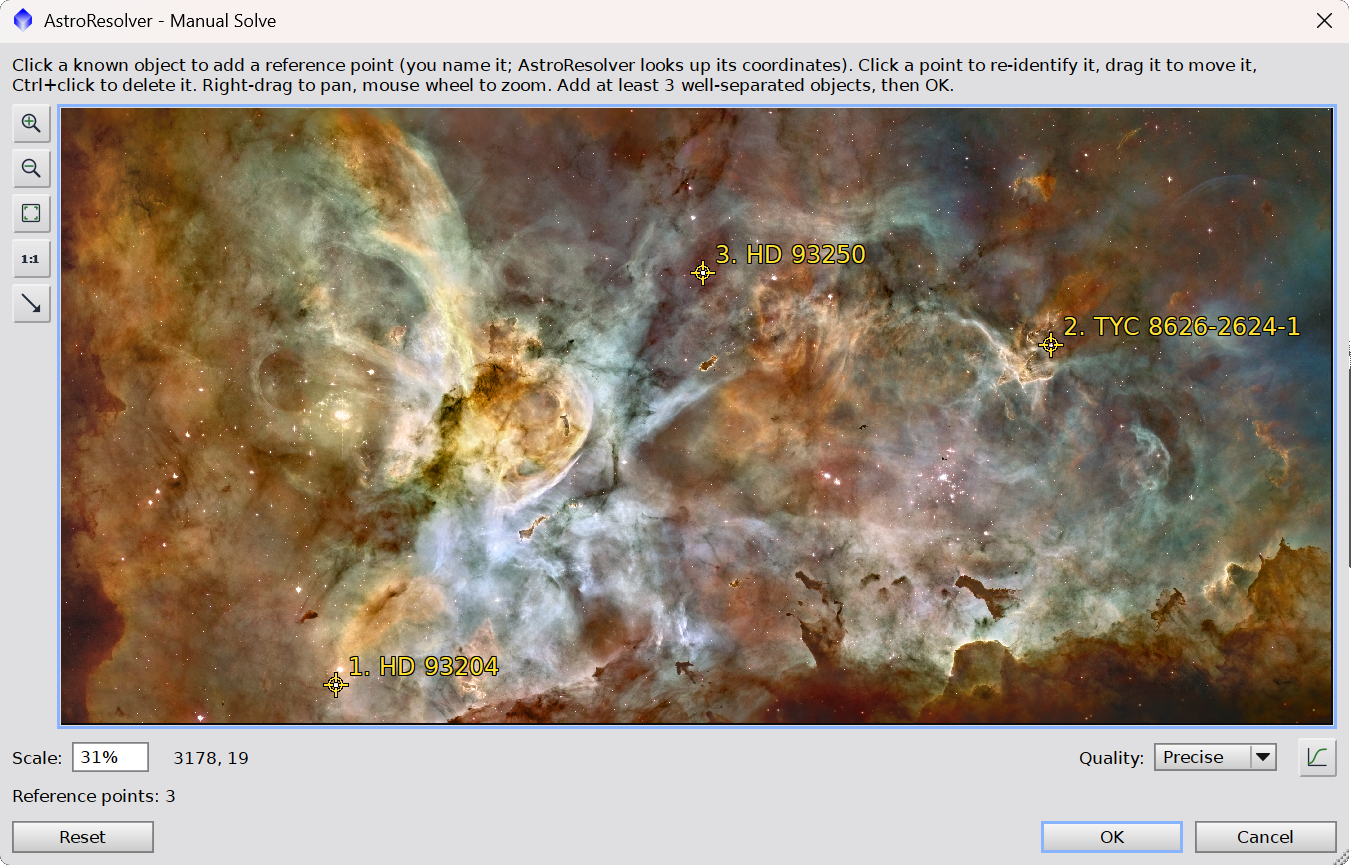
Some images defeat any automatic solver: narrowband frames whose bright knots are not in a star catalog, ultra-wide fields that span a whole constellation, or heavily processed pictures where the stars no longer match a catalog's geometry. For these, AstroResolver can solve from points that we identify ourselves.
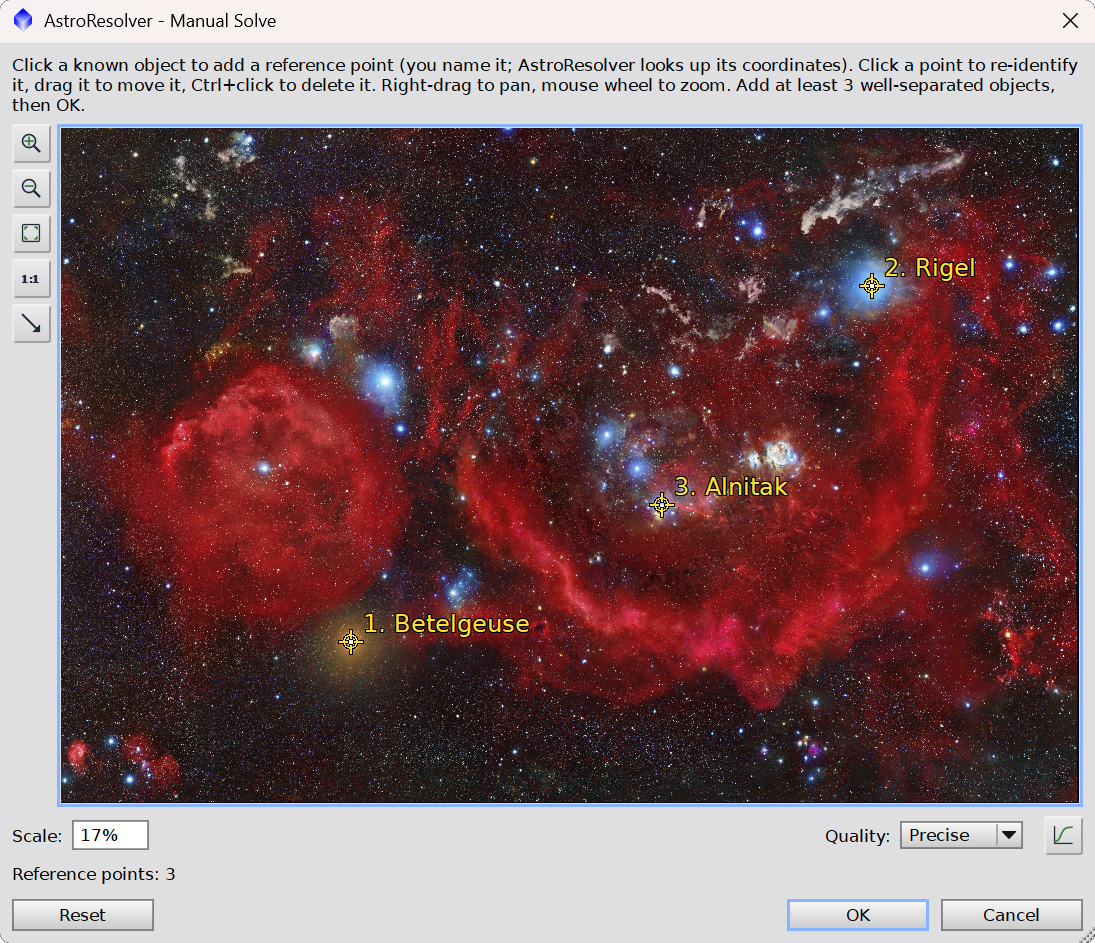
We click Manual solve... to open a window showing the active image. We click on a feature we can name — a bright star, a catalogued object — and type its name; AstroResolver resolves it through SIMBAD and pins a numbered marker at that spot. We repeat for a few more objects, spread as widely across the frame as possible. An existing point can be dragged to fine-tune its position, or removed with Ctrl+click. An optional auto-stretch (off by default) makes faint objects easier to see while we work.
With at least three points in place, AstroResolver fits a WCS directly from the correspondence between our clicked pixels and the objects' catalog coordinates, and writes it to the image. Here the tool trusts us: it runs basic sanity checks and rejects an obviously impossible fit, but it does not cross-check the points against a catalog. The more points we give it, and the wider they are spread, the more accurate and better-conditioned the solution.
4.3 Reading the results
AstroResolver reports its progress and its result in the Process Console. On success we see the solved field center, the image scale in arcseconds per pixel, the field rotation (and whether the image is mirrored), the number of catalog stars matched, the RMS residual of the fit in arcseconds, and whether a distortion model was fitted. A high star count at a sub-pixel RMS is the signature of a solid solution.
4.4 Verifying the solution
Because AstroResolver writes a standard WCS, we can verify it with any astrometry-aware tool. For example, the FindingChart process overlays catalog objects, constellation lines, and grids; and it will display the field in context. If FindingChart lands cleanly on the object's FOV across the whole frame, including the corners, the solution is good.
5 How AstroResolver works
[hide]
Understanding the pipeline helps us read the console output and diagnose the rare failure. The solve proceeds in stages:
- Star detection. AstroResolver detects the stars in the image and measures their positions to sub-pixel accuracy. If the first detection pass does not yield a solution, it automatically retries with a contrast-enhanced detection pass that surfaces fainter, cleaner stars.
- Catalog query. Around the position we provided, it queries the Gaia catalog as configured in PixInsight's Gaia process. When we have not supplied a scale, it tries a small ladder of field sizes, from narrow to wide, until one produces a match. When we do supply a scale, it queries the matching field size directly, with some room for errors.
- Asterism matching. The detected stars and the catalog stars are matched by comparing the shapes of star triangles. Triangle shape is independent of scale, rotation, and mirroring, which is exactly why AstroResolver does not need to know the image scale or orientation in advance. A robust voting and verification step keeps only a transform that lands many catalog stars on real detected stars.
- Full-frame refinement. Once an initial lock is found, AstroResolver recenters on the real solved position, re-queries the catalog at the now-known field of view, and refines the fit against stars across the entire frame, typically hundreds of them.
- Distortion model. For wide fields, a linear WCS cannot follow the optics into the corners. AstroResolver fits a surface-spline distortion model from the matched stars, so the solution stays accurate from center to edge.
6 Usage tips and limitations
[hide]
- The position only needs to be inside the frame. The object we look up does not have to be centered; anywhere in the image is fine. The solved center reported in the console is where the image actually points, which may differ from the object we named by a noticeable amount.
- A scale hint helps, but is never required. Supplying it skips the field-size search and makes the solve quicker. Without it, AstroResolver sweeps a range of field sizes that covers everything from long focal lengths and small, narrow fields to wide camera lenses.
- The Gaia databases must be configured. AstroResolver uses the Gaia catalog as set up in PixInsight's Gaia process, and checks for it when the interface is launched: if no Gaia database is available it warns us right away. The automatic solve cannot work without it, although the manual reference-point solve, which relies on SIMBAD rather than Gaia, still can.
- When the automatic solve just won't lock. Narrowband nebulae with few catalog stars, ultra-wide constellation frames, and heavily reprocessed images are the hard cases. When re-checking the object we looked up and the scale hint does not help, the Manual solve reference-point method almost always will.
- When it fails. If too few stars are detected, or the position is well outside the frame, or the field falls outside the searched scale range, AstroResolver reports that no match was found and leaves the image untouched. Re-checking the object we looked up and making sure the image is reasonably star-rich resolves most failures.