
GraXpert Background Extraction
GraXpert's AI background extraction, run from DSPX
GraXpert Background Extraction removes the gradient from an image with the AI model of GraXpert, a separate program that we run for us. We choose subtraction or division and the smoothing, DSPX sends the image to GraXpert and brings the result back, and GraXpert can give us the background it found as a new image. GraXpert is not part of DSPX: we install it ourselves.
1Introduction
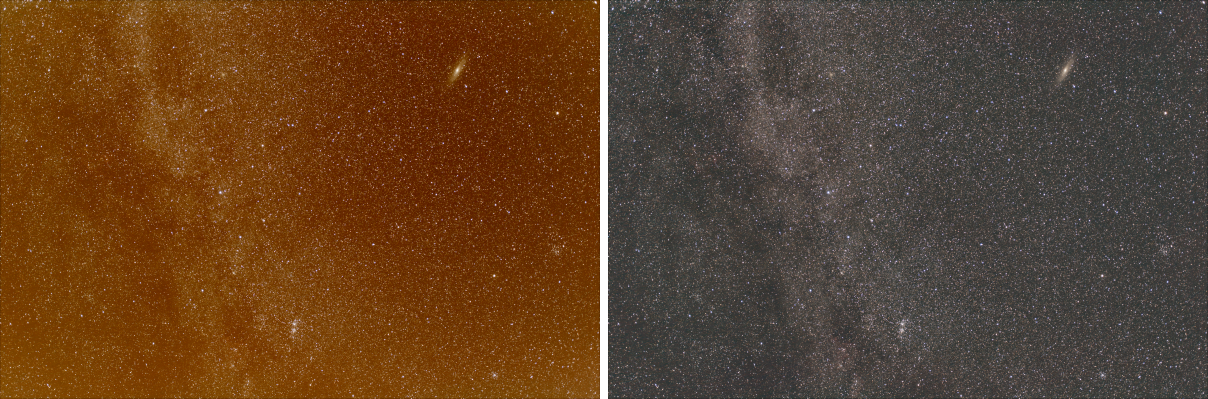
GraXpert is free software for astrophotography, made by its own authors and available from its own website. Its background extraction finds the gradient of an image with a neural network, with no samples to place. This process is the way to use it without leaving DSPX: it takes the image of the panel, hands it to the GraXpert installed on this computer, waits for it, and replaces the image with what GraXpert made. The result goes through the image's mask and selection and makes one history step, like the result of any other process.
DSPX ships nothing of GraXpert and downloads nothing of it. GraXpert itself is free software under the GPL-3.0, and the AI models it uses have their own license, Creative Commons BY-NC-SA 4.0, which is for non-commercial use. They are separate software, and their licenses are theirs. We find GraXpert in , where we say which program to run. Our own background extraction, with samples we place and models we choose, is Background Extraction.
2Quick Start
- Install GraXpert. Get GraXpert... in opens its download page in our browser.
- In the same page, press Find or Browse... to say where the program is, then Check: it shows GraXpert's version and the commands it has.
- Open the image and choose .
- Leave Correction on Subtraction for a gradient of light, or choose Division for vignetting.
- Click Apply. The Log shows what GraXpert says while it works.
3Interface & Parameters
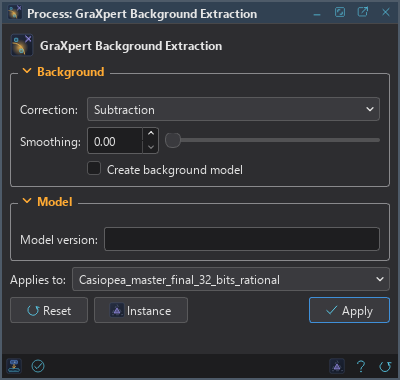
The panel has two sections, Background and Model, then the image the process applies to, the buttons and the system bar along the bottom. There is no live preview: GraXpert takes seconds to minutes, so the process runs when we click Apply.
3.1Background
Correction: How the background GraXpert found is removed:
- Subtraction: the background is subtracted. It removes an additive gradient, such as light pollution. The default.
- Division: the image is divided by the background. It removes a multiplicative one, such as vignetting or the residue of a flat field.
Smoothing: How smooth the background model is, from 0 to 1. 0 by default.
Create background model: Also makes the background GraXpert found as a new image, named after the image with the suffix background. Off by default.
3.2Model
Model version: The version of GraXpert's AI model, written as three numbers such as 1.0.0. Empty, the default, uses the latest one GraXpert has. A model that GraXpert does not have on this computer yet is downloaded by GraXpert itself.
3.3Apply, Reset and the Preview
Apply writes the image to a temporary file, runs GraXpert on it, reads the result and replaces the image with it, in one history step that Undo takes back, through the image's mask if it has one. The panel shows the progress GraXpert reports, and the Cancel button stops GraXpert and everything it started. The image keeps its size, its channels and its sample type; integer images get the result clipped to their range, so nothing wraps around. Alpha channels and the image's metadata, astrometric solution included, are not touched.
4How We Run GraXpert
We want to be exact about what DSPX does on this computer.
- The program. DSPX runs the one program named in , or, when that is empty, the first GraXpert it finds in the usual install places (it only looks for the file, and runs nothing while looking). The program is GraXpert-win64.exe on Windows, GraXpert-linux on Linux and the program inside GraXpert.app on a Mac. It runs as a separate program with an argument list, never through a shell.
- The command. The arguments are those of GraXpert's own command line:
-cli -cmd background-extraction, the file,-output result, then-correction,-smoothing,-bgwhen we ask for the background model,-ai_versionwhen we name a model and-gpuwhen GPU in Preferences is On or Off. The first line DSPX writes to the Log is this command. - The files. DSPX makes a private temporary folder, writes the image there as a 32-bit floating point FITS file, lets GraXpert write its result and the background model beside it, reads them, and removes the folder when the run ends, whether it succeeded, failed or was canceled. Nothing else is written to disk, and nothing is kept.
- The network. DSPX makes no connection for this. GraXpert may: it lists and downloads its AI models from its own server.
5When Something Goes Wrong
- GraXpert was not found. Install it and set its path in Preferences.
- GraXpert stopped with an exit code. The message ends with GraXpert's last words. The Log has the rest.
- GraXpert could not download its AI model. Check the internet connection and run again, or name a model version GraXpert already has.
- GraXpert wrote no image, or one of another size. The image is left as it was.
6Usage Tips and Tricks
Look at the background model. Turn on Create background model once: a model with the structure of the object in it means the gradient is not what GraXpert took it for. GraXpert's own documentation says more about the stage of processing it suits.
Several attempts. Smoothing and the model version change the result. Undo and try another setting; the History panel keeps each step.
Other images. Once the settings are right, we save the process () to apply it to other images from the Process Shelf. GraXpert runs once for each image.
7Related Tools
Background Extraction: our own background extraction, with samples we place and polynomial or spline models.
GraXpert Denoise: GraXpert's noise reduction.
GraXpert Deconvolution: GraXpert's deconvolution, in the releases that have it.