
Plate Solve
Where the image is on the sky, from its stars alone
Plate Solve finds where an image is on the sky and writes that into the image as its astrometric solution: the sky position of every pixel, with a distortion model accurate from the center to the corners. It needs nothing but the stars: no object name, no coordinates, no focal length or pixel size. The processes that work with the sky, such as Survey Overlay, Photometric Glow Subtraction and Catalog Star Color, read the solution it writes.
1Introduction
An astrometric solution says, for each pixel of an image, where it points on the sky. Plate Solve computes it by matching the stars of our image with the stars of the Gaia DR3 catalog, and writes it into the image's metadata the way PixInsight writes it: the astrometric solution properties, with a surface spline distortion model, and the standard WCS keywords of its linear part, so that a FITS file carries it too. The pixels are never touched. The solution is one history step, undone like any other.
Plate Solve is the engine of our AstroResolver module, running in DSPX. It detects the stars, finds the field, asks the catalog for the stars there, matches them by the shapes of star triangles, refines the fit over the whole frame and fits the distortion model. A solid solution matches hundreds of stars at a few tenths of an arcsecond.
What the solver needs first is a rough position and scale. We can give them (an object's name, the center's coordinates, the pixel size and focal length), the image's own metadata often has them, and when neither does, the all-sky search finds the image from its stars alone, in index files of star patterns built on our computer from the catalog files. The search takes a few milliseconds; its answer then becomes the hints of an ordinary solve, which confirms it independently and makes the final solution.
Nothing is downloaded to solve an image when the catalog files are on our computer: the stars come from our own Gaia DR3 files, and only stars beyond what they hold are asked from ESA's online archive, when we allow it.
2Quick Start
- Open the image and choose . The panel works on the image in front, named under the settings ("Applies to").
- Leave every setting as it is. With nothing typed, Plate Solve takes what it can from the image's metadata, and when that is not enough the all-sky search finds the image.
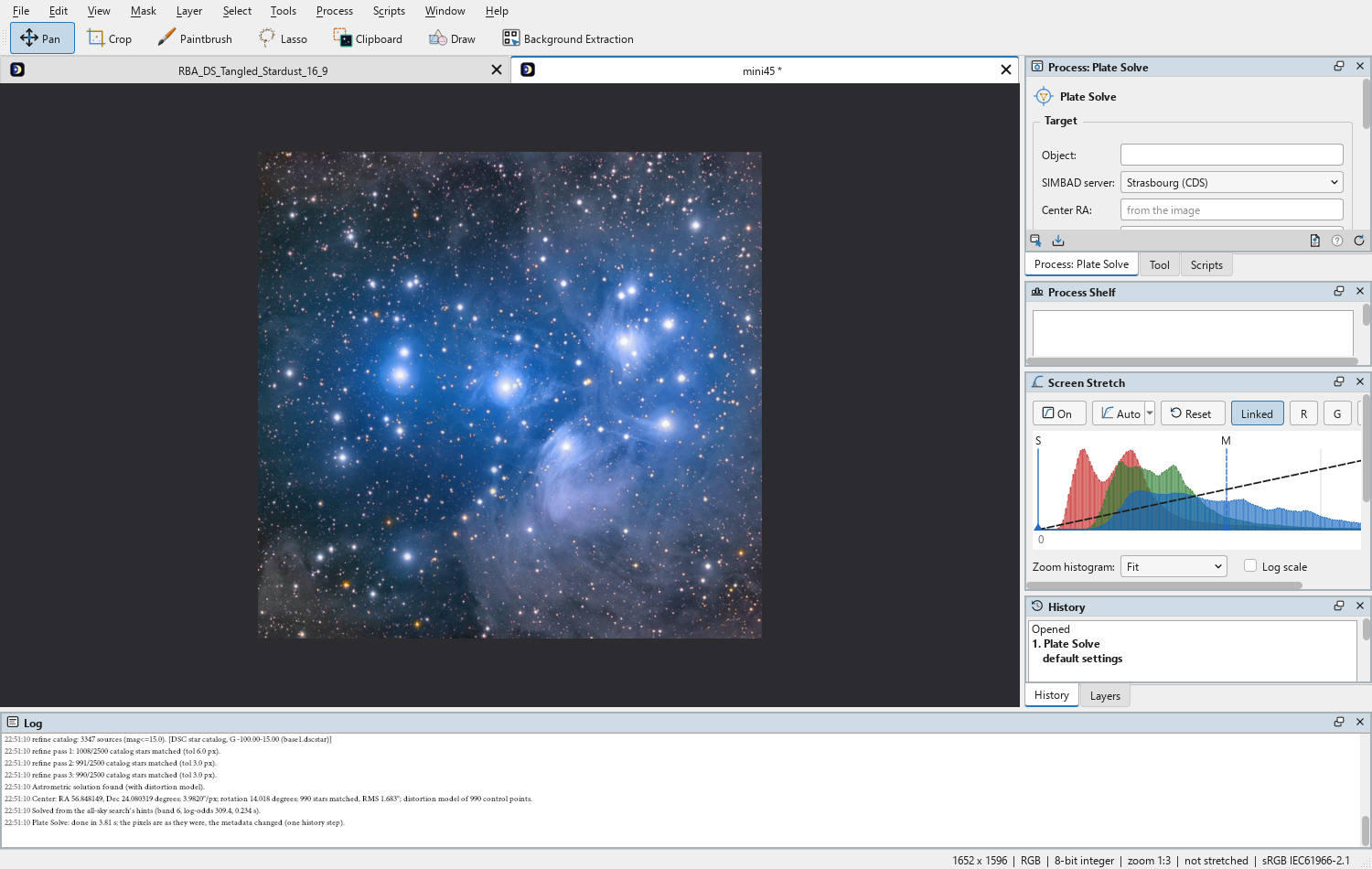
- Click Apply. A few seconds later the panel says where the image points, at what scale, and how many stars were matched: Solved · RA 56.85°, Dec +24.08° · 3.982″/px · 990 stars · 3.8 s.
- If it fails, the line says why. Typing the name of an object in the image (
M45,NGC 7000) under Object and applying again solves most of the rest.
3Interface & Parameters
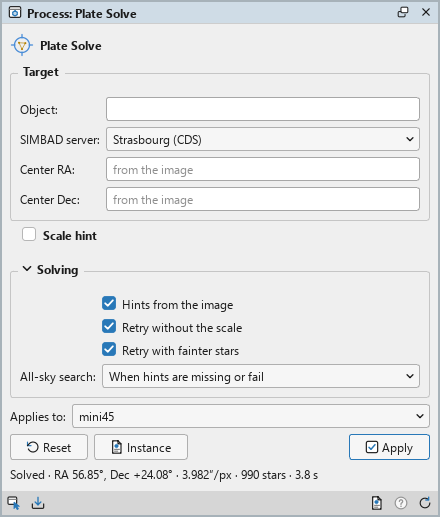
The panel has three sections: Target, what we know of where the image points; Scale hint, what we know of its scale; and Solving, where the hints come from and what to try when a solve fails. Every field of Target and Scale hint is optional.
3.1Target
Object: An object in the image, such as M20, NGC 6995 or
Horsehead Nebula, or coordinates typed as text (18 02 39 -22 58 26). The name is looked
up in a built-in catalog of about 14,400 names (Messier, NGC, IC and named stars, among others), with no network,
and then in SIMBAD. The object does not need to be centered: anywhere in the frame is enough. A name takes
precedence over the center fields. Empty: the center below, or the image's own metadata.
Center RA: The approximate right ascension of the image's center, in degrees from 0 to 360. Empty means no center hint. The field shows where the center comes from instead: "from the image" while Hints from the image is on, "from the object" when an object is named, "not given" otherwise.
Center Dec: The approximate declination of the image's center, in degrees from −90 to +90. The center is used only with both coordinates; with one alone, or a value out of range, a line under the fields says so and no center is used.
3.2Scale Hint
Scale hint: The title of the section is a check box. On, the solve uses the scale given below; off, the section shows its title alone, and the scale comes from the image's metadata, from the all-sky search, or from a sweep of fields of view. A scale is never required: a right one only makes the solve quicker.
Pixel size (µm): The sensor's pixel size in micrometers, binning included.
Focal length (mm): The telescope's or the lens's focal length in millimeters.
Resolution (″/px): The image scale in arcseconds per pixel. Beside the focal length, the panel shows the resolution the pixel size and focal length give ("= 1.00″/px"). That value is itself a field: a resolution typed there takes over, the pixel size and focal length are dimmed and not used, and use pixel size and focal length under them goes back.
3.3Solving
Hints from the image: Takes what the settings leave out from the image's metadata: an existing solution, the RA and DEC or OBJCTRA and OBJCTDEC keywords, the center and object properties of an XISF file, the OBJECT name through the built-in catalog, and the scale from FOCALLEN and XPIXSZ. On by default.
Retry without the scale: When a solve with a scale hint fails, tries once more at any scale, sweeping fields of view from 0.15 to 10 degrees: the metadata may not know of a focal reducer, a Barlow or binning. The all-sky search follows the same rule: a search narrowed by a scale that fails is tried again at any scale. On by default.
Retry with fainter stars: When a solve fails, detects the stars again on a stretched copy of the image, which finds fainter ones. On by default.
All-sky search: Whether Plate Solve may find the image from its stars alone, with the index files ("The All-Sky Search", below):
- Off: never. An image whose approximate center is not known is not solved.
- When hints are missing or fail: the default. The hints are tried first; with no center, or when the solve from the hints fails, the search finds the image, and its center and scale become the hints.
- Always: the search first, whatever the hints; the hints are tried only if the search fails.
Fallback name server: The SIMBAD mirror asked first for a name the built-in catalog does not
have: Strasbourg (CDS) or Harvard (CfA). SIMBAD needs an exact designation, such as
HD 37742.
3.4Apply, Instance and the System Bar
Applies to: The image Plate Solve works on: the image in front, or another open image picked in the list. A picked image stays the panel's image when another comes to the front; Follow Active, shown beside the list while a pick is kept, makes the panel follow the image in front again.
Apply: Solves the image and writes the solution into its metadata, replacing any solution it had: one history step, and the pixels are as they were. While it runs, the panel shows its progress and Cancel. When it ends, one line says where the image points; its tooltip has the solution in full (the center to six decimals, the scale, the rotation and whether the image is flipped, the stars matched and the RMS of the fit, the distortion model, and where the hints came from). A failure is one line with the reason, and the image is left as it was.
Reset: Puts every setting back to its default.
Instance: Opens a window with the process as the panel has it now, as a DSPX process
(.dsproc) or as a PixInsight process icon (.xpsm) that AstroResolver opens. Copy puts
the text on the clipboard; Save... saves it as a file and puts it on the Process Shelf. The all-sky search is
a setting of DSPX alone, so a PixInsight icon leaves it out.
The bar along the bottom of the panel has the same commands as small icons: drag to apply and Apply on the left, Instance, Help and Reset on the right. Dragging the first icon onto any image window solves that image with the panel's settings; dropped on the Process Shelf, it keeps the process there.
4Where the Hints Come From
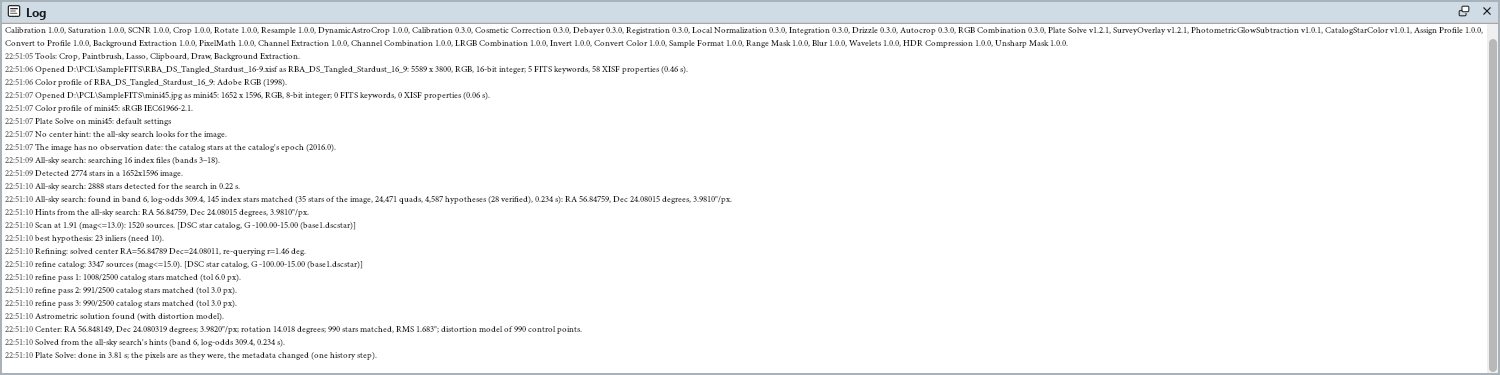
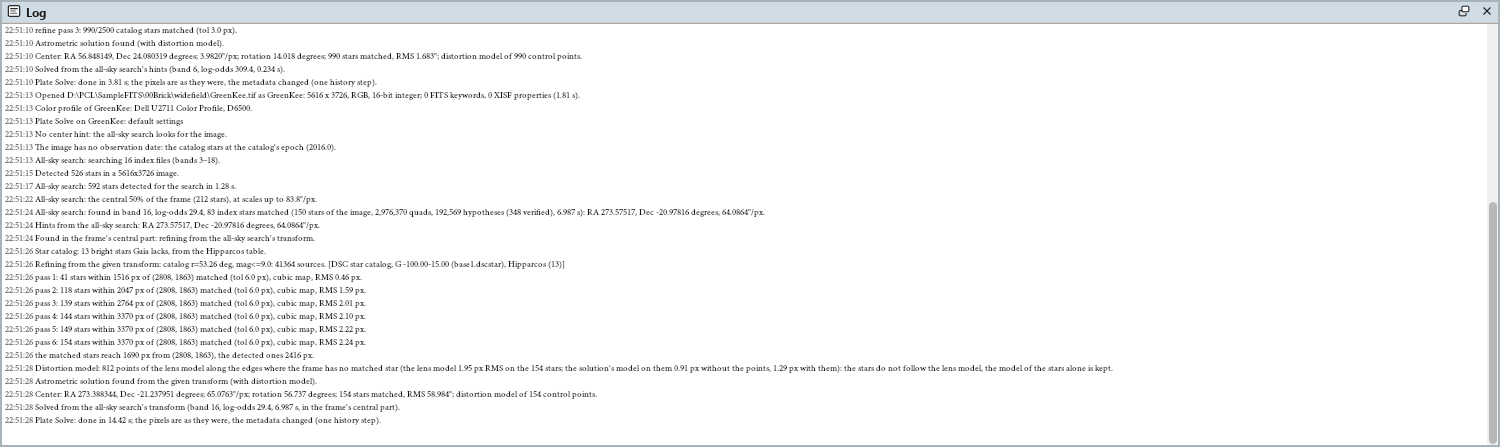
Plate Solve gathers its hints in this order: the settings, then (with Hints from the image on) the image's metadata, then the all-sky search when it is allowed and needed. The Log says where each hint came from.
- A center from the Object field, the Center fields, an existing solution, the coordinate keywords or properties, or the OBJECT keyword through the built-in catalog.
- A scale from the Scale hint, from FOCALLEN and XPIXSZ (or the XISF properties that hold them), or from an existing solution. Without one, the solver sweeps fields of view from 0.15 to 10 degrees, and the all-sky search tries every scale its index files cover.
- The date of the image, from DATE-AVG, else the middle of the exposure, else its start: the catalog stars are moved by their proper motion to that date. An image with no date is solved against the catalog's own epoch, 2016.0, and the Log says so.
When a solve from the hints fails, Plate Solve retries as the Solving settings say: with fainter stars, without the scale, and finally with the all-sky search.
5The All-Sky Search
The all-sky search finds an image from its stars alone. It takes groups of four bright stars of the image and describes the shape of each group by four numbers, which are the same wherever the image points, whatever its scale, rotation or mirroring. It looks those shapes up in the index files, which hold the same description for groups of catalog stars over the whole sky, and checks each candidate by how many more catalog stars land on detected stars than chance would allow. A field is accepted only with overwhelming evidence: in tests on ten thousand frames of random stars, the search never accepted one.
The search usually takes a few milliseconds; detecting its stars takes about a second. Its center and scale are then the hints of an ordinary solve, which matches the catalog with its own method and fits the distortion model: an independent check before anything is written to the image. The first search of a session reads the index files into memory, a second or two (longer from a slow disk); the next solves start at once.
A partial hint narrows the search: a scale (from the settings, FOCALLEN and XPIXSZ, or an old solution) to within a factor of two of it, a focal length alone to pixels of 2 to 10 µm, a pixel size alone to focal lengths of 10 to 5,000 mm. The search has a minute in all.
5.1The Index Files
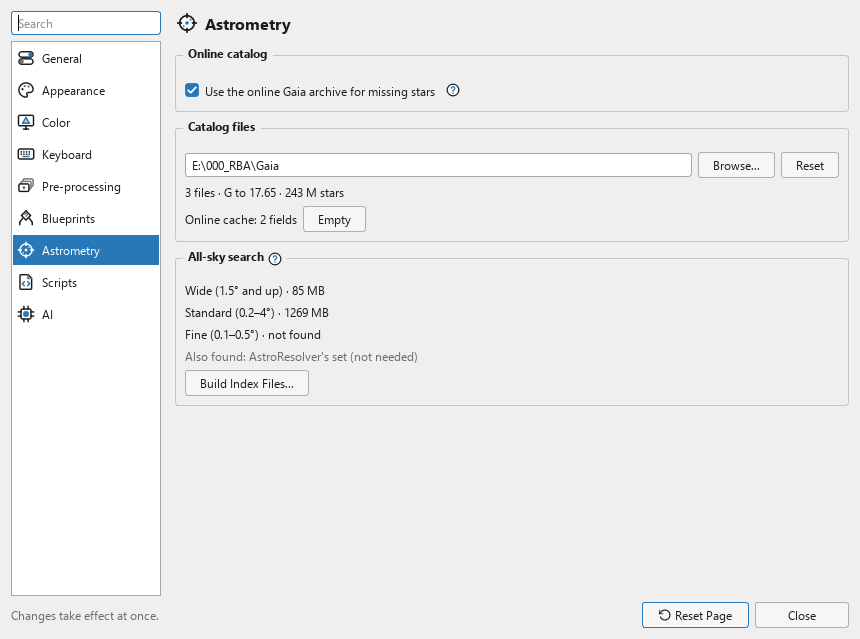
The index files are built on our computer from the catalog files, with ("Building the Index Files", below). Nothing is downloaded. They come in three sets, each for a range of field sizes:
- Wide: fields from about 1.5 degrees up, camera lenses and short focal lengths. About 85 MB; it needs the catalog files to magnitude G 15.
- Standard: fields of about 0.2–4 degrees, most telescope images. About 1.3 GB; it needs the catalog files to G 17.65.
- Fine: fields of about 0.1–0.5 degrees, long focal lengths. Built around the catalogued objects (within 0.5 degree of about 14,000 galaxies, nebulae, clusters and named stars; 573 MB) or for the whole sky (2.8 GB); it needs the catalog files to G 17.65.
Wide and Standard together cover practically every telescope and camera lens. Fine turns fields of 0.1 to 0.2 degree from mostly unsolved to mostly solved: built around the objects, it solves an image pointed at one of them as well as the whole sky's set does, at a fifth of its size; built for the whole sky, it solves narrow fields anywhere. All the sets are searched together. Below about 0.1 degree, a field has too few stars bright enough for any index, and a name or coordinates are the way to solve it.
The search looks for the index files in the index folder of each catalog folder, in the order the
catalog files are looked for, then in the folder shared with our AstroResolver module, which it only reads. Each band
is taken from the first folder that has it, and a folder another program is writing into is left alone until it is
done. The all-sky search group of lists each set found, with its
size, and its (?) lists the folders in order.
5.2Building the Index Files
Build Index Files... opens a window with the sets the catalog files can build, each with its size on disk and an estimate of the time it takes; a set the catalog files cannot build says what it needs. A set already in the destination says "built". Fine has a choice on its line: around catalogued objects (0.5°), the default, or whole sky.
The Destination is one of the folders the search reads, so new files are always found:
- Shared with AstroResolver (recommended): the default, so that DSPX and AstroResolver in PixInsight use one build.
- DSPX's own folder.
- A catalog folder's index folder, listed last and used only when we choose it.
Under the list are the folder and the free space on its disk and, only when they apply, a line saying that another program is writing into the folder, or that an earlier folder already holds the same sets (files built here would not be used while it does).
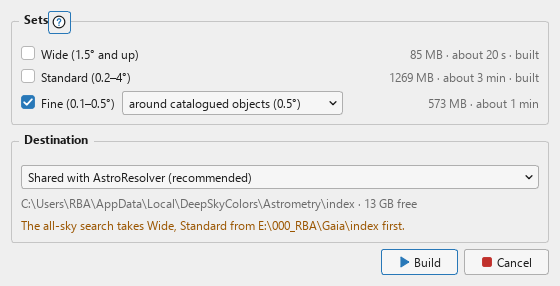
Build starts. The build runs in the background, so we can keep working: the window shows each set's progress and where it is, and closing the window or Preferences does not stop it (the Astrometry page shows its progress beside the button). Standard takes about three minutes on a fast computer and up to 2.5 GB of memory; the estimates in the window are for our computer. Cancel stops it within a second and keeps nothing of the set being built; the sets finished before stay. Rebuilding a set that is already there asks first. The next solve uses the new files, with no restart.
6Camera Lenses and Wide Fields
A camera lens's frame is hard for a plate solver: tens of degrees of sky that no single flat projection holds, strong distortion toward the corners, and often a landscape over part of it. Plate Solve handles them in three steps:
- The central part. When the whole frame is not found, the search runs again on the stars of its central half, then of its central 35%, where the projection is closest to flat. The part shares the frame's center, so finding it gives the frame's center and scale.
- Growing from the search's answer. For a field found in its central part, or more than 10 degrees across, the solve does not start from a center and scale: it starts from the search's own mapping of the sky onto the image, and grows it outward, matching catalog stars ever farther from the center, with a fit that follows the lens's distortion, until it covers the frame.
- The edges. Where the frame has no stars (a landscape, dark corners), the distortion model would have nothing to hold on to. When the matched stars follow a lens closely, Plate Solve fits that lens's model on them and adds points of it along the edges where no star was matched. They are used only when the lens model fits the stars and the solution stays as good with them; otherwise the stars' own solution is written alone, and the Log says why. The solution's star count and RMS are always the stars' alone.
Lenses from about 200 mm down to 14 mm solve this way, over the sky and to the edges. What cannot be solved is what is not one lens's projection: a fisheye (the solution is a flat projection, so the solve is refused rather than written wrong), a stitched panorama, or a composite of several frames. A raw frame from the camera solves more surely than a processed, resampled print version of it.
7The Catalog
The stars come from Gaia DR3 through our own catalog files (Base 1 to G 15, Bases 2 and 3 to G 17.65), with the brightest stars, which Gaia does not measure, from Hipparcos. The folder of the catalog files is set in , and the line under it says how many files there are and how deep they go.
Beyond the files, with Use the online Gaia archive for missing stars on, Plate Solve asks ESA's archive for the field it needs, over https: its center, radius and magnitude limit, nothing else. Every answer is kept in a cache on our computer, so a field is asked for once; Empty clears the cache. Off, only the catalog files and the cache are used. Without catalog files, every solve goes to the archive, and Build Index Files... has nothing to build from.
8What Uses the Solution
The solution is what DSPX's astrometric processes read: Survey Overlay, Photometric Glow Subtraction and Catalog Star Color. Applied to an image without one, they offer to plate solve it first, with Plate Solve's panel settings, and go on when the solve succeeds.
The geometry operations (the Crop tool, Crop, Rotate and Resample) recompute the solution for the new grid, so a cropped, turned or resampled image stays solved; the Log says so. Because the solution is written as PixInsight writes it, a solved image saved as XISF is solved in PixInsight too, and a FITS file keeps the linear part in its WCS keywords.
9Usage Tips and Tricks
Build Wide and Standard once. With them, nearly every image solves with nothing typed. Without index files, Plate Solve needs a name, coordinates or a center in the metadata.
Add Fine for long focal lengths. Fields narrower than about 0.2 degree need it. Around the catalogued objects is enough when we point at objects, which is what we usually do.
A name helps where the stars do not. Narrowband images with few stars, heavily processed pictures and fields below 0.1 degree solve best from an object's name or coordinates, which only need to be somewhere in the frame.
A wrong scale is not fatal. A reducer, a Barlow or binning the header does not know of is caught by Retry without the scale. A right scale hint only makes the solve faster.
Read the tooltip. The line after a solve is a summary; its tooltip has the solution in full, and a high star count at a sub-pixel RMS is the sign of a solid solution.
Solve before cropping, or after. Either works: the geometry operations carry the solution, and Plate Solve solves a crop as well as the whole frame.
Solve again to replace. Applying Plate Solve to a solved image replaces its solution; Undo brings the old one back.
10Related Tools
Survey Overlay: an all-sky survey for the field of a solved image, pixel-matched to it or around it. A quick way to see the solution at work.
Photometric Glow Subtraction: subtracts the glow of bright stars, each scaled by its Gaia magnitude, through the solution.
Catalog Star Color: gives each star the color of its catalog star, found through the solution.
Dynamic Astro Crop: the Crop tool, which crops, resamples, flips and turns an image and recomputes its solution.