Multiscale TGV Denoise
Noise removed by a smooth model that keeps edges, gradients and stars
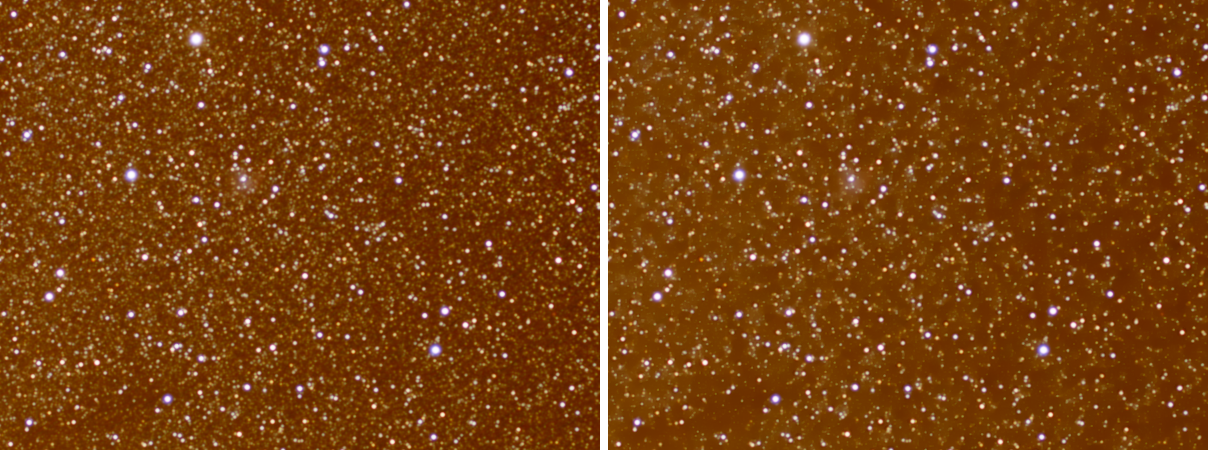
Multiscale TGV Denoise removes the noise of an image, mono or color, by finding the smoothest picture that still agrees with the data to within the noise. Its smoothness allows gradients as well as flat areas, so skies, nebulae and the sides of a galaxy come out clean without the blocky patches other smoothing methods leave. It works at several scales, can model the stars so that their amplitude is never reduced, can protect the significant structure with a mask, and runs on the graphics card.
1Introduction
Noise is what the picture does not explain. We ask for the smoothest picture that stays within the noise of the data, and measure smoothness by the total generalized variation of second order: it prefers pictures whose slope changes little, so a gradual brightening across a nebula costs nothing, and only a real edge costs something. The solution is found by iteration, and it stops when its change per iteration, in units of the noise, falls below the Tolerance.
The noise is measured on the image, in the flat parts of the sky. In DSPX mode it is first made equal at every level by a transform of the signal, so Strength means the same in the shadows and in the highlights; in PixInsight compatibility mode one noise unit for the whole image is used. A color image is solved as one problem in a luminance and two chrominance components, so the edges of the three channels agree. The image is solved at full resolution and then at coarser scales, each in its own noise unit, so the blotches of noise that are larger than a pixel are removed as well.
A deep-sky image has stars on a sky, and the process uses that: it repairs dead pixels first, keeps the stars out of the corrections of the coarser scales, and can fill the dark specks that noise leaves inside the sky. Turn Deep-Sky Image off for an image without stars, such as a lunar or a daylight picture.
Multiscale TGV Denoise has PixInsight's process id and parameter ids, so a PixInsight icon of the process opens here and a DSPX icon opens there. The switches that are ours alone are kept apart in the DSPX section and are not written to a PixInsight icon.
2Quick Start
- Open the image, linear or stretched, and choose .
- Leave the settings as they are for a first try: Strength 0.5, Scales 2.
- Turn on the live preview (the eye) to see the result on the part in view. With up to 3 scales it follows the settings as they change; beyond that, the panel makes the preview when we ask.
- Raise Strength to remove more noise, and Scales to remove larger blotches.
- Click Apply. The Log says the mode, the noise measured, the scales used and where the solver ran.
3Interface & Parameters
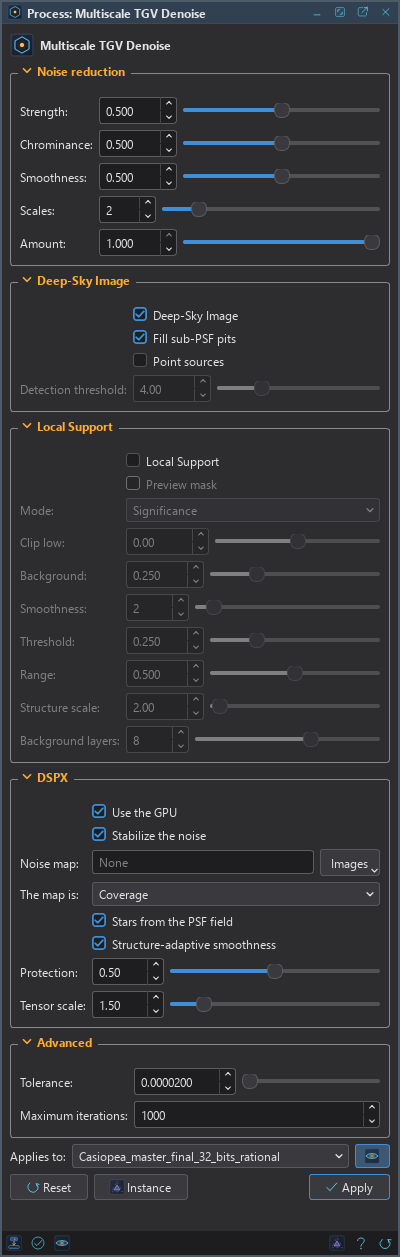
The panel has the sections Noise reduction, Deep-Sky Image, Local Support, DSPX and Advanced, then the image the process applies to with the live preview's eye, the buttons and the system bar.
3.1Noise Reduction
Strength: How strongly the noise is reduced, from 0 to 1, 0.5 by default. The scale is geometric: 0 is a quarter of the default weight, 1 is four times it, and each 0.1 changes the weight by about 30 percent.
Chrominance: The strength of the color noise reduction compared with the luminance's. It is never stronger than the luminance's, so the smoothing of the luminance does not change with it. It has no effect on a gray image.
Smoothness: The balance between the two orders of the model, from 0 to 1, 0.5 by default. At 0.5 flat regions are favored with sharp transitions between them. A smaller value keeps smooth gradients; a larger one approaches plain total variation, with its flat patches.
Scales: How many scales are denoised, from 1 to 8, 2 by default. The scales are the full resolution and then the image reduced by 2, 3, 4, 6, 8, 10 and 12. A scale that would leave fewer than 96 pixels on the short side is left out, and the Log says how many were used.
Amount: The fraction of the noise reduction applied, from 0 to 1. The result is a mix of the processed and the original image.
3.2Deep-Sky Image
Deep-Sky Image: On by default. The image has stars on a sky background: the dead pixels are repaired, the stars are found, and the options below apply. Off, the process works on any image without stars and measures the noise where the structure is.
Fill sub-PSF pits: On by default. Raises the dark specks that are narrower than a star to the level of their neighborhood, which is 1.5 times the FWHM of the PSF; where there is structure it raises them by at most half a sigma. Stars are not touched. In DSPX mode the PSF is the image's own field at each pixel.
Point sources: Off by default. Every star above the detection threshold is represented by a component of the shape of the PSF, and the amplitudes are found together with the smooth picture. The smooth picture never sees the stars, so a star keeps its amplitude at any strength and the faint stars survive. In a color image the stars are solved on the luminance and keep their own chrominance.
Detection threshold: From 2 to 10, 4 by default, in noise sigmas over the local level. A star must stand out by this much to be modeled or kept out of the coarser scales. A lower value admits fainter stars and more noise peaks. It applies when Deep-Sky Image is on.
3.3Local Support
Local support makes a mask from the whole input image and uses it to decide where the noise reduction applies: the result is the original plus Amount times the mask times the change. White allows all of the noise reduction, black blocks it. It applies to deep-sky images only.
Local Support: Off by default. Protects the significant structures and concentrates the noise reduction on the background.
Preview mask: Shows the mask, in gray, instead of the result in a preview. Applied to an image, nothing changes and the Log says so.
Mode: How the mask is made:
- Brightness: a mask from the brightness of the image, following the procedure of the MLDenoise process as its page describes it. The brighter a pixel, the more it is protected.
- Significance: the default. A mask from how far the smoothed luminance rises above its large-scale background, in units of the noise. The noise itself and gradual gradients are not protected; stars and the structure of a nebula are.
Clip low: Brightness mode. The low clipping point, from -20 to 20, in robust sigmas from the median. A lower value brings more of the faint sky into the mask's range.
Background: Brightness mode. The level the sky is brought to before the mask is made, 0.25 by default. A higher value protects the highlights more.
Smoothness: Brightness mode. The radius, in pixels, of the median filter that smooths the mask, 2 by default. 0 turns it off.
Threshold: Significance mode. Where the protection begins, from 0 to 1, 0.25 by default: 0 is 1 sigma of the smoothed luminance's noise, 0.25 about 3, 0.5 is 10 and 1 is 100.
Range: Significance mode. How far above the threshold the protection grows to complete, from 0 to 1, 0.5 by default: 2 times the threshold at 0, 100 times at 0.5, 5000 times at 1. The protection rises with the logarithm of the excess.
Structure scale: Significance mode. The standard deviation, in pixels, of the smoothing applied before the excess is measured, 2 by default.
Background layers: Significance mode. The layers of the median transform whose residual is taken as the large-scale background, from 1 to 12, 8 by default. Structure larger than about 2 to the power of this value plus 1 pixels is background. An image smaller than that window has no room for the default.
3.4DSPX
These switches are ours. They count in DSPX mode and turn off in PixInsight compatibility mode, which keeps PixInsight's ways.
Use the GPU: On by default. The solver, the resampling of the scales and the point-source model run on the graphics card when allows it and the image is large enough to pay for it. The result agrees with the processor's to within 5e-3 of a noise sigma at most. The Log says where the solver ran.
Stabilize the noise: On by default. The noise is made the same at every signal level before denoising and restored after. Off, one noise unit measured on the flattest parts of the image is used for the whole image.
Noise map: An open image of the image's size that says how noisy each pixel is, such as the number of frames of each pixel of a stack. More noise means more smoothing. It also scales the noise of the Significance mask.
The map is: What the noise map's values mean: Coverage (more means cleaner), Noise scale or Variance (more means noisier). Only the relative values matter.
Stars from the PSF field: On by default. The stars and their shape come from the program's own star finder and the PSF measured on the image, and the pits are sized from the local PSF.
Structure-adaptive smoothness: On by default. The smoothness follows the structure of the image, so filaments and edges are protected without a mask.
Protection: How much the smoothness falls on coherent structure, 0.5 by default.
Tensor scale: The scale, in pixels, of the measure of the structure, 1.5 by default.
3.5Advanced
Tolerance: The iterations stop when the change of the solution per iteration, in units of the noise, falls below this value, 2e-5 by default.
Maximum iterations: The most iterations of the solver, 1000 by default. It normally stops earlier, when it has converged.
3.6Apply, Reset and the Preview
Multiscale TGV Denoise changes the image it is applied to. The live preview shows the result on the part in view, made from the measurements of the whole image, so it matches the same region of the final result. With more than 3 scales, the part of the image a pixel depends on is too large for a live preview and the preview is made on request.
4Stars and the Coarser Scales
The stars of a deep-sky image are found by the program's star finder on the luminance, and each is given the shape of the PSF field of the image at its place. A star that stands out of the sky by at least the detection threshold has a footprint: the region where its model is above half a sigma, with a soft edge. The coarser scales correct the image by what their solve removes, and they leave the footprints alone, so the halo of a star is not eaten by the smoothing of a large scale. This does not depend on Point sources. With it, the stars are also solved together with the smooth picture and put back with their own amplitudes. The Log says how many stars were found and how many were above the threshold.
5Using the Local Support
Turn on Local Support and Preview mask together to see the mask on a preview before making the result. With Significance, lower the Threshold to protect fainter structure, and raise Range to make the protection grow more gently. With Brightness, a larger Background protects the highlights more, and Smoothness evens out the mask's noise. When the mask looks right, turn Preview mask off and apply.
6Usage Tips and Tricks
Linear images. The process works on a linear image as it comes. With the noise stabilized, the same Strength suits the shadows and the highlights.
Faint stars. If faint stars are weakened, turn on Point sources and lower the detection threshold a little. Watch the Log: a threshold that admits many noise peaks finds many more stars.
Color noise. Raise Chrominance only as far as the color noise needs. It never exceeds the luminance's, and the stars keep their color.
Large blotches. Add scales one at a time. Each one removes noise of a larger size and costs a solve of its own, on a smaller image.
7Related Tools
Noise Reduction: our wavelet and non-local means method, which protects stars and detail with thresholds that follow the structure. GraXpert Denoise: the AI denoising of GraXpert, when it is installed. Deep Star Removal: to remove the stars first when they are in the way of a strong reduction.