Surface Align
Images of the same surface or scene aligned and stitched from what they show
Surface Align finds how images of the same surface or scene fit together from what they show, not from stars or a solution: tiles of the moon, the frames of a landscape, a flat scan. It puts the frames on one canvas, or lines each one up with a reference frame, matches their brightness, and writes the result, the geometry of every frame and a report. It works on files.
1Introduction
Star alignment needs stars. A mosaic of the moon, a panorama of a valley or the tiles of a scan have none, but they have craters, rocks, ridges and edges, and the same ones show in two frames that overlap. Surface Align looks for those. Each frame is first made into a plain 8-bit picture at a reduced size, the analysis size, in which the dark and the bright parts are both visible whether the data is linear or stretched. The data itself is never changed: that picture is only what the matching sees. In it we find features (SIFT, the usual detector for this work), match them between every pair of frames that can overlap, and keep the pairs whose matches agree on one geometry.
Then one fit over all the pairs at once gives every frame its place, so errors do not pile up along a chain of tiles. The frames' brightness is matched the same way, together, from what the overlaps say; the frames are resampled onto the canvas, each fading out toward its edge, and added up. The reference frame, the first or the best connected, keeps its geometry and its brightness, and everything is put in its terms.
For a panorama, or tiles taken by a telescope that turns about its center, the frames are not related by a flat transform but by a rotation of the camera. Choose the Camera rotation model: each frame gets a rotation, and the camera one focal length and a radial distortion, all found together from the matches. The result is drawn in a projection of the sphere of directions, flat, cylindrical, spherical or stereographic, and leveled.
Frames that do not connect to the others are left out, and the Log says which and why. A run that cannot find any overlap stops with a message that says what to try. A run that has to leave something out never leaves it out silently.
Surface Align is our own process and has no equivalent in PixInsight, so it saves as a DSPX process
(.dsproc) only. It is not for stars: frames of a star field are for the star registration of the
pre-processing processes, which also handles stretched images.

2Quick Start
- Choose .
- Add the frames with Add Files... or Add Folder.... They should overlap by about a quarter of their size or more.
- Leave the settings as they are and click Run. The stitched image is written to the folder of the first frame as
SurfaceAlign.xisf, with the transforms file and the report beside it, and opened. - To line frames up with one of them instead, set Task to Align to reference. Each frame is written, on the
reference frame's pixels, as
name_aligned.xisf.
3Interface & Parameters
Surface Align works on files, so its panel lists the frames at the top and has the sections of settings as tabs under the list (Task, Features and matching, Geometry, Brightness, Blending, Output); the panel remembers the tab you left. It works on no open image and has no live preview. For a first look at what was found without making the images, turn on Analyze only: the transforms file and the report are written, and the report says how well every pair and every frame fit.
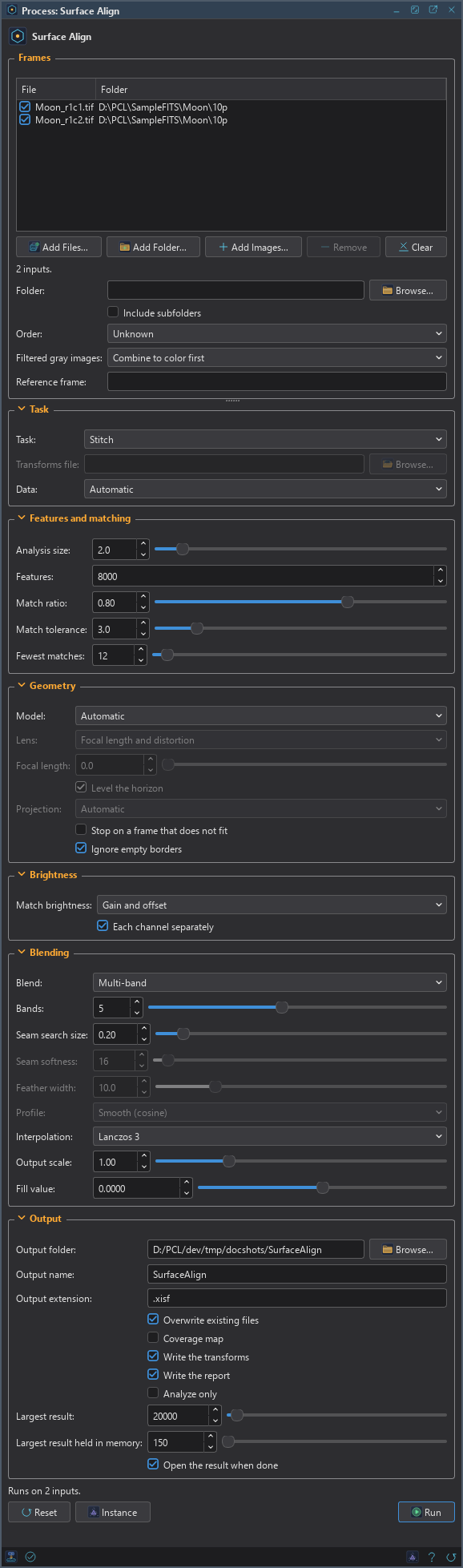
3.1Frames
Frames: The images to align or stitch. Each row has a check box that keeps it in the run.
Folder: A folder whose images are all frames, besides the files listed. Empty, the default: none.
Include subfolders: Looks in the folder's subfolders too. Off by default.
Filtered gray images: For gray images with a filter, read from the FILTER keyword, the filter property or a word of the file name (R, G, B, L, Ha, OIII, SII):
- Combine to color first: the default. When R, G and B are all there, the gray frames of each tile become one color
frame, with the L frame if there is one, and the color frames are put together. The frames of one tile are found by their file
names without the filter:
tile3_R.fits,tile3_G.fitsandtile3_B.fitsare one tile. When the names do not say, they are paired in the order of the list if every filter has as many frames, and the Log says so. A tile without all three filters is left out, and the Log says so. Other filters are results of their own. - One result per filter: each filter is found and stitched on its own, and the results are named after it.
Order: Unknown (the default): every pair of frames is tried, or, with more than 40 frames, each frame with its eight neighbors in the list. Sequence: the frames follow each other along a scan or a pan, so only neighbors in the list are compared. Either is much faster than comparing everything with everything.
Reference frame: The name of the frame that keeps its geometry and brightness. Empty, the default: the first frame for Align to reference, the best connected for Stitch.
3.2Task
Task:
- Stitch: the default. The frames are put on one canvas, the union of their footprints. A result larger than Largest result is refused, with its size in the message.
- Align to reference: every frame is resampled onto the reference frame's pixels, and written as
name_aligned. What lies outside a frame is the fill value. - Apply transforms: uses the transforms file of an earlier run on the frames listed, which are found by their paths. Use it to apply what was found on a luminance image to color frames, or to the full-size files.
Transforms file: With Apply transforms: the file written by an earlier run.
Data: Automatic (the default), Linear or Stretched. Whether the frames are linear or already stretched. Only how the features are looked for depends on it: for linear data the picture the matching sees is stretched, for stretched data it is used as it is. Automatic decides from the frame's median.
3.3Features and matching
Analysis size: The size, in megapixels, the frames are analyzed at. From 0.1 to 25, 2 by default. A bigger size finds finer detail and costs more time and memory; a frame smaller than this is used whole.
Features: The most features kept for each frame. From 500 to 100000, 8000 by default.
Match ratio: How much better the best match for a feature must be than the second best. From 0.5 to 0.95, 0.8 by default. Lower keeps fewer, surer matches; raise it for surfaces with little detail.
Match tolerance: How far, in full-size pixels, a match may be from the fitted geometry and still count. From 0.5 to 20, 3 by default.
Fewest matches: The fewest agreeing matches for two frames to count as overlapping. From 6 to 200, 12 by default. A pair is also tested against the number of matches it had: a few agreeing matches among thousands of chance ones do not make an overlap.
3.4Geometry
Model: How the frames relate to the reference:
- Automatic: the default. A similarity (shift, rotation and scale), or an affine model when it fits clearly better; the Log says which and the two residuals.
- Translation, Similarity, Affine.
- Homography: a perspective change. It has the most freedom and, from few matches, the least stability: far from the matches it can be off by many pixels. Use it when the frames clearly show a perspective change.
- Camera rotation (panorama): a camera or telescope that turns about its center: a rotation for each frame and one lens for all. For Stitch only.
Lens: With Camera rotation: what is found about the lens. Fixed: the focal length given below, or estimated from the pairs, and no distortion. Focal length: the focal length is refined. Focal length and distortion (the default): also the radial distortion, in two terms. The parameters are freed one after the other, so that a poor first focal length does not spoil the distortion.
Focal length: With Camera rotation: the lens's focal length in pixels, which is its focal length in millimeters divided by the pixel size in millimeters. 0, the default, estimates it.
Level the horizon: With Camera rotation: turns the result so that a level pan comes out level. On by default.
Projection: With Camera rotation: the shape of the result: Automatic (the default: planar for fields under 100 degrees, cylindrical for a wide, low panorama, spherical otherwise), Planar, Cylindrical, Spherical or Stereographic.
Stop on a frame that does not fit: Stops, naming the frame, instead of leaving it out. Off by default.
Ignore empty borders: Zero-valued borders, such as a registered frame's, are no data: they are not looked at for features and do not take part in the blend. On by default.
3.5Brightness
Match brightness: A gain and an offset for each frame, found together for all the frames from what their overlaps say, with stars and other differences rejected: None, Offset only, Gain only or Gain and offset (the default). The reference frame keeps its brightness.
Each channel separately: For color frames: a gain and an offset for each channel, which also matches their color. On by default.
3.6Blending
Blend: In the overlaps. Feather: each frame fades out toward its edge. Seam: a path of least difference is found through each overlap and each frame is used on its side of it, softened. Multi-band (the default): the same paths, and each band of detail, from the coarse to the fine, is blended over a width of its own, so that a seam is not seen whatever the brightness and the texture on its two sides. Where one frame covers a pixel, that frame is the pixel.
Bands: With Multi-band: the levels of the pyramid, from 1 to 10, 5 by default. More bands blend wider.
Seam search size: With Seam and Multi-band: the size, in megapixels, the frames are reduced to when the seams are searched, from 0.05 to 2, 0.2 by default.
Seam softness: With Seam: the pixels over which a seam fades, 16 by default.
Feather width: With Feather: how far in from a frame's edge it fades, in percent of its shorter side. From 0.5 to 50, 10 by default.
Profile: With Feather: the shape of the fade, Linear or Smooth (cosine) (the default).
Interpolation: How the frames are resampled: Nearest neighbor, Bilinear, Bicubic or Lanczos 3 (the default).
Output scale: The pixel size of the stitched image relative to the reference frame's pixels. From 0.05 to 4, 1 by default.
Fill value: The value where no frame reaches. 0 by default.
3.7Output
Output folder: Where the results are written. Empty, the default: the folder of the first frame.
Output name: The stitched file's name without its extension, SurfaceAlign by default. The
transforms file and the report are named after it.
Output extension: The file format, .xisf (the default) or .fits. The results are 32-bit floating point: nothing is clipped.
Overwrite existing files: Replaces a file of the same name. Off by default: a new name is used (_1, _2...).
Coverage map: Also writes how many frames cover each pixel, as a second image. Off by default.
Write the transforms: Writes the transforms file (below). On by default.
Write the report: Writes the text report. On by default.
Analyze only: Finds the geometry and writes the transforms and the report, without making the images.
Largest result: The largest result made, in megapixels. From 1 to 1000000, 4000 by default (48 GB as a 3-channel 32-bit FITS file). A result is not held in memory, so this only protects the disk; raise it for a larger mosaic.
Largest result held in memory: A result larger than this, in megapixels, is not held in memory: it is made and written strip by strip, and opens from the file. From 1 to 100000, 150 by default. A result written this way is always a 32-bit floating point FITS file, whatever the output extension, and the Log says so. Its blend equals the blend of the whole canvas to within a few thousandths of the data's range.
Open the result when done: Opens the stitched image, or the aligned frames, when the run is done. On by default.
4The Transforms File
Every run writes a text file, SurfaceAlign.transforms.json, with what was found: for each frame whether it was
used or why not, the 3 by 3 matrix that takes its pixels to the reference frame's pixels, its gain and offset for each channel,
and how well it fit, and for the run the model, the canvas and the residual. It is a documented, versioned format
("version": 1); a program that reads it should refuse a version it does not know, as Surface Align does. Pixel
coordinates are pixel indices, the center of the first pixel being (0, 0). Apply transforms reads this file, so the
same geometry can be applied to other files: align on the luminance, then apply to the red, green and blue frames.
GPU. In DSPX mode, putting the frames together runs on the graphics card for a canvas of about a megapixel or more: the resampling of every frame and, with multi-band blending, the blend itself, about 2 to 3 times faster than on the processor (measured on a 24 and a 60 megapixel canvas). The search for the match between the frames and the seams stay on the processor. If the card fails, the processor makes that part and the Log says so. Choose CPU only in to keep it on the processor, and see GPU Acceleration for what else runs on the card.
5Usage Tips and Tricks
- Overlap. About a quarter of a frame, or more, gives the matching enough to work with. Frames that overlap by a few percent only tend to fail with "no two frames could be matched".
- Repeating or empty surfaces. A flat mare, a checkered pattern or a blank sky offers nothing to match. The Log shows the number of features found in each frame; raise Features, the Analysis size and the Match ratio, and check that the frames overlap.
- Memory. A result up to the in-memory limit is made whole: a canvas of 150 megapixels in color takes about 3 GB. A larger one is made in strips and needs a few gigabytes whatever its size: a 278 megapixel color panorama of 20 frames of 24 megapixels took 7 GB at its peak.
- Panoramas. Take the frames with the camera turning about the lens's front, so that near things do not shift between frames; the process does not correct parallax, and the seams are placed to go around what moved as far as the overlaps allow. Leave the lens on Focal length and distortion unless the frames come from a lens known to be free of distortion.
- What is not here yet. Manual control points, and the lunar and day-and-night specializations, are the next steps of this process.
6Related Tools
- Mosaic: the panes of an astronomical mosaic put together from their astrometric solutions.
- Registration: star registration of calibrated frames onto a reference.