
Registration
Calibrated frames aligned onto a reference by their stars, and written as new files
Registration aligns calibrated frames onto a reference frame by their stars, so that every star falls on the same pixel in all of them, and writes each aligned frame as a new file. It is the step between calibration and integration of a night processed step by step; a pre-processing session does it on its own.
1Introduction
No two frames of a night point at exactly the same place: dithering moves the telescope on purpose, tracking drifts, and a meridian flip turns the field around. Before frames can be integrated, each one has to be moved onto a common grid. Registration does it in three steps:
- The stars. Each frame is measured as the pre-processing engine measures a calibrated frame: its stars detected and fitted. The measurements are kept in the program's cache, so frames measured once, by an earlier run or by Integration's weights, are not measured again.
- The match. Each frame's stars are matched to the reference's by triangles of stars and RANSAC, and the transform that takes the frame onto the reference is fitted to the matched pairs.
- The warp. Each frame is resampled onto the reference's grid with clamped Lanczos interpolation and written as a new file. Pixels the frame does not cover are zero, and values are truncated to the range from 0 to 1, as PixInsight's StarAlignment writes them.
The registered frame keeps the frame's keywords and properties, its noise and PSF signal estimates among them, so Integration can weigh it without measuring it again. Registration can also write, for each frame, the drizzle data the Drizzle process reads.
Registration is the pre-processing engine's own registration, with the parameters of PixInsight's StarAlignment where the engine has them: a PixInsight icon of StarAlignment opens here, and the panel saves one that PixInsight opens. StarAlignment's own star detector and matcher settings are kept from an icon but not used.
2Quick Start
- Choose .
- Add Files..., and choose the calibrated frames of one target and filter.
- Leave Reference image empty to let the process choose the best frame, or Browse... to one.
- Choose an Output folder, or leave it empty to write each registered frame next to its frame, with
_rat the end of its name. - Click Run. The Log gives each frame's match; the registered frames are listed under the settings.
3Interface & Parameters
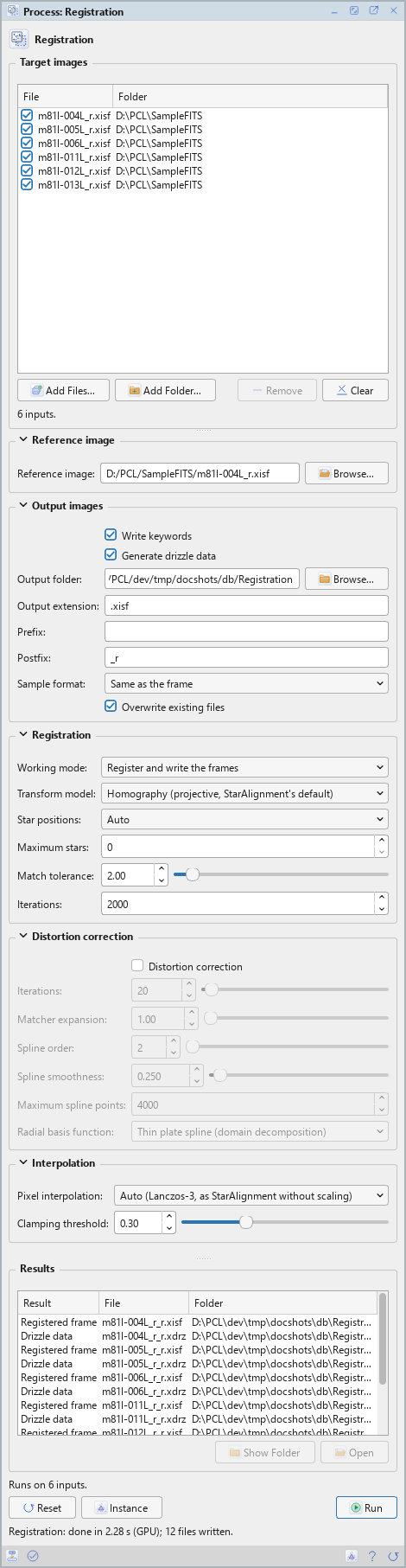
Registration is a process that works on files: its panel lists the frames at the top and has five sections of settings, Reference image, Output images, Registration, Distortion correction and Interpolation, each of which folds away with the arrow beside its title. Under them are the results of the last run, the buttons and the system bar along the bottom. It works on no open image, so it has no Applies to and no live preview.
3.1Target Images
Target images: The frames to register. Each row shows a file and its folder, with a check box that keeps it in the run or leaves it out. Add Files... and Add Folder... add frames; Remove takes the selected rows away; Clear empties the list. The line under the list says how many frames there are.
3.2Reference Image
Reference image: The frame the others are registered onto: one of the list, or any other file, which is measured but not written. Browse... chooses it. Empty, the default: the process chooses it from the frames' measurements, as a pre-processing session does, the frame of the highest PSF signal weight among those of usual star counts, FWHM and eccentricity. The Log says which frame it chose and why.
3.3Output Images
Write keywords: On by default. Each registered frame gets HISTORY keywords with the reference, the model, the transform, the interpolation and the distortion model, if any.
Generate drizzle data: Off by default. Writes a .xdrz file per frame, next to its
registered frame and with its name: the frame, the reference's geometry and the alignment, for the
Drizzle process.
Output folder: Where the registered frames, the drizzle data and the report are written. Empty, the default: next to each frame. Browse... chooses a folder; it is made if it does not exist.
Output extension: The file format of the registered frames: .xisf, the default, or
.fits.
Prefix: Text put before each output file's name. Empty by default.
Postfix: Text put after each output file's name, before its extension: _r by
default.
Sample format: The sample format of the registered frames: Same as the frame, the default, 16-bit integer, 32-bit integer, 32-bit floating point or 64-bit floating point.
Overwrite existing files: Off by default: a file of the same name is kept, and the new one gets a
new name, with _1, _2... at the end. On, it is replaced.
3.4Registration
Working mode: What a run writes:
- Register and write the frames: the default. Each registered frame, and its drizzle data when asked.
- Transforms only (a report, no frame written): no frame is written; only a report,
registration.tsvin the output folder, a row per frame with its transform, its match and why it failed if it did, and the drizzle data when asked.
Transform model: The geometry each frame is fitted to the reference with: Shift, Similarity (shift, rotation, scale), Affine, or Homography (projective, StarAlignment's default), the default.
Star positions: Which position of each star is matched: PSF fits' centers, Star detector's barycenters (StarAlignment's), or Auto, the default: the barycenters, unless the stars are undersampled, with a FWHM under 2 pixels, where the fits are more accurate.
Maximum stars: The most stars of each frame matched. 0, the default, is automatic: 2000.
Match tolerance: How far, in reference pixels, a star may be from its match and still count. 2 by default.
Iterations: The most RANSAC iterations of each stage of a match. 2000 by default.
3.5Distortion Correction
Distortion correction: Off by default, as in StarAlignment. Corrects what each frame's transform leaves of the field's distortion: surface splines fitted to the residuals of the matched stars, used when the frame is warped and written into its drizzle data. For wide fields, and for frames turned by a meridian flip. The Log gives each frame's model: how many star pairs, the residual with and without it, and its largest correction. With it off, the settings below are grayed out.
Iterations: The most fits of the distortion model, each followed by pairing the stars again with it. 20 by default.
Matcher expansion: How much farther than the match tolerance a star may be from where the model puts it and still be paired. 1 by default.
Spline order: The surface splines' derivative order, from 2, thin plates and the default, to 5.
Spline smoothness: How far the splines may stay from the stars, which carry the noise of their measurement: 0 makes them go through every point, more makes them smoother. 0.25 by default.
Maximum spline points: The most points the surface splines are made of. 4000 by default.
Radial basis function: The surface splines' kernel: Variable order, Thin plate spline, Gaussian, Multiquadric, Inverse multiquadric, Inverse quadratic, or one of the domain decomposition kinds, which are generated faster from 2,000 points on: Variable order (domain decomposition), Thin plate spline (domain decomposition), the default, and Multiquadric (domain decomposition).
3.6Interpolation
Pixel interpolation: How the registered pixels are computed from the frame's: Lanczos-3, Lanczos-4, Lanczos-5, or Auto (Lanczos-3, as StarAlignment without scaling), the default.
Clamping threshold: Damps the dark rings Lanczos leaves around bright stars: where neighboring pixels differ by more than this, the interpolation is clamped. Lower clamps more; 0.30 by default.
3.7Run and Instance
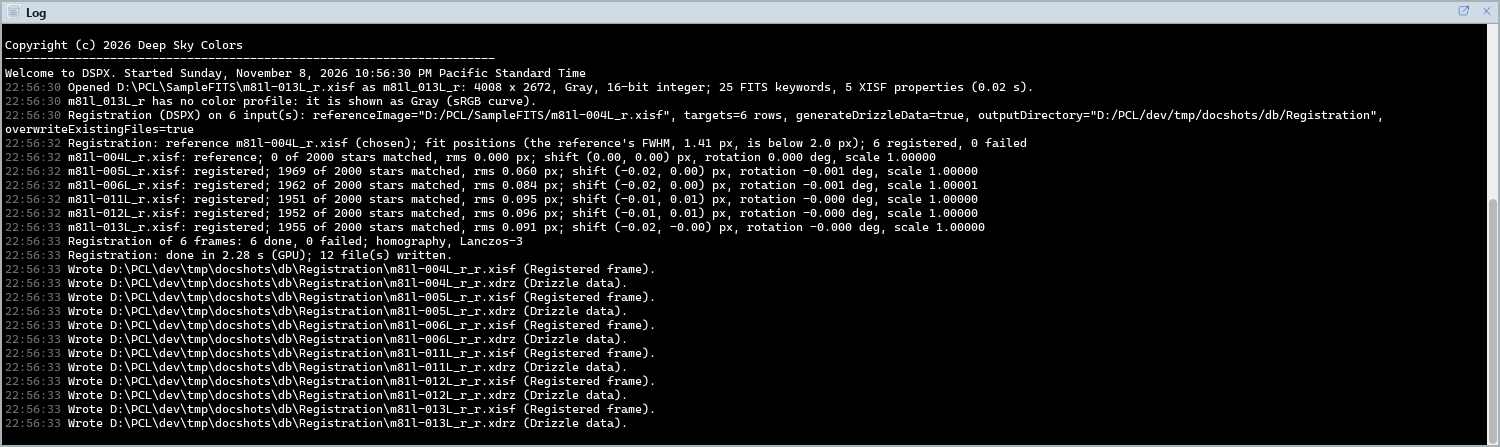
Run: Registers the frames checked in the list. The Log gives the reference and why it was chosen, each frame's match (stars matched, the rms of the match, the shift, rotation and scale, and whether it is mirrored) and a summary. A frame that cannot be measured or matched is a warning in the Log, and the others are written; a run where none is fails. The frames themselves are only read. The results are listed under the settings: Open, or a double click, opens a registered frame as an image, and Show Folder shows its folder; drizzle data and the report are listed, not opened.
Instance: Shows the process as the panel has it now, as text: the settings as a DSPX
process (.dsproc) or as a PixInsight process icon (.xpsm) of StarAlignment, the list of frames
included, chosen under Format. Copy puts the text on the clipboard; Save... saves it as a file and
puts it on the Process Shelf.
Reset: Puts every setting back to its default and empties the list.
The system bar along the bottom of the panel has the same commands as small icons: at the left, drag and Run; at the right, Instance, Help (this page) and Reset. Dropped on the Process Shelf, the first icon keeps the process there as a row of its own, with its frames; applied from the shelf, it runs on them. With , the bar alone has them.
4Registration and PixInsight
Registration finds the stars as the pre-processing engine does, not with StarAlignment's star detector, and matches
them with the engine's own matcher; the transform, the warp and the files written follow StarAlignment's defaults:
the projective transform, clamped Lanczos-3, zero where the frame has no data, values truncated to the range from 0 to
1, the frame's sample format. The drizzle data are PixInsight's .xdrz format, with the engine's exact
transform added, so the Drizzle process uses exactly the registration's transform; PixInsight's DrizzleIntegration
ignores that addition and reads the matrix.
Registration is not limited to linear frames. A stretched image, a nebula-filled field, a star-reduced image, an 8-bit file or a crop that shares only a third of its area with the reference all have stars to align on, and Registration finds them. When the first look finds few stars, as it does in an image whose stretch has squeezed the stars against the sky, it looks again with a higher sensitivity and keeps the longer list; and when the brightest stars of two frames are not the same stars, as in a partial overlap, it matches the stars of each region instead. Both are automatic (the second look is not made in PixInsight compatibility mode, below), and neither changes the result for frames that registered before. A frame with too little in common with the reference still fails, with the reason in the report.
With PixInsight compatibility mode on, in , the frames' measurement follows PixInsight's ImageCalibration step by step; off, the default, it makes the same measurements with less work, but for the noise estimates, which differ slightly. The match and the warp are the same in both modes.
5Usage Tips and Tricks
One filter, one reference. Register the frames of every filter onto the same reference frame: the masters integrated from them are then aligned with each other, ready to be combined.
Drizzle later. Turn Generate drizzle data on if a drizzled master may be wanted: the
Drizzle process needs the .xdrz files, and making them later means registering
again.
Transforms only. To check a night's registration before writing gigabytes of frames, run Transforms only: the report gives every frame's shift, rotation, scale and rms.
Wide fields. With a short focal length, or frames from both sides of the meridian, turn Distortion correction on and compare the residuals the Log gives with and without the model.
GPU. In DSPX mode, aligning the frames of a large set runs on the graphics card 1.4 to 2 times faster than on the processor; the more modest the processor, the larger the gain. A discrete graphics card is what it uses. Choose CPU only in to keep it on the processor, and see GPU Acceleration for what else runs on the card.
6Related Tools
Calibration and Cosmetic Correction: the steps before.
Local Normalization: matches the registered frames' backgrounds to the reference's.
Integration: stacks the registered frames into a master.
Drizzle: a master at a finer pixel scale, from the drizzle data.