
Mosaic
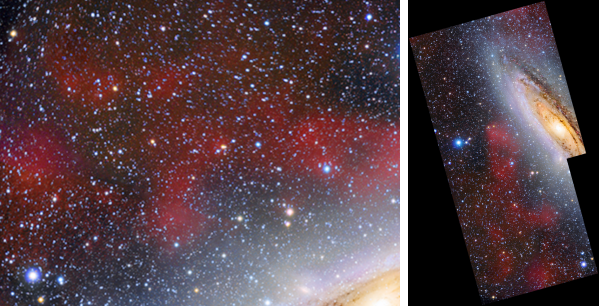
The panes of a mosaic put together from their astrometric solutions alone
Mosaic puts the panes of a mosaic together from their astrometric solutions alone: each pane is placed, resampled onto one grid, matched in brightness to its neighbors and blended into the others, with no stars to pick and no control points to set. Images that are not solved are solved for us. It works on files and writes the mosaic to a file.
1Introduction
A pane that has an astrometric solution knows where it lies on the sky. That is all that is needed to assemble a mosaic: the mosaic gets a solution of its own, a projection centered on the panes, a pixel scale and an orientation, and every pane is resampled onto that grid at the place its solution says. Where a pane lands is computed exactly, its distortion model included, every eight pixels and interpolated between.
The panes differ in brightness: the sky glow changed between the exposures, the gain differs, a gradient runs across a pane. Mosaic measures every pair of overlapping panes on a coarse grid of the mosaic, and finds for all the panes at once the gain and the offset, and optionally a tilted plane, that make the overlaps agree. The panes are then blended across the overlaps, with a feathered edge or a seam that follows the least visible path.
The panes should have their gradients removed first, with Background Extraction. Gray panes taken through filters are grouped by their filter and combined into a color mosaic, or made into one mosaic per channel.
Mosaic is our own process and has no equivalent in PixInsight, so it saves as a DSPX process (.dsproc)
only.
2Quick Start
- Choose .
- Add the panes with Add Files... or Add Folder.... The panel lists them with their state: Solved, Solved here, Not solved or Unreadable.
- Leave the settings as they are. Panes that are not solved are solved when we click Run, after a question.
- Click Run. The mosaic is written to the folder of the first pane, as
Mosaic.xisf, and opened.
3Interface & Parameters
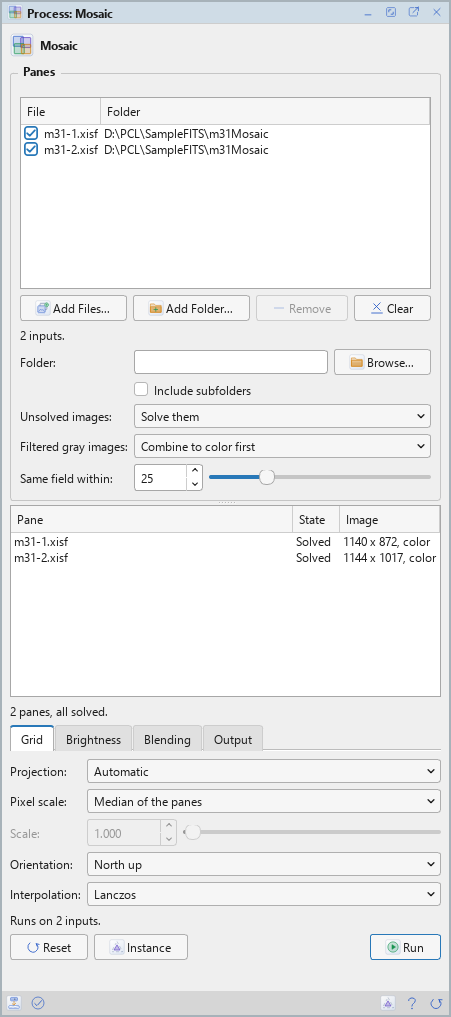
Mosaic is a process that works on files: its panel lists the panes at the top, under Panes, with their state, size and channels and a Solve button, and has four tabs of settings, Grid, Brightness, Blending and Output. The panel is as tall as the tab in front. Under them are the buttons and the system bar along the bottom. It works on no open image, so it has no Applies to and no live preview.
3.1Panes
Panes: The panes of the mosaic: images with an astrometric solution, put together by it alone. Each row shows a file, its folder, its state (Solved, Solved here, Not solved or Unreadable), its size and its channels, with a check box that keeps it in the run or leaves it out. Add Files... and Add Folder... add panes, Remove takes the selected rows away and Clear empties the list. Solve solves the images that are not solved, without making a mosaic; its button says how many.
Folder: A folder whose images are all panes of the mosaic, besides the files listed. Empty, the default: none.
Include subfolders: Looks in the folder's subfolders too. Off by default.
Unsolved images: What to do with images that have no astrometric solution:
- Ask: the default. Run asks how many images are not solved and whether to solve them now: Yes, No to leave them out, or Cancel.
- Solve them: solves them with the Plate Solve process on a copy: the file is never changed. A solution found is kept for the next run, in a one-pixel file in the temporary folder, so a pane is solved once.
- Leave them out: the panes without a solution are left out, and the Log says so.
Filtered gray images: For gray panes with a filter, read from the FILTER keyword, the filter property or a word of the file name (R, G, B, L, Ha, OIII, SII):
- Combine to color first: the default. When R, G and B are all there, the R, G and B panes of the same field become one color pane, with the L pane if there is one, by LRGB Combination with its default parameters. A position without all three is left out, and the Log says so.
- One mosaic per channel: each filter makes a mosaic of its own, named after the output name with the filter.
Narrowband and other filters are always mosaics of their own.
Same field within: Panes of different filters are of the same field when their centers are this close, in percent of the field's radius, and their size is the same. From 1 to 100, 25 by default.
3.2Grid
Projection: The mosaic's projection, centered on the field: Automatic (the default: Gnomonic, and Stereographic for fields wider than 50 degrees), Gnomonic or Stereographic.
Pixel scale: The mosaic's pixel scale: Median of the panes (the default), Finest pane, Coarsest pane or Fixed.
Scale: With Fixed: the pixel scale in arcseconds per pixel, from 0.01 to 100. 1 by default.
Orientation: North up (north at the top, east at the left; the default), or As the first pane, the first pane's orientation, exact near its center.
Interpolation: How the panes are resampled onto the mosaic's grid: Nearest neighbor, Bilinear, Bicubic or Lanczos (the default, Lanczos 3). A pane that is finer than the mosaic by 1.5 times or more is first averaged down by the whole factor.
The size of the mosaic is the union of the panes' footprints. A mosaic larger than 1.5 gigapixels is refused.
3.3Brightness
Match brightness: A gain and an offset for each pane, found together for all the panes from what their overlaps say: None, Offset only, Gain only or Gain and offset (the default).
Each channel separately: For color panes: a gain and an offset for each channel, which also matches their color. On by default. Off, one for all channels.
Gradient: Off (the default), or Plane, which also fits a tilted plane for each pane, a first-order gradient, from the overlaps.
Reference pane: The name of the pane that keeps its brightness. Empty, the default: the pane with the most overlaps, one for each group of panes that do not meet the others.
3.4Blending
Blend: In the overlaps, Feather (the default): each pane fades out toward its edge; or Seam: a path of least difference through each overlap, softened over Seam softness. Where one pane covers a pixel, that pane is the pixel.
Profile: With Feather: the shape of the fade, Linear or Smooth (cosine) (the default).
Feather width: With Feather: how far in from a pane's edge it fades, in percent of its shorter side, from 0.5 to 50. 10 by default.
Seam softness: With Seam: the number of pixels over which the seam fades, from 1 to 2000. 24 by default.
Isolation distance: A pane that touches no other and is farther than this many pane diagonals from every other is left out, with a line in the Log. From 0 to 50, 2 by default; 0 turns it off.
Ignore empty borders: Zero-valued borders of registered panes are no data. On by default.
Trim edges: The number of pixels dropped from the edge of every pane, from 0 to 500. 0 by default.
3.5Output
Output folder: Where the mosaic is written. Empty, the default: the folder of the first pane.
Output name: The file's name, without its extension. Mosaic by default. Several mosaics, one
for each channel, add the channel.
Output extension: The file format: .xisf, the default, or .fits. The mosaic is
32-bit floating point.
Overwrite existing files: Off by default: a file of the same name is kept, and the new one gets
_1, _2 and so on added to its name.
Coverage map: Also writes how many panes cover each pixel, as a second image named after the mosaic
with _coverage at the end. Off by default.
Open the result when done: On by default: the mosaic opens when the run ends.
3.6Run and Instance
Run: Makes the mosaic from the panes that are checked. The panel shows its progress and Cancel. The Log gives each pane's gain, offset and plane.
Instance: Shows the process as the panel has it now, as text, a DSPX process (.dsproc),
the list of panes included. Copy puts the text on the clipboard; Save... saves it as a file and puts it on the
Process Shelf.
Reset: Puts every setting back to its default.
The system bar along the bottom has the same commands as small icons: at the left, drag and Run; at the right, Instance, Help (this page) and Reset.
4How the Mosaic Is Made
- The panes are read and, if needed, solved. A pane of another channel count than most, one with no solution, or one that cannot be placed on the projection is left out, and the Log says so.
- The mosaic's solution is made: the projection centered on the panes, the pixel scale and the orientation. It is written to the file, in the XISF properties and the FITS keywords.
- Each pane is sampled on a coarse grid of the mosaic. For every pair of overlapping panes the two corrected values must agree in every shared cell: one linear least squares finds the gains, offsets and planes of all the panes at once, with three rounds of clipping at 3 sigma for each pair, which leaves out stars and nebulosity that differs.
- Each pane is resampled into the mosaic and blended with the others, by feathering or along a seam.
4.1Memory and Speed
The run reads each pane twice, once to measure it and once to put it in, and keeps one pane at a time, the coarse samples of all of them, and the mosaic with a weight plane: four bytes for each channel and four more for each output pixel, plus one pane. The mosaic is held whole in memory. The work runs on every core.
5Usage Tips and Tricks
Remove the gradients first. A gradient in a pane shows as a step at the seam. Remove it from each pane with Background Extraction before the mosaic, or try Gradient on Plane.
Seam for panes that differ. When the panes differ in sharpness or seeing, a seam through the least visible path hides the change better than a feather over a wide overlap.
The reference pane. The pane that keeps its brightness is the one the others are matched to. Choose the pane with the best sky.
Look at the coverage map. A coverage map shows the overlaps and any hole, which has the value 0 in the mosaic.
6Related Tools
Plate Solve: solves the panes that have no astrometric solution.
Background Extraction: removes the gradient of each pane before the mosaic.
LRGB Combination: combines the filters of each pane position into a color pane.
Crop: trims the finished mosaic to the area we want.