
Adaptive Stretch
A stretch curve built from the image's own contrast
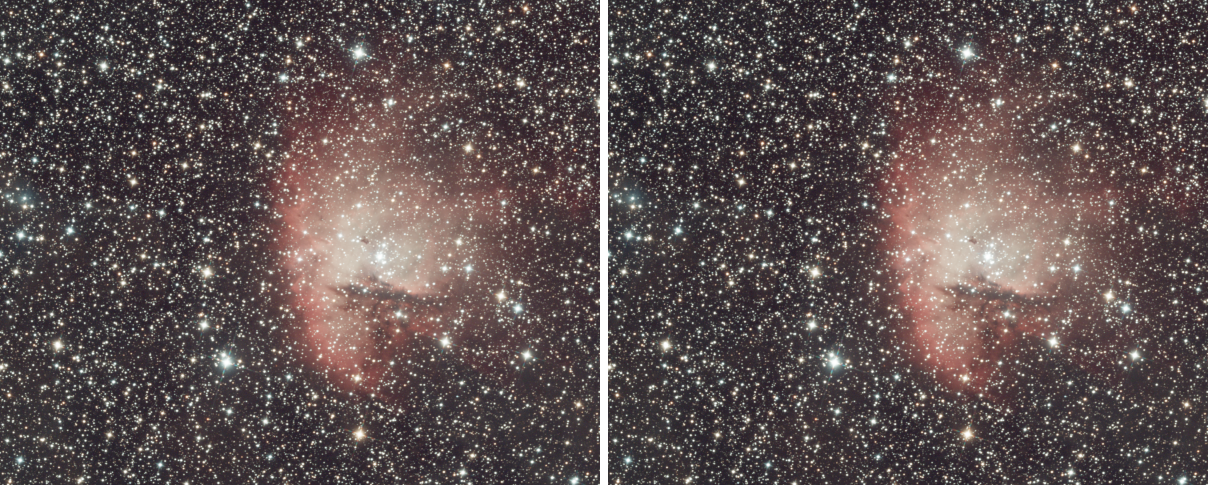
Adaptive Stretch stretches an image with a curve that is not drawn but measured: the levels where the image holds the most detail get the most of the output range. It brings up faint structure without a curve to tune and without clipping the sky, and it is a good first stretch of a linear image or a second look at a stretched one.
1Introduction
A stretch is a curve from the image's levels to the output levels. Adaptive Stretch builds that curve from the image. It looks at every pair of neighboring pixels, to the right and below. When two neighbors differ by more than the Noise threshold, the difference is detail, and it spans all the levels between the two values. The curve rises in proportion to the number of such pairs that span each level, from 0 to 1 over the image's range. A level crossed by much detail climbs steeply; a level nothing crosses is almost flat, so the empty parts of the histogram are squeezed out.
Each channel of a color image has a curve of its own. Contrast protection keeps a minimum slope in the quiet levels so that they are not lost, and a region of interest lets us measure the curve on one part of the image and apply it to all of it, for instance on a region of nebula without the stars.
Adaptive Stretch is our own engine, with the parameters of PixInsight's AdaptiveStretch. The method is the one the process is described by, so the curve of an image is close to PixInsight's but is not guaranteed to match it bit for bit. A PixInsight icon of AdaptiveStretch opens here, and the panel saves one that PixInsight opens.
2Quick Start
- Open the image and choose . The live preview (the eye) shows the result on the part in view.
- Raise Noise threshold if the noise is being stretched, or lower it if fine detail is lost. The default suits most images.
- If the faint areas look too flat, turn on Contrast protection and raise Protection.
- Click Apply.
3Interface & Parameters
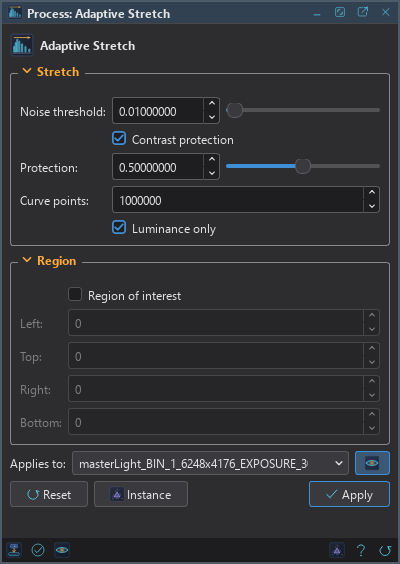
The panel has two sections, Stretch and Region, each of which folds away with the arrow beside its title, then the image the process applies to with the live preview's eye, the buttons and the system bar along the bottom.
3.1Stretch
Noise threshold: Differences between neighboring pixels at or below this are noise and count for nothing. From 0 to 1, 0.001 by default.
Contrast protection: Keeps some contrast in the levels with little detail instead of squeezing them out. Off by default.
Protection: With Contrast protection on: the curve's slope never falls below this fraction of its steepest slope. From 0 to 1, 0.01 by default. A higher value keeps more of the quiet levels, and flattens the stretch.
Curve points: How finely the levels are divided to make the curve, 1,000,000 by default. At most about two million are used. The default needs no change.
Luminance only: For a color image, measures one curve on the luminance and scales the three channels by the ratio, so the colors keep their proportions. It is a setting of DSPX and is ignored with the PixInsight compatibility mode on, in .
3.2Region
Region of interest: Measures the curve only in the rectangle below. The curve is applied to the whole image. Off by default, the curve is measured on the whole image.
Left: The left edge of the rectangle, in pixels.
Top: The top edge, in pixels.
Right: The right edge, in pixels; the pixel at this column is not in the rectangle.
Bottom: The bottom edge, in pixels; the pixel at this row is not in the rectangle.
The four edges are typed; the panel has no rectangle to draw. An empty rectangle is the whole image.
3.3Apply, Preview and Instance
Live preview (the eye): At the end of the Applies to row; Preview in the system bar is the same switch. The curve is measured once on the whole image and the part in view gets it, with the banner "PREVIEW, not applied"; the image itself does not change until Apply. Before, in the banner, or the backslash key held, shows the image as it is.
Applies to: The image the process works on, chosen in a list of the open images. It shows the image in front, and follows it as we bring other images to the front. Picking another image in the list makes the panel work on that one without bringing it to the front, and Follow Active, the small button that appears beside the list, makes the panel follow the image in front again.
Apply: Stretches the image named in Applies to, in one history step that Undo takes back, through the image's mask if it has one. Alpha channels are not touched. Integer images are taken as numbers between 0 and 1 and written back rounded.
Instance: Shows the process as the panel has it now, as text: a DSPX process
(.dsproc) or a PixInsight process icon (.xpsm), chosen under Format. Copy puts
the text on the clipboard; Save... saves it as a file and puts it on the Process Shelf.
Reset: Puts every setting back to its default.
The system bar along the bottom has the same commands as small icons: at the left, drag to apply and Apply; at the right, Instance, Help (this page) and Reset.
4How the Curve Is Made
For each channel, Adaptive Stretch counts, for every level, the pairs of neighbors whose values differ by more than the Noise threshold and whose range includes that level. The curve is the running total of those counts, scaled from 0 to 1 over the image's levels, and it is read by linear interpolation. With Contrast protection on, the slope of the curve is raised wherever it would fall below Protection times its steepest slope. The image is then mapped through the curve.
5Usage Tips and Tricks
Measure where the detail is. The curve serves the detail it finds in the measured area. A region of interest on the nebula, without bright stars, gives a curve for the nebula's structure, and the curve is then applied to the whole image.
Noise threshold from the noise. If the stretched background looks grainy, the threshold is below the noise. Doubling it is a good first move.
Color images. Luminance only keeps the colors where they were; without it each channel has its curve and the color balance changes.
GPU. In DSPX mode part of the work runs on the graphics card when the image is large. We give no figure. A small image stays on the processor, where it is quicker. Choose CPU only in to keep it on the processor, and see GPU Acceleration for what else runs on the card.
6Related Tools
Hyperbolic Stretch: a stretch we shape with a few parameters, with control over where the contrast goes.
Arcsinh Stretch: a stretch that keeps the color of a linear image.
Masked Stretch: a stretch in small steps that protects the stars.
Histogram: the black and white points and the midtone, set by hand.