Dynamic PSF
Click on stars to measure their point spread functions
Dynamic PSF measures stars: a click on a star fits a point spread function to it, a Gaussian, a Moffat or another shape, and lists its center, amplitude, widths, angle and how well it fits. It averages the stars listed and makes an image of the average, a kernel for deconvolution. We use it to judge the focus, the seeing and the guiding, to find elongated stars, and to give a deconvolution the PSF of the image itself. The image is never changed.
1Introduction
The light of a star does not land on one pixel: the optics, the atmosphere and the guiding spread it into a small blob, the image's point spread function, or PSF. Its width, the FWHM (full width at half maximum), is the sharpness of the image; its shape says whether the stars are round, and if not, in which direction they are stretched.
Dynamic PSF fits a function to the star nearest the click. It looks for the brightest pixel within the search radius, measures the background and the noise around it, and fits, by least squares (PCL's PSF fit, the one DSC Studio's registration uses), the function chosen: a Gaussian, a Moffat whose beta is fitted too, a Moffat of a fixed beta, a Lorentzian, or a variable shape. With Auto it fits several and keeps the one that deviates least. The fit is elliptical unless Circular is on. A color image gives a row per channel.
In PixInsight, DynamicPSF is an interface of its own; here it is a tool, in the toolbar and the Tools menu. It has no process instance: its result is a list, written to the Log, and the image it measures stays as it is.
2Quick Start
- Open the image and click Dynamic PSF on the toolbar, or choose it in the Tools menu. The Tool panel shows it.
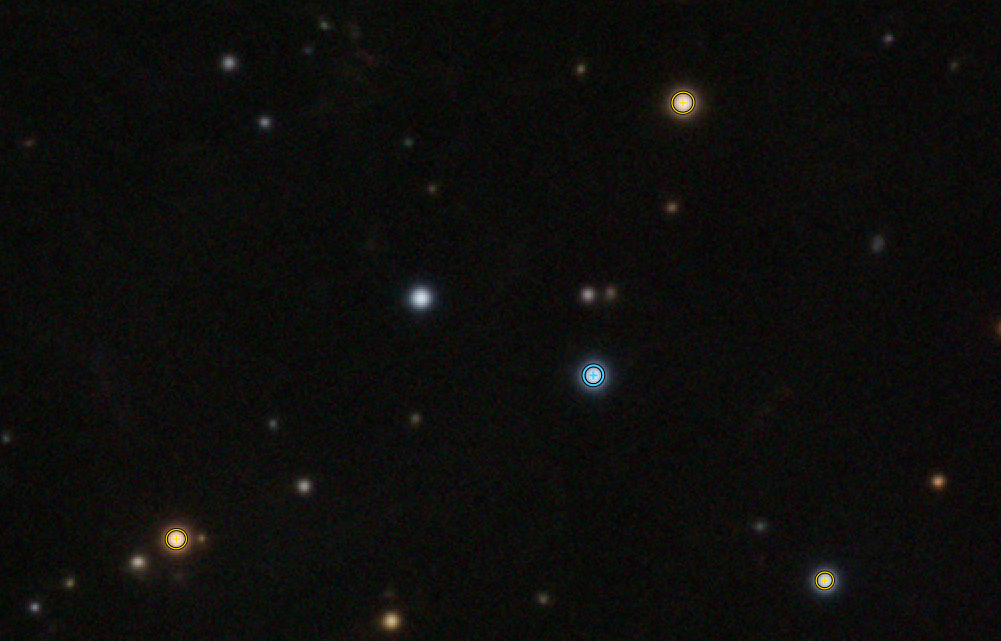
- Zoom in and click on a star: its PSF is fitted and listed, and its ellipse is drawn on the image. The first click starts the session on that image.
- Click on more stars, isolated and not saturated. The average is shown under the list.
- Click Write to Log to keep the list, or Make PSF Image for an image of the average PSF.
3Interface & Parameters
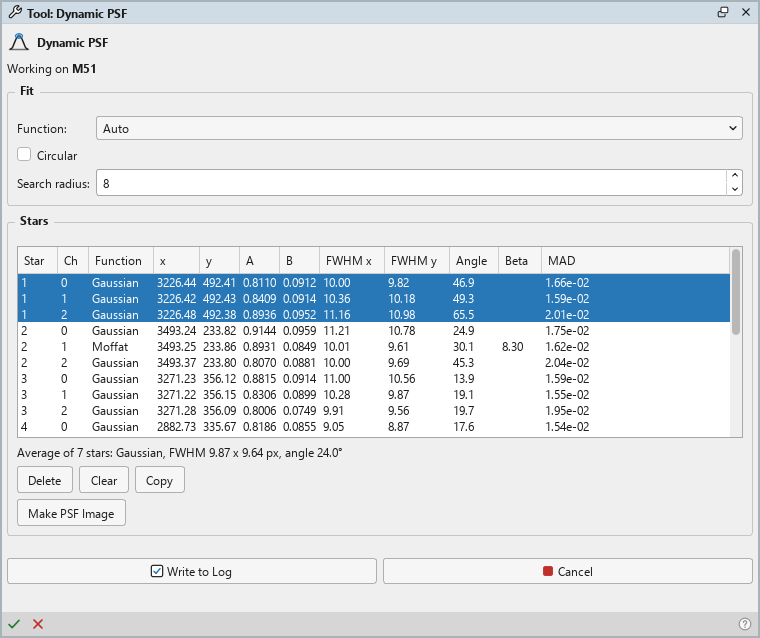
The Tool panel shows the tool's name and icon on its first row; its tooltip says what the tool does and how to use it. Under it, the image the session is on, then two groups, Fit and Stars, then Write to Log and Cancel. The bar along the bottom of the panel has Write to Log (a check mark) and Cancel (a cross) on the left, and Help on the right.
3.1Fit
The options apply to the stars clicked from then on; the stars listed keep their fits.
Function: The function fitted to each star: Auto, the default, fits a Gaussian, a Moffat, a Moffat of beta 4, 2.5 and 1.5, and a Lorentzian, and keeps the one whose fit deviates least. Or one function: Gaussian, Moffat (its beta fitted), Moffat10, Moffat8, Moffat6, Moffat4, Moffat25 and Moffat15 (a Moffat of beta 10, 8, 6, 4, 2.5 or 1.5), Lorentzian (a Moffat of beta 1), or VarShape, a variable shape whose exponent is fitted.
Circular: Off by default: the PSF is an ellipse, with two widths and an angle. On, it is round, one width.
Search radius: How far from the click, in pixels, the star's peak is looked for, from 2 to 64; 8 by default. The background and the noise are measured on the border of a box three search radii around the click.
3.2Stars
Stars: The list, a row per PSF: the star's number (its channels share it), the channel, the function, the center x and y in pixels, the amplitude A above the background B, the FWHM x and FWHM y in pixels, the Angle of the first axis in degrees, counterclockwise from the image's x axis, the Moffat's Beta (empty for a Gaussian), and the MAD, the mean absolute deviation of the fit: the smaller, the better it fits. A click on a row selects its star.
Under the list, the average: "Average of 7 Gaussian stars: FWHM 9.87 x 9.64 px, angle 24.0°". It is the mean of the rows of the function the list holds most, whatever their star or channel, each parameter averaged and the angle averaged as an axis, so that 10° and 170° make 0°. With Auto, rows of other functions are left out of it; the count is of the stars it averages.
Delete: Removes the selected star, all its rows (Delete over the image).
Clear: Removes every star.
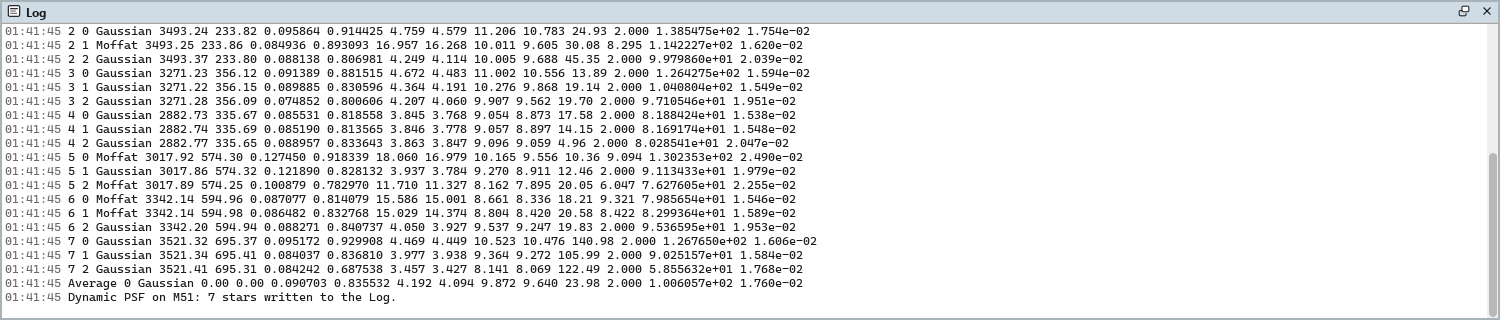
Copy: Puts the list on the clipboard, tab-separated for a spreadsheet, with a header and the average as its last row, which has no channel and no position. It has more columns than the panel: the Gaussian widths sx and sy and the flux too. A Gaussian's beta is empty, as in the panel.
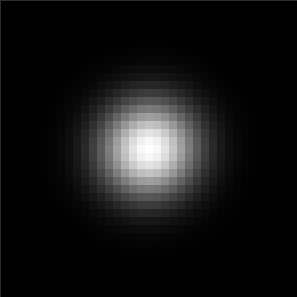
Make PSF Image: A new image, PSF, of the average PSF: 32-bit floating point, gray,
amplitude 1 at its center, no background, square, an odd number of pixels across, twice its full width at a tenth of
its maximum (at least 5 pixels, at most 255).
3.3Write to Log and Cancel
Write to Log: Writes the list, as Copy has it, to the Log, and ends the session. Nothing is recorded in the image's history: the image is not changed.
Cancel: Ends the session and forgets the list.
4Measuring Stars
4.1The Session
The first click on an image starts the session on it; clicks on other images are ignored until the session ends. While it is open, Dynamic PSF holds the image, as the other tools do: write the list to the Log, or cancel, before processing it.
Over the image, a click on a star listed selects it, Ctrl+click removes it, and a click anywhere else fits a new star. Ctrl+Z and Ctrl+Y undo and redo the list's changes, a star added, removed or cleared, one at a time.
4.2When Nothing Is Listed
A click lists nothing, and the panel says why, when no star stands out there (its peak less than three times the noise above the background), when the fit fails, or when the fitted center is farther from the click than three search radii. On a color image a star is listed only when every channel fits.
4.3The PSF Image
The average PSF as an image is what a deconvolution needs as its kernel: the PSF of the image itself, measured on its own stars. Measure stars of the area that matters, round and well exposed, so the average describes it.
5Usage Tips and Tricks
Choose the stars. Isolated, unsaturated stars of medium brightness give the best fits. A saturated star has a flat top that no function fits well; a faint one fits its noise.
Read the shape. FWHM x and FWHM y close to each other mean round stars. Clearly different, with the same angle across the field, they point at the guiding or the tracking; different angles in the corners point at tilt or the optics.
Linear or stretched. The widths are a property of the stars and can be measured on either. The amplitudes and backgrounds are those of the image as it is.
Compare frames. The same stars measured on two frames, or before and after a process, show what changed; Copy puts both lists in a spreadsheet.
6Related Tools
Deconvolution: restores the detail the PSF blurred.
Statistics: the image's statistics and noise, per channel.
Registration: fits the stars of every frame the same way.