Spectrophotometric Flux Calibration
The scale from pixel values to physical flux, measured on the stars of the field
Spectrophotometric Flux Calibration measures the scale that turns the pixel values of an image into physical flux. For each channel it compares what the camera recorded for the stars of a plate solved image with what their Gaia spectra predict through the filter and the sensor, and writes the scale to the image's properties. The pixels do not change; the scale lets later measurements, such as photometry and the processes that need a flux calibrated image, work in physical units.
1Introduction
The pixel values of a linear image are in arbitrary units: they depend on the exposure, the aperture and the gain. A flux calibration finds the factor between those units and the light from the star. For each matched star it takes the star's signal, measured with a fit of its profile, over its catalog photon flux density, the integral of the star's spectrum through the filter and the sensor over the response's own integral. The scale of a channel is the median of these ratios over the stars, after the fraction farthest from the median is left out.
The result for each channel, the scale, its sigma, the mean full width at half maximum of the stars in x and y and the number of stars used, is written to the image as properties. The pixels are not changed. A workflow that asks for a flux calibrated image accepts an image that carries this calibration.
The spectra are those of Gaia DR3 (ESA/Gaia/DPAC), kept in a file of our own beside the catalog files; without it the process cannot run and says so. The filters and the sensor are chosen from the same library of curves as in Spectrophotometric Color Calibration. A gray image uses the gray filter.
Spectrophotometric Flux Calibration follows PixInsight's process of the same name by its parameters, so its icons open here and run. Its estimator is our own.

2Quick Start
- Open the plate solved image, linear, and choose . An image that is not solved needs Plate Solve first.
- Choose the camera's curves: the filter or filters and the Sensor QE, from the lists beside each. A gray image uses Gray filter; a color image the Red filter, Green filter and Blue filter.
- Click Apply. The image does not change; the Log gives the scale factors and the properties are written.
3Interface & Parameters
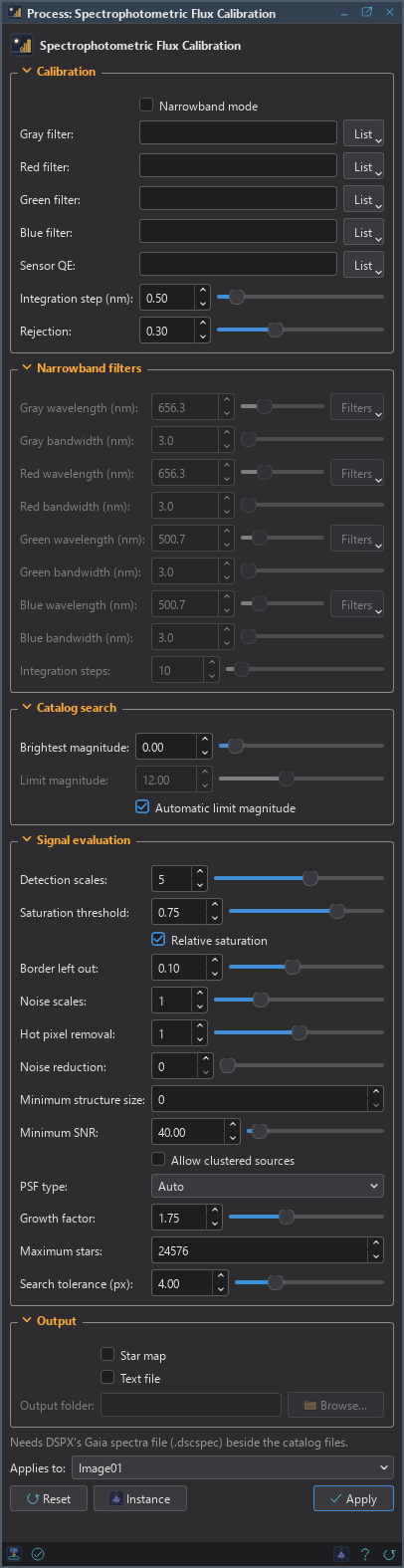
The panel has five sections, Calibration, Narrowband filters, Catalog search, Signal evaluation and Output, each of which folds away with the arrow beside its title, then the image the process applies to, the buttons and the system bar along the bottom.
3.1Calibration
Narrowband mode: The channels were taken through narrowband filters: each is given by its wavelength and bandwidth, in Narrowband filters. Off by default.
Gray filter: The filter of a grayscale image. Empty, the default: DSC Luminance (400 to 700 nm).
Red filter: The red channel's filter transmission (color images).
Green filter: The green channel's filter transmission (color images).
Blue filter: The blue channel's filter transmission (color images).
Sensor QE: The sensor's quantum efficiency. Ideal QE curve, the default, is for a color sensor whose filter curves already include it.
Integration step (nm): The step of the integrals of the spectra through the filters, from 0.1 to 5. 0.5 by default.
Rejection: The fraction of the stars farthest from the median scale that is left out, from 0 to 0.9. 0.3 by default.
Each curve has a List beside it with the library of curves, as in Spectrophotometric Color Calibration, and Import a Curve... to add our own.
3.2Narrowband Filters
Gray wavelength (nm): The central wavelength of the gray image's filter, from 100 to 2500. 656.3 by default.
Gray bandwidth (nm): The full width of the gray image's filter, from 0.1 to 1000. 3 by default.
Red wavelength (nm): The central wavelength of the red channel's filter. 656.3 by default.
Red bandwidth (nm): The full width of the red channel's filter. 3 by default.
Green wavelength (nm): The central wavelength of the green channel's filter. 500.7 by default.
Green bandwidth (nm): The full width of the green channel's filter. 3 by default.
Blue wavelength (nm): The central wavelength of the blue channel's filter. 500.7 by default.
Blue bandwidth (nm): The full width of the blue channel's filter. 3 by default.
Integration steps: The number of steps of the integrals of the spectra over each band, from 5 to 100. 10 by default.
3.3Catalog Search
Brightest magnitude: Catalog stars brighter than this Gaia G are not used, from −2 to 30. 0 by default.
Limit magnitude: The faintest Gaia G magnitude searched, from 0 to 30. 12 by default, used when the automatic limit is off.
Automatic limit magnitude: Finds the magnitude that gives about 8000 catalog stars. On by default.
3.4Signal Evaluation
The signal of each star is measured as in Spectrophotometric Color Calibration.
Detection scales: The wavelet layers star detection uses: the largest stars detected are about 2 to the power of this many pixels. From 1 to 8, 5 by default.
Saturation threshold: Stars with a pixel at or above this are not measured. From 0.1 to 1, 0.75 by default.
Relative saturation: The threshold is a fraction of the smallest channel maximum, with the border left out. On by default.
Border left out: The fraction of the width and height at each side that relative saturation leaves out, from 0 to 0.25. 0.1 by default.
Noise scales: The first wavelet layers left out of star detection, as noise. From 0 to 4, 1 by default.
Hot pixel removal: The radius of the median filter that star detection applies against hot pixels, from 0 to 2. 1 by default.
Noise reduction: The radius of the Gaussian filter that star detection applies against noise, from 0 to 50. 0, the default, is none.
Minimum structure size: The smallest star detected, in pixels. 0, the default, is automatic.
Minimum SNR: Stars with a lower signal to noise ratio are not measured. From 0 to 1000, 40 by default.
Allow clustered sources: Measures stars that share a structure with others. On by default.
PSF type: The function fitted to each star: Gaussian, Moffat 1.5, Moffat 4, Moffat 6, Moffat 8, Moffat 10 or Auto, the default.
Growth factor: The star flux is measured over the fitted PSF times this, from 0.5 to 4. 1.25 by default.
Maximum stars: The brightest stars measured in each channel, at most. 24576 by default.
Search tolerance (px): The largest distance from a star to its catalog position, from 0.1 to 16. 4 by default.
3.5Output
Star map: Also makes an image marking the stars the calibration used. Off by default.
Text file: Also writes each star's catalog and measured fluxes to a text file. Off by default.
Output folder: Where the text file goes. Empty, the default: the temporary folder.
3.6Apply and Instance
Applies to: The image the process works on, chosen in a list of the open images. It shows the image in front, and follows it as we bring other images to the front. Picking another image in the list makes the panel work on that one without bringing it to the front, and Follow Active, the small button that appears beside the list, makes the panel follow the image in front again.
Instance: Shows the process as the panel has it now, as text: a DSPX process
(.dsproc) or a PixInsight process icon (.xpsm), chosen under Format. Copy puts the text
on the clipboard; Save... saves it as a file and puts it on the Process Shelf.
Reset: Puts every setting back to its default.
The system bar along the bottom has the same commands as small icons: at the left, drag to apply and Apply; at the right, Instance, Help (this page) and Reset. The Apply button measures the image and writes the properties; the pixels are not changed.
4What Is Written to the Image
For each channel the estimator takes each matched star's signal over its catalog photon flux density, leaves out the Rejection fraction farthest from the median in the logarithm, and takes the median of the rest as the scale and 1.4826 times the median absolute deviation as its sigma. Both are multiplied by 100 million. The mean full width at half maximum of the stars in x and y and the number of stars are recorded too, with a normalization factor and the version of the calibration, as properties of the image.
5Usage Tips and Tricks
Calibrate linear data. Do it before any stretch. The scale is a property of the linear pixel values.
Check the sigma. A sigma that is small against the scale means the stars agree. A large one means a poor match: the wrong filter curve or a wrong solution is the usual reason.
Choose the equipment curves. As in color calibration, the result is as good as the curves of the filter and the sensor.
6Related Tools
Spectrophotometric Color Calibration: balances the colors from the same catalog and curves.
Plate Solve: solves the image, which the calibration needs.
Color Calibration: a color calibration from a white reference, when the equipment curves are unknown.