
Color Calibration
White balance from the stars, a galaxy, or the Gaia catalog
Color Calibration balances the colors of a linear color image so that a white reference comes out neutral. The white can be the image's own stars, found with wavelets; a spiral galaxy or any region we choose; factors we type; or the image's stars looked up in the Gaia catalog through its astrometric solution, with the Sun's color or the average color of spiral galaxies as white. The background is neutralized at the same time, and the factors are written to the Log.
1Introduction
A camera does not see the three colors equally: the sensor, the filters, the optics and the atmosphere each weigh the channels differently. Color Calibration measures that difference on something we take to be white and multiplies each channel so the white comes out white. Everything else in the image keeps its color relative to it.
What counts as white is a choice, and the process offers four:
- The stars of the image, the default. Structure detection finds the small bright structures, which on a star field are the stars, and their mean color is the white. A rich field of stars of every type averages close to white.
- A region or another image: a nearby spiral galaxy, whose integrated light mixes all its stars, is a classic white reference.
- Factors we type: the three factors of an earlier run, for an image of the same camera and filters.
- The Gaia catalog, our own addition: each star of the image is measured and compared with the color its Gaia BP-RP says it has, with a G2V star (the Sun) or the average spiral galaxy as white. It needs a plate solved image and DSPX's catalog files.
Color Calibration is our own engine, written from PixInsight's published description of its process of the same name, with the same parameters: a PixInsight icon of ColorCalibration opens here, and the panel saves one that PixInsight opens. The catalog white is DSPX's own: it is not written to a PixInsight icon, and the icon's notes say so.
2Quick Start
- Open the linear color image, with its gradients removed and its background neutral.
- Choose . With the live preview (the eye) on, the result shows on the image.
- Leave the defaults to take the white from the stars of the image. For a plate solved image, Catalog white reference can take it from the Gaia catalog instead.
- Click Apply. The Log gives the three white balance factors.
3Interface & Parameters
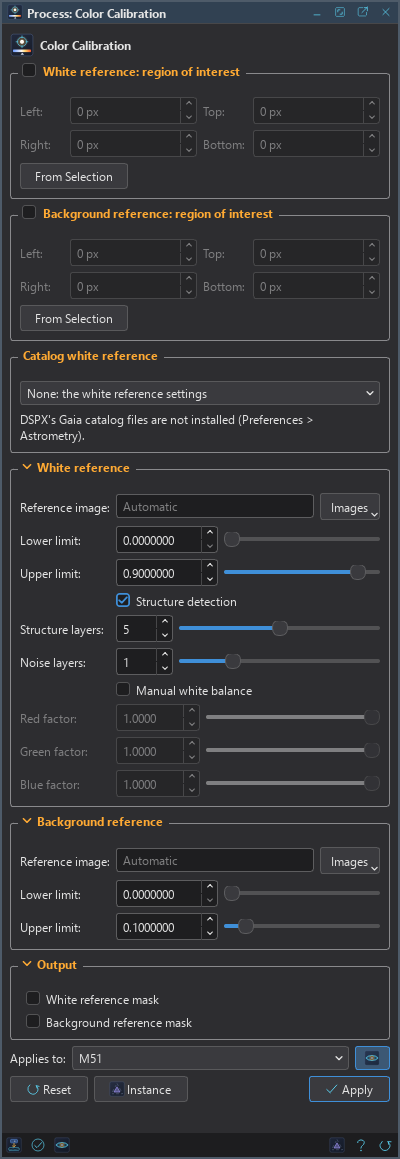
At the top of the panel are the two regions of interest, one for the white reference and one for the background reference, each with its own check box, then the catalog white. Under them are three sections, White reference, Background reference and Output, each of which folds away with the arrow beside its title, then the image the process applies to with the live preview's eye, the buttons and the system bar along the bottom.
3.1Regions of Interest
The panel has two regions, each a rectangle of its reference image: White reference: region of interest and Background reference: region of interest.
Region of interest: The box in the title of each group. Checked, only that rectangle of the reference is measured; unchecked, or with an empty rectangle, the whole reference.
Left: The left edge of the rectangle, in pixels of the reference image.
Top: Its top edge.
Right: Its right edge; the column at this value is not included.
Bottom: Its bottom edge; the row at this value is not included.
From Selection, in each group, takes the rectangle from the selection drawn on the image, turns that region on and clears the selection, so that it does not limit where the process is applied. To calibrate on a galaxy, we draw a rectangle around it and take it as the white region.
3.2Catalog White Reference
Catalog white reference: Where the white comes from:
- None: the default. The white reference settings below decide.
- Gaia stars, G2V white: the stars of the image, each compared with the color the Gaia catalog gives it, so that a star of the Sun's color comes out white.
- Gaia stars, average spiral galaxy white: the same, with the integrated color of spiral galaxies as white, a little warmer than the Sun.
The line under the list says whether the catalog can be used: the image needs an astrometric solution (see Plate Solve) and DSPX's Gaia catalog files must be installed (). When one is missing, the line says which, and the choice is grayed out. With a catalog white, the white reference settings but Upper limit are grayed out.
3.3White Reference
Reference image: The image whose pixels give the white, chosen with Images among the open images, or typed. Empty, shown as Automatic, it is the image itself. Another image must be a color image and be open while we apply.
Lower limit: White reference pixels with a sample at or below this value are left out. 0 by default.
Upper limit: White reference pixels with a sample at or above this value are left out: saturated and nonlinear pixels, such as the cores of bright stars. 0.9 by default. With the catalog, the stars that reach it are left out.
Structure detection: On, the default, the white is taken from the small bright structures found with wavelets: on a star field, the stars. Off, from every pixel within the limits, which is what we want for a galaxy's region.
Structure layers: The wavelet layers the structures are found in: the largest structure is 2 to this power pixels across, so 5, the default, finds structures up to 32 pixels. From 2 to 8.
Noise layers: How many of the first wavelet layers are left out, so that noise, hot pixels and the smallest stars are not taken. 1 by default, from 0 to 4.
Manual white balance: Use the three factors below instead of a white reference: the factors another run wrote to the Log, for instance.
Red factor: What the red channel's signal above the background is multiplied by, from 0 to 1.
Green factor: The same for green.
Blue factor: The same for blue.
3.4Background Reference
Reference image: The image whose pixels give the background levels. Empty, shown as Automatic, it is the image itself.
Lower limit: Background reference samples at or below this value are left out. 0 by default.
Upper limit: Background reference samples above this value are left out: stars and nebulae. 0.1 by default.
3.5Output
White reference mask: Also makes a new image, a mask that is white where the pixels the white was taken from are: the way to see what structure detection found.
Background reference mask: Also makes a mask of the pixels the background was taken from.
3.6Apply, Preview and Instance
Live preview (the eye): At the end of the Applies to row; Preview in the system bar is the same switch. On by default. The image shows Color Calibration applied to the part in view, as the settings change, with the banner "PREVIEW only, nothing applied"; the image itself does not change until Apply. Before, in the banner, or the backslash key held, shows the image as it is. The background and the white are measured once on the whole image (the Log says how long that took; structure detection and the catalog take a few seconds), so at 1:1 the preview is exactly what Apply gives there; at a reduced zoom it is computed on the reduced view and is very close. When a preview takes long, it updates when we release the mouse.
Applies to: The image Color Calibration works on, chosen in a list of the open images. It shows the image in front, and follows it as we bring other images to the front. Picking another image in the list makes the panel work on that one, its live preview included, without bringing it to the front; the pick stays while we work on other images, and Follow Active, the small button that appears beside the list, makes the panel follow the image in front again. An image that a tool or a run is working on is listed, but cannot be picked.
Apply: Calibrates the image named in Applies to, in one history step that Undo takes back, through the image's mask if it has one, and writes what it measured and the factors to the Log. The size, the sample format and the metadata, the astrometric solution included, stay as they are. The masks of Output arrive as new images. A gray image is refused.
Instance: Shows the process as the panel has it now, as text: the settings as a DSPX
process (.dsproc) or as a PixInsight process icon (.xpsm) of ColorCalibration, chosen under
Format. Copy puts the text on the clipboard; Save... saves it as a file and puts it on the Process
Shelf.
Reset: Puts every setting back to its default.
The system bar along the bottom of the panel has the same commands as small icons: at the left, drag to apply and Apply; at the right, Instance, Help (this page) and Reset. Drag to apply, the first icon, carries the process with its settings: dropped on an image's window, it applies them to that image, whatever image the panel works on; dropped on the Process Shelf, it is kept there as a row of its own. With , the bar alone has them.
4What Color Calibration Does
4.1The Background and the White
First the background: each channel's mean over the background reference's samples within its limits, as Background Neutralization measures it. Then the white: the mean of each channel over the white reference's pixels whose three samples are all within the limits and, with structure detection, that belong to a structure. A structure is where the wavelet layers from Noise layers to Structure layers, summed, rise more than three times their noise.
The factor of each channel is what makes the white, above the background, equal in the three channels; the largest factor is 1, so nothing is brightened. Every pixel then becomes its background plus its signal above the background times the factor: the background stays where it is, and the signal is balanced.

4.2The Catalog White
With a catalog white, the stars of the Gaia catalog inside the image are placed on it through its astrometric solution, moved to the date the image was taken, down to magnitude G 16. Each is measured by aperture photometry, the aperture set from the stars' own size, its background taken in a ring around it. Stars that reach the upper limit, and stars with a neighbor close enough to spoil the measurement, are left out. The color each star should have comes from its BP-RP through the same model of a star's light that Catalog Star Color uses; the factors are the median of what makes the measured colors match the expected ones, over at least 20 stars.
Two whites are offered: G2V, a star like the Sun at 5770 K, and the average spiral galaxy, the mean integrated color of spiral galaxies, about 5890 K. They differ only slightly; the first makes a star like the Sun white, the second makes the light of a typical galaxy white.
Stars are taken from the brightest down, at most 3000, which is plenty: the Log says how many were measured, of how many catalog stars in the field, and when the most were taken. It also gives their median BP-RP. A star like the Sun has 0.82; in Milky Way fields most measured stars are redder, cooler stars and stars reddened by dust. The catalog white keeps them as red as the catalog says they are, while Structure detection makes the light of the image's own stars white on average. So on such a field the two give different factors, the catalog white a warmer image: on the Pacman Nebula, whose stars have a median BP-RP of 1.06, G 0.71 and B 0.79 against structure detection's G 0.81 and B 0.96. Both are right for what they do: the catalog white for the colors the stars have, structure detection for a neutral average star.

5Usage Tips and Tricks
Background first. Color Calibration neutralizes the background as it works, but the white it measures is better when the gradients are gone: Background Extraction first, then Background Neutralization, then Color Calibration.
Look at the white reference mask. When the result looks wrong, Output's White reference mask shows which pixels were taken as white. Nebulosity in it means Structure layers is too high; too few stars, that Upper limit is too low.
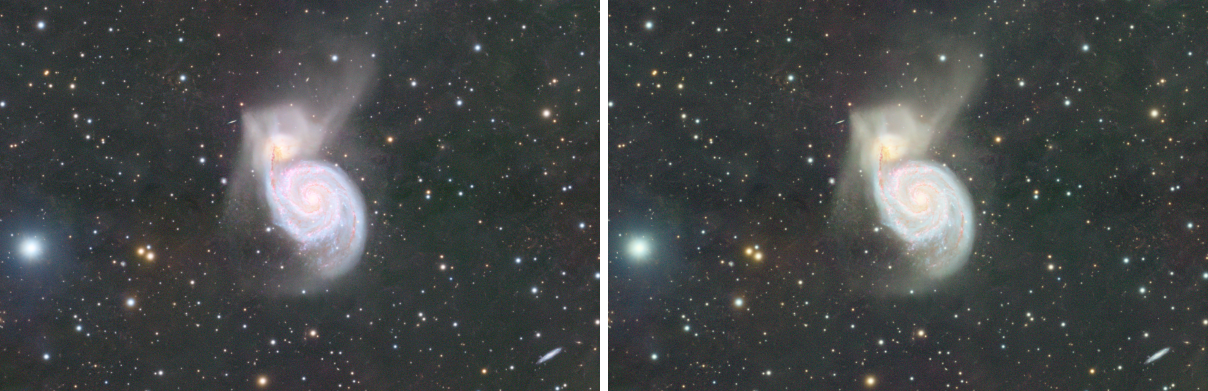
A galaxy in its own region. For a field with a large spiral galaxy, a region around it with Structure detection off takes its integrated light as white.
The same factors for a series. Images of the same camera and filters can share their balance: the factors of one run, typed with Manual white balance, give the others the same colors.
Linear data only. The factors multiply the signal, which is right for linear data. On a stretched image the balance is no longer a product of the channels.
GPU. In DSPX mode the structure detection (the starlet layers of the white reference, their median and deviation, and the map of the structures) runs on the graphics card when the reference is a quarter of a megapixel or more. On a 24 MP reference it takes a fraction of the three seconds the processor needs. The map is the same as the processor's but, at most, for a sample within the rounding of a float of the threshold. Choose CPU only in to keep it on the processor, and see The Processor and the GPU.
6Related Tools
Background Neutralization: the neutral background alone, without a white balance.
Catalog Star Color: gives each star the color the catalog measured, after the image is stretched.
Plate Solve: gives the image the astrometric solution the catalog white needs.
SCNR: removes a color cast that a white balance cannot, such as the green of a narrowband palette.