
Star Trails Blending
Many frames of one field blended into an image of the stars' trails
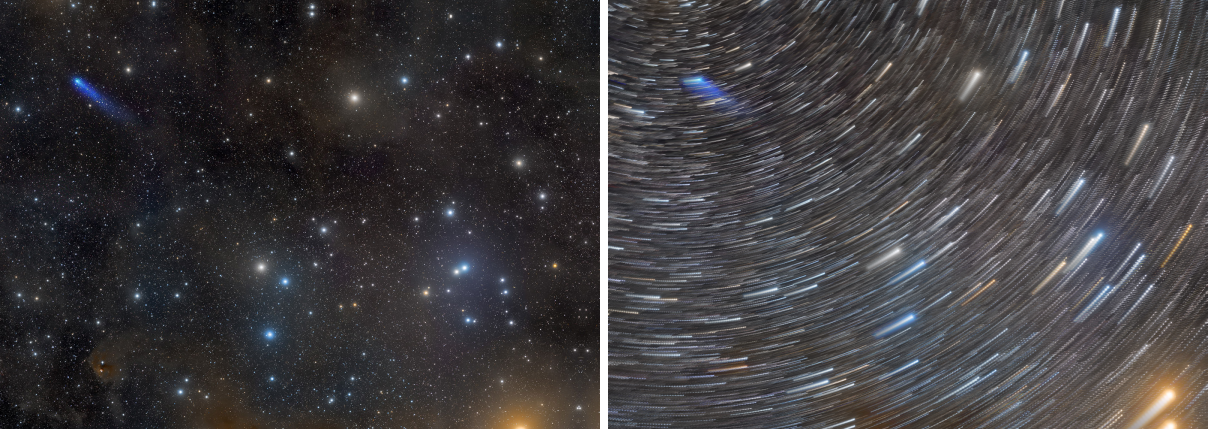
Star Trails Blending blends many frames of the same field into one image that shows the stars' movement as trails. The frames are put together by the brightest value, with a fade that gives each trail a bright head and a fading tail, or with other blends, and the dotted trails that short exposures leave can be closed into continuous lines. It works on files and writes the blended image to a file.
1Introduction
A long exposure of the night sky shows the stars as trails, but it also overexposes the sky and the foreground. Many short exposures taken one after the other, blended afterwards, give the same trails with full control: each frame is sharp and well exposed, and the blend decides how the trails look. The simplest blend keeps, for each pixel, the brightest value of any frame; a star that moved across the field then leaves a line.
The frames are blended as given. They are not registered here: if the ground or the sky must stand still, we register the frames first with Registration. The order of the list is the order of the blend, which matters for the fade, and Reverse order turns the list around.
Short exposures leave a gap between one frame's star and the next, which makes the trail a line of dots. Fill gaps closes them, along the direction of the trails.
Star Trails Blending is our own process and has no equivalent in PixInsight, so it saves as a DSPX process
(.dsproc) only.
2Quick Start
- Choose .
- Add the frames, in the order they were taken, with Add Files... or Add Folder....
- Leave Blend mode on Lighten (maximum). For trails with a head and a tail, choose Lighten with fade.
- If the trails are dotted, raise Fill gaps to a few pixels more than the distance between the dots.
- Click Run. The image is written to the folder of the first frame, as
StarTrailsBlended.xisf, and opened.
3Interface & Parameters
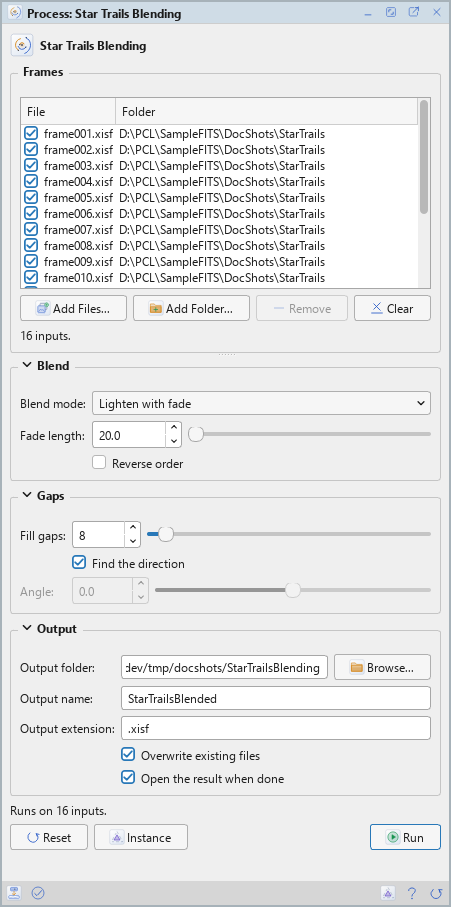
Star Trails Blending is a process that works on files: its panel lists the frames at the top, under Frames, and has three sections of settings, Blend, Gaps and Output, each of which folds away with the arrow beside its title. Under them are the buttons and the system bar along the bottom. It works on no open image, so it has no Applies to and no live preview.
3.1Frames
Frames: The frames of the field, in the order they were taken, all of one size. Each row shows a file and its folder, with a check box that keeps it in the run or leaves it out. Add Files... and Add Folder... add frames, Remove takes the selected rows away and Clear empties the list. Register the frames first to hold the ground or the sky still.
3.2Blend
Blend mode: How the frames are put together:
- Lighten (maximum): the brightest value of each pixel: full trails. The default.
- Lighten with fade: older trails decay: a trail fades to half its intensity over the Fade length.
- Screen: brightens like layered exposures.
- Average: the mean of the frames.
- Sum (clipped): the frames added up, cut at white.
Fade length: With Lighten with fade: the number of frames over which a trail fades to half its intensity, from 1 to 10000, 20 by default. Each star has a bright head and a fading tail.
Reverse order: Blends the frames from the last to the first, so the fade then ends at the first. Off by default.
3.3Gaps
Fill gaps: Closes the gaps between a star's dots along the trail, up to this many pixels, from 0 to 200. 0, the default, is off. It works with Lighten, Lighten with fade and Screen.
Find the direction: Takes the trails' direction from the blended image: one direction for the whole image. On by default. It needs trails that are continuous and nearly straight.
Angle: With Find the direction off: the direction of the trails, in degrees, from −90 to 90. 0 is along the rows, 90 along the columns.
3.4Output
Output folder: Where the image is written. Empty, the default: the folder of the first frame.
Output name: The image's file name, without its extension. StarTrailsBlended by
default.
Output extension: The file format: .xisf, the default, or .fits. The image is
32-bit floating point.
Overwrite existing files: Off by default: a file of the same name is kept, and the new one gets
_1, _2 and so on added to its name.
Open the result when done: On by default: the blended image opens when the run ends.
3.5Run and Instance
Run: Blends the frames that are checked in the list. The panel shows its progress and Cancel, and lists what was written.
Instance: Shows the process as the panel has it now, as text, a DSPX process (.dsproc),
the list of frames included. Copy puts the text on the clipboard; Save... saves it as a file and puts it on the
Process Shelf.
Reset: Puts every setting back to its default.
The system bar along the bottom has the same commands as small icons: at the left, drag and Run; at the right, Instance, Help (this page) and Reset.
4How the Frames Are Blended
Lighten keeps the maximum. Lighten with fade multiplies the blend so far by a factor f before taking the maximum with the next frame, with f equal to 0.5 to the power of one over the Fade length, so a trail fades to half after that many frames. Screen, Average and Sum combine the frames as their names say, Sum being cut at white.
Fill gaps is a grayscale closing with a line of the given length along the trails. The direction is the dominant direction of the gradient on the bright pixels of the blended image, one for the whole image, which is right for nearly straight trails and needs trails that are continuous.
5Usage Tips and Tricks
Fade for a head and a tail. With Lighten with fade, a short Fade length gives short tails and a long one gives tails that last through the series.
Fill gaps a little longer than the gap. A value just above the distance between the dots joins them without smearing the trail.
6Related Tools
Registration: registers the frames when the ground or the sky must stand still.
Integration: stacks the same frames to remove the noise instead of keeping the movement.
Comet Alignment: another process for a series of frames of a moving object.