
Brightness-Aware Palette
A color image from Ha, OIII and SII in which each pixel's recipe depends on how bright the lines are there
Brightness-Aware Palette makes a color image from gray images of Ha, OIII and, if we have it, SII. A fixed palette gives every pixel the same recipe: SII to red, Ha to green, OIII to blue. Here the recipe changes with how bright the lines are at each pixel, so faint regions and bright regions get different colors and the usual flat green cast does not appear. We choose a family of recipes, how much SII the red takes, where the green changes from Ha to OIII and how gradual the change is, and the stars can be blended toward gray. It works on linear and on stretched images, shows every change live, and makes a new image or replaces the one it is applied to.
1Introduction
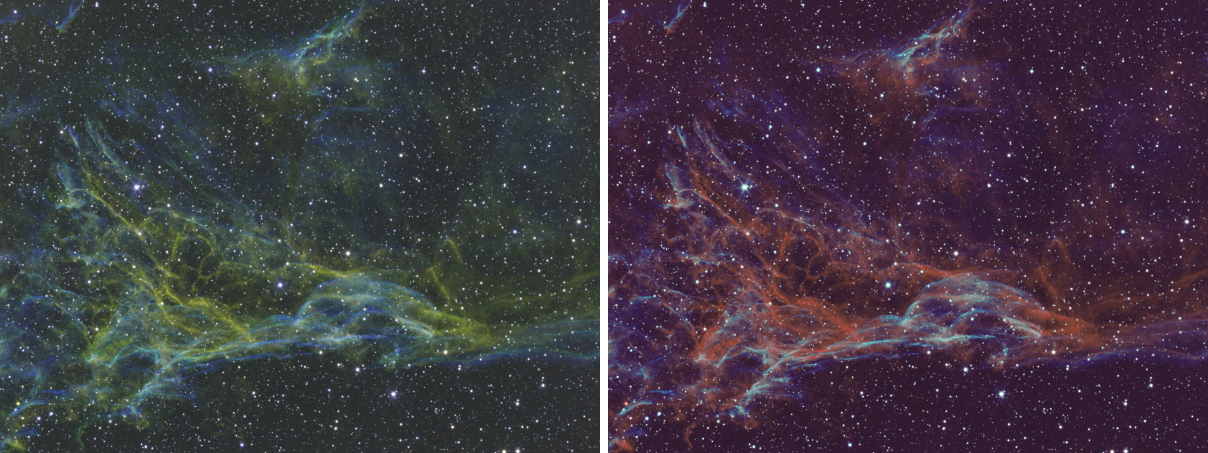
In the recipes of this process, blue always carries the OIII. The red takes Ha where the OIII is faint and takes a share of SII where the OIII is bright. The green is Ha, held back, where the lines together are faint, and OIII where they are bright. The result in the default family, Teal and gold, is gold in the Ha regions and teal where the OIII is strong, with the SII adding warm detail in the transition.
Brightness is measured on each line's own range. The switches must behave alike on linear data, where the lines are dim and far apart in strength, and on stretched data. For that, the process measures each line once on the whole image: the 0.5 and 99.5 percentiles give a range, and a midtones balance takes the line's median to 0.25 of that range. This normalized copy of a line is used only to decide the weights. The colors themselves are mixed from the lines' own values, so a linear input gives a linear image, which we stretch afterward, and the balance between the lines is ours to set. Because of that, the lines should have matching backgrounds before they are combined: run the Narrowband Normalization script first (Scripts > DSPX Scripts). When the backgrounds differ strongly, the process says so after a run, and writes a warning to the Log.
For a dual-band pair, leave the SII image empty: Ha then stands in for SII. The script Extract Ha and OIII (Dual Band) splits a dual-band color image into the two gray images this process reads.
2Quick Start
- Open the gray images of the lines. Bring the Ha image to the front, or choose it in Ha image.
- Choose .
- In OIII image choose the OIII image. Choose the SII image too, if there is one.
- Open Live, and the preview appears on the image in front. Adjust Palette, Warm line blend, Green switch point and Transition softness until the colors are right.
- If the image has stars, set Star color to Natural white blend.
- Click Apply. The color image opens as a new image,
Ha_palette.
3Interface & Parameters
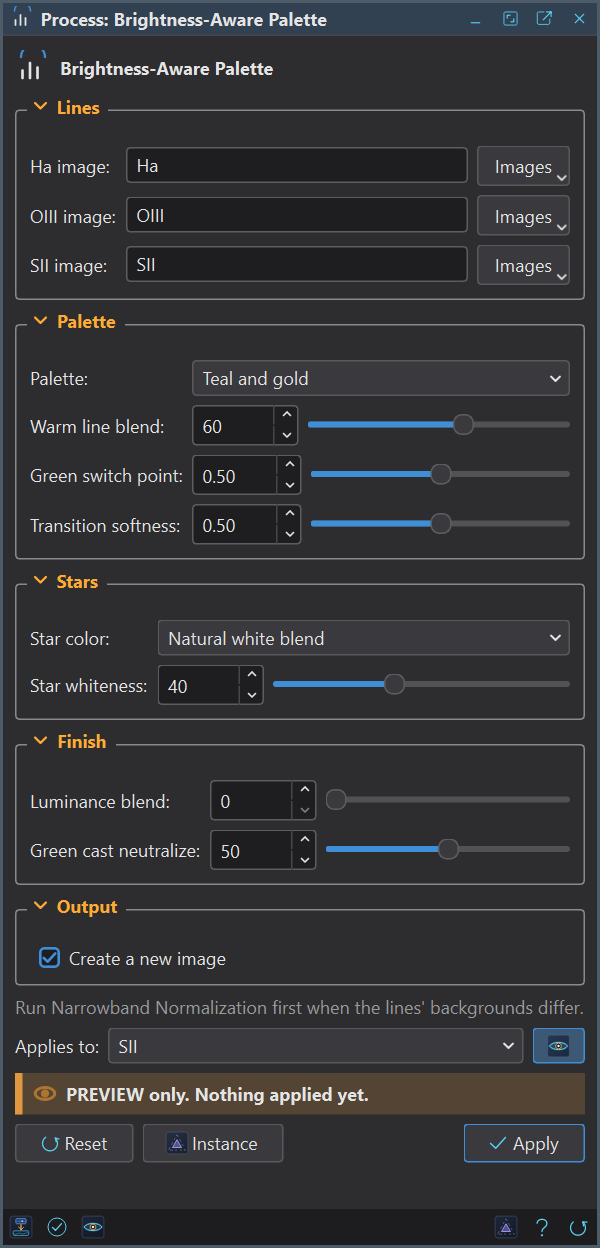
The panel has the sections Lines, Palette, Stars, Finish and Output. Settings that do not matter for the family chosen are disabled. Under them are the image the process applies to, the Live box, the buttons and the system bar.
3.1Lines
Ha image: The gray Ha image. Empty, which the panel shows as Active image, means the image the process is applied to.
OIII image: The gray OIII image, of the same size as the others. It is required.
SII image: The gray SII image, of the same size. Optional: without it Ha stands in for SII, which is how a dual-band pair is combined.
The three must be different images, gray, and of one size. A color image or a size that differs is refused, with the name of the image and its size.
3.2Palette
Palette: The family of recipes. Teal and gold (the default): gold where the lines are faint, teal where the OIII is bright. Ember: warmer, with the red keeping more Ha and less blue. Classic SHO: SII red, Ha green, OIII blue, the same at every pixel; the brightness settings do not act. HOO: Ha red, OIII green and blue, a little warmer in the faint regions.
Warm line blend: From 0 to 100 percent, 60 by default. How much SII, against Ha, the red takes where the OIII is bright. 0 keeps Ha in the red everywhere. It acts in Teal and gold and in Ember.
Green switch point: From 0 to 1, 0.5 by default. The combined brightness of Ha and OIII at which the green changes from the faint recipe to OIII. A lower point starts the change in fainter regions. It does not act in Classic SHO.
Transition softness: From 0 to 1, 0.5 by default. How gradual the changes are. At 0 the change is nearly a hard edge, which can show as contours in smooth regions; at 1 it spreads over the whole range. It does not act in Classic SHO.
3.3Stars
Star color: Keep palette (the default): stars take the recipe like everything else, which makes them gold or teal. Natural white blend: stars go toward gray by Star whiteness. The stars are found with the same star detector the pre-processing tools use, on the brightest of the lines, and the blend fades out at the edge of each star.
Star whiteness: From 0 to 100 percent, 40 by default. How far a star goes toward the gray of its own mean at its center. It acts only with Natural white blend.
A third choice, taking the stars' colors from a star catalog, is not offered here: it needs a plate solved image and the catalog files, which a set of gray lines does not have. The script Star Stretch applies catalog colors to stars when we need them.
3.4Finish
Luminance blend: From 0 to 100 percent, 0 by default. How far the brightness of the result goes toward the mean of the lines, with the colors kept in proportion. Raise it to bring back brightness that the recipe took away.
Green cast neutralize: From 0 to 100 percent, 50 by default. Removes this share of the green that is above both red and blue. Teal, where green meets blue, is not a cast and is kept.
3.5Output
Create a new image: On by default: the result opens as a new 32-bit color image, named after the
image in front with _palette, and the lines are left as they are. Off: the image the process is applied to is
replaced by the color image, in one history step that Undo takes back. Use it on one of the lines.
3.6Apply and Instance
Applies to: The image the process works on and previews on; Ha is taken from it when Ha image is empty.
Apply: Makes the color image. It needs a license, like the other processes; the live preview does not.
Instance: Shows the process as the panel has it now, as text, as a DSPX process
(.dsproc). Copy puts the text on the clipboard; Save... saves it as a file and puts it on the
Process Shelf. PixInsight has no process of this name, so there is no PixInsight icon of it. A saved process is how a look
is kept and shared: it holds the family and every value, and the names of the three images.
Reset: Puts every setting back to its default.
4Live Preview
The preview shows the color image on the image in front while we change a setting. The lines' ranges and the star mask are measured once on the whole image and kept while the three images and Star color stay the same, so the preview of the part in view is what Apply gives there. The preview needs the other lines to be open and of the size of the image in front.
5Usage Tips and Tricks
Looks to start from. DSPX has no built-in set of named instances, so these are values to type and then save as an instance with a name of your own. They are starting points: the data decides.
| Look | Palette | Warm | Point | Softness | Stars | Luminance | Neutralize |
|---|---|---|---|---|---|---|---|
| Bronze and teal | Teal and gold | 60 | 0.5 | 0.5 | Natural white, 40 | 0 | 50 |
| Ember | Ember | 70 | 0.45 | 0.6 | Natural white, 40 | 10 | 50 |
| Classic SHO | Classic SHO | not used | not used | not used | Natural white, 40 | 0 | 0 |
| Soft HOO | HOO | not used | 0.55 | 0.8 | Natural white, 40 | 20 | 30 |
Match the lines first. A line much stronger than the others pushes the recipe toward its color everywhere. Narrowband Normalization matches the backgrounds and signals before this process.
Stretch afterward. On linear lines the result is linear and dark. Stretch it as any color image, with Hyperbolic Stretch or Arcsinh Stretch, and raise the color with Saturation.
Stars. With stars in the data, use Natural white blend. For the cleanest result, remove the stars first, color the starless lines, and put the stars back.
Weak Ha. When the Ha is much weaker than the OIII, the faint-region recipe, which leans on Ha, goes dark and blue. Lower the Green switch point and raise the Luminance blend.
6Related Tools
Saturation and SCNR: the finishing steps for color. Channel Combination: a fixed combination of three gray images into the channels of a color image. PixelMath: any recipe we can write as an expression.