
Calibration
Light frames freed of the camera's bias, dark current and the optics' uneven illumination
Calibration takes from each light frame what the camera and the optics added to the sky: the bias of the electronics, the dark current of the exposure and, through the flat, the vignetting and the shadows of dust. It works on files: each calibrated frame is written as a new file with its noise and PSF signal measured in its keywords, ready for the next steps of the night. The pre-processing window calibrates on its own; the process is the step by itself.
1Introduction
A raw light frame is the sky plus what the camera adds to it. Calibration takes those away with three masters, each integrated from frames of their own:
- The master bias, the electronics' offset of a frame of no exposure, is subtracted.
- The master dark, the dark current of an exposure with the shutter closed, is subtracted, scaled when Optimize the dark is on by the factor that leaves the least noise in each frame, so a dark of another exposure or temperature still fits.
- The master flat, a frame of an even light source through the same optics, divides the frame, scaled to a mean of about one, so vignetting and dust shadows are evened out.
Each frame then has its noise measured, and with Evaluate signal its stars fitted for their PSF signal; both are written as the frame's keywords and properties, as PixInsight's ImageCalibration writes them, so Integration later weighs the frames by them. The frame keeps its own keywords, and HISTORY lines say how it was calibrated.
Calibration is DSC's pre-processing engine with the parameters of PixInsight's ImageCalibration, in its order and sections: a PixInsight icon of ImageCalibration opens here with its files and masters, and the panel saves one that PixInsight opens. Its cosmetic correction is our own, the one of Cosmetic Correction.
2Quick Start
- Choose .
- Add Files..., and choose the light frames of one camera, filter and binning.
- Under Master frames, give the Master bias, the Master dark and the Master flat with their Browse... buttons. If the master dark was integrated from raw darks, with the bias still in it, turn on Calibrate the master dark.
- Choose an Output folder, or leave it empty to write each frame next to its original.
- Click Run. The calibrated frames are listed under the results, each named after its frame with
_cat the end.
3Interface & Parameters
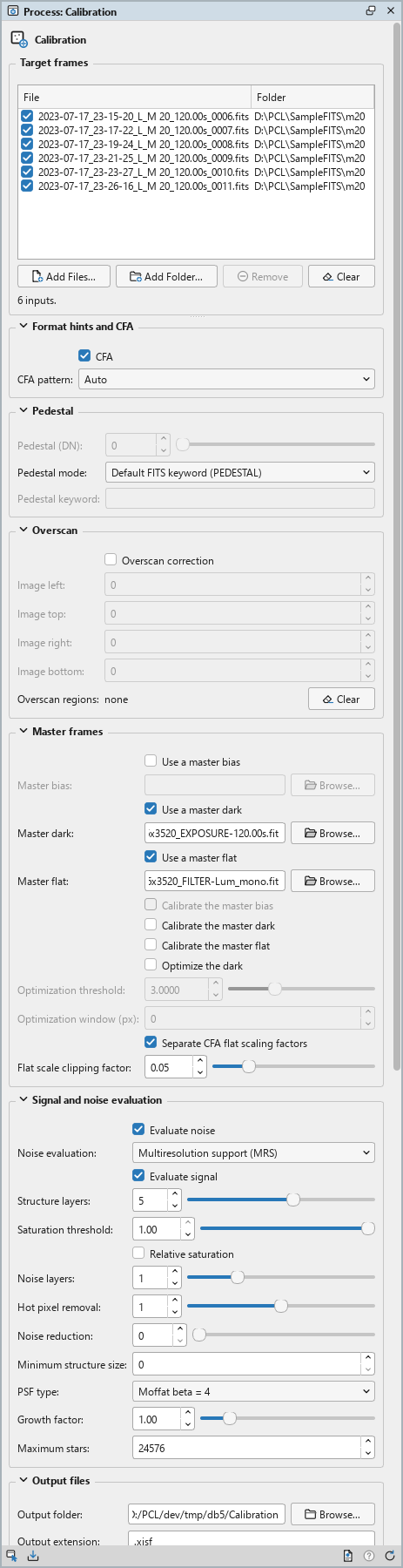
Calibration is a process that works on files: its panel lists the frames at the top, under Target frames, and has seven sections of settings, Format hints and CFA, Pedestal, Overscan, Master frames, Signal and noise evaluation, Output files and Cosmetic correction, each of which folds away with the arrow beside its title. Settings that do not apply are grayed out. Under them are the results of the last run, the buttons and the system bar along the bottom. It works on no open image, so it has no Applies to and no live preview.
3.1Target frames
Target frames: The light frames to calibrate: FITS, XISF or camera raw files. Each row shows a file and its folder, with a check box that keeps it in the run or leaves it out. Add Files... and Add Folder... add frames (a folder's image files, not its subfolders'); Remove takes the selected rows away; Clear empties the list. The line under the list says how many frames there are and how many are enabled.
3.2Format hints and CFA
CFA: On by default, as in ImageCalibration. The frames may be mosaics of a one-shot color camera: the dark is then optimized and the flat scaled per color of the color filter array. It takes effect only when the masters say which pattern they have; monochrome masters calibrate as monochrome whatever it says.
CFA pattern: The color filter array's pattern: Auto, the default, takes it from the masters' properties or their BAYERPAT keyword; or one of the eight patterns, from RGGB to BGRG.
3.3Pedestal
A pedestal is a constant some capture programs add to every pixel so that no value falls below zero. It is taken off every frame, the masters included, before anything else.
Pedestal (DN): With Literal value, the pedestal, in 16-bit data numbers, from 0 to 1000. 0 by default.
Pedestal mode: Where each frame's pedestal comes from: Literal value, the value above; Default FITS keyword (PEDESTAL), the default, the frame's PEDESTAL keyword (none: no pedestal); or Custom FITS keyword, the keyword named below.
Pedestal keyword: The keyword that holds the pedestal, with Custom FITS keyword.
3.4Overscan
Some CCD cameras read a strip of pixels that never see light, the overscan. Its median tells the frame's bias level at the time it was read.
Overscan correction: Off by default. Subtracts the overscan regions' medians, then crops each frame to the image rectangle.
Image left:, Image top:, Image right:, Image bottom: The image rectangle, in pixels: what is left of each frame after the overscan correction.
Overscan regions: Up to four regions, each a source rectangle that is measured and a target rectangle its median is subtracted from. They come with a saved process or a PixInsight icon: the panel says how many there are, and Clear takes them away.
3.5Master frames
Use a master bias: On by default: subtract the master bias given below.
Master bias: The master bias's file, chosen with Browse.... Empty, the default: no bias.
Use a master dark: On by default: subtract the master dark given below.
Master dark: The master dark's file. Empty: no dark.
Use a master flat: On by default: divide by the master flat given below.
Master flat: The master flat's file. Empty: no flat.
Calibrate the master bias: Off by default. Correct the master bias's overscan first, with Overscan correction on.
Calibrate the master dark: Off by default. Subtract the master bias, and the overscan, from the master dark first: for a master dark integrated from raw darks, which still holds the bias. A dark that is optimized must be free of the bias, so turn this on for such a dark.
Calibrate the master flat: Off by default. Subtract the master bias and the dark from the master flat first: for a flat integrated from raw flat frames. Off for a flat made of calibrated flats.
Optimize the dark: On by default. Scale the master dark for each frame by the factor that leaves the least noise in it. The Log gives each frame's factor.
Optimization threshold: The dark's pixels more than this many sigmas above its median are the ones the optimization measures, from 0 to 10; 3 by default.
Optimization window (px): Measure the factor in a centered square of this size, which is faster on large frames. 0, the default: the whole frame.
Separate CFA flat scaling factors: On by default. With a CFA pattern, the master flat is scaled by a factor per color instead of one for all.
Flat scale clipping factor: The fraction of the flat's lowest and highest values left out of its scaling factor, from 0 to 0.25; 0.05 by default.
3.6Signal and noise evaluation
What is measured on each calibrated frame and written into it: the estimates Integration weighs the frames by, and that Registration and Local Normalization use to choose their reference.
Evaluate noise: On by default. Measure each frame's noise and write it as its NOISExx keywords and PCL:Noise properties.
Noise evaluation: How the noise is estimated: Multiresolution support (MRS), the default, Iterative k-sigma clipping, or the N* robust noise estimator.
Evaluate signal: On by default. Detect the frame's stars and fit them to measure its PSF signal, written as its PSFFLXxx ... PSFSGNxx keywords and PCL:Signal properties. The settings below are the star detector's and the fit's.
Structure layers: The wavelet layers the star detector looks at, from 1 to 8; 5 by default. More finds larger stars.
Saturation threshold: Stars with a peak above this are saturated and left out, from 0.10 to 1; 1 by default.
Relative saturation: Off by default. The saturation threshold is relative to the frame's highest value.
Noise layers: The finest wavelet layers left out of star detection as noise, from 0 to 4; 1 by default.
Hot pixel removal: The radius of the median filter that keeps hot pixels from being taken for stars, from 0 to 2 pixels; 1 by default.
Noise reduction: The radius of a Gaussian filter applied before detection, for very noisy frames. 0, the default: none.
Minimum structure size: The smallest star detected, in pixels. 0, the default: automatic.
PSF type: The function fitted to the stars: Gaussian, a Moffat function of beta 1.5, 4, 6 or 8, the Variable shape Moffat, or Auto. Moffat beta = 4 by default.
Growth factor: The fitting regions around the stars are grown by this factor, from 0.5 to 4; 1 by default.
Maximum stars: The most stars fitted per frame; 24576 by default.
3.7Output files
Output folder: Where the calibrated frames are written. Empty, the default: next to each frame. Browse... chooses a folder; one that does not exist is made.
Output extension: The format of the calibrated frames: .xisf, the default, or
.fits.
Prefix: Text put before each frame's name. Empty by default.
Postfix: Text put after each frame's name, before its extension: _c by default.
Sample format: The calibrated frames' sample type: 16-bit integer, 32-bit integer, 32-bit floating point, the default, or 64-bit floating point.
Output pedestal (DN): With Literal value, a constant added to every calibrated frame, in 16-bit data numbers, from 0 to 1000, so that no value is truncated at zero; written as the frame's PEDESTAL keyword. 0 by default.
Output pedestal mode: Literal value, the default, the value above; or Automatic: a pedestal only for a frame that would otherwise have too many values at or below zero, just large enough for them, at most 1000; the Log says when one is applied.
Limit: With Automatic, the share of a frame's values that may be at or below zero before a pedestal is added; 0.0001 by default.
Overwrite existing files: Off by default: a file of the same name is kept, and the new one gets
a new name, with _1, _2... at the end. On, it is replaced.
3.8Cosmetic correction
DSPX's own, not ImageCalibration's: defective pixels replaced while the frames are calibrated, as Cosmetic Correction does on frames already calibrated. A PixInsight icon has none of these settings, so they stay at their defaults.
Hot pixels from the master dark: Off by default. Replace the pixels the master dark shows hot by the median of their nearest neighbors of the same color.
Hot sigma: A dark pixel this many robust sigmas above its local median is hot, from 1 to 100; 10 by default. The detection is Cosmetic Correction's.
Cold pixels from the master dark: Off by default. Replace the pixels the master dark shows cold.
Cold sigma: A dark pixel this many robust sigmas below its local median is cold; 10 by default.
Defect map: An image of the frames' size whose zero pixels are defective; they are replaced too. Empty, the default: none.
Neighborhood: How far valid neighbors are looked for, in steps of pixels of the same color, from 1 to 16; 4 by default.
3.9Run and Instance
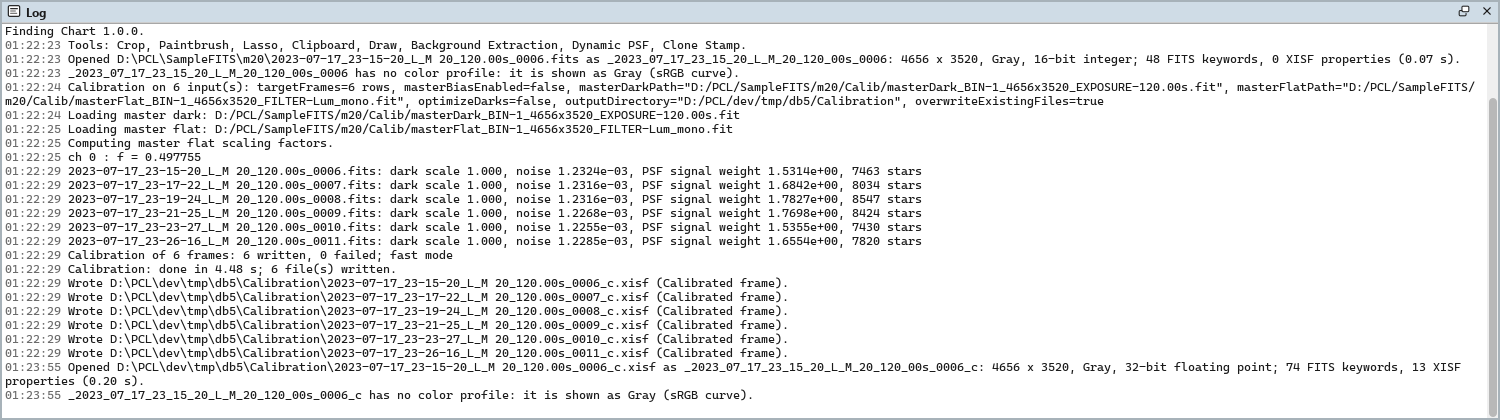
Run: Calibrates the frames checked in the list, on a thread of its own, with its progress and Cancel. The line above the buttons says how many frames the run will work on, or why it cannot start. The Log gives the masters loaded and, for each frame, the dark's scaling factor, the noise, the PSF signal weight and the stars found, then a summary. A frame that cannot be read or calibrated is a warning and the others are written; a canceled run leaves none of its files.
Results: What the last run wrote, a calibrated frame a row. The frames are not opened: a double click, or Open, opens one as an image; Show Folder shows its folder.
Instance: Shows the process as the panel has it now, as text: the settings as a DSPX
process (.dsproc) or as a PixInsight process icon (.xpsm) of ImageCalibration, chosen under
Format, the list of frames included. Copy puts the text on the clipboard; Save... saves it as a
file and puts it on the Process Shelf.
Reset: Puts every setting back to its default and empties the list.
The system bar along the bottom of the panel has the same commands as small icons: at the left, drag and Run; at the right, Instance, Help (this page) and Reset. Dropped on the Process Shelf, the first icon keeps the process there as a row of its own, with its frames: applied from the shelf, it calibrates them again, with no image needed. With , the bar alone has them.
4What a Calibrated Frame Holds
Each frame becomes (light − bias − k dark) / flat, with k the dark's scaling factor (1 when the dark is not optimized) and the flat divided by its scaling factor, plus the output pedestal. The calibrated frame keeps the light's keywords and properties, its observation date among them, and adds:
- HISTORY lines: the masters' file names, whether each was calibrated, the dark's scaling factors and how they were found, the flat's scaling factors, the defects corrected and the output pedestal;
- the noise estimates, NOISExx and its scaling keywords, and the PSF signal estimates, PSFFLXxx to PSFSGNxx and PSFSGTYP, with the PCL:Noise and PCL:Signal properties, as ImageCalibration writes them;
- a PEDESTAL keyword when an output pedestal was added.
The PixInsight compatibility mode, in , decides two things. On, the dark's factor is found by ImageCalibration's own search and every calibrated sample is truncated to the range from 0 to 1, as PixInsight does. Off, DSPX's way, the factor is found in closed form, and samples below zero are kept: the sky's noise is not clipped, so its mean and its noise estimate stay true on dark skies. A floating point file keeps those negative samples; an integer file is still truncated. A HISTORY line says which mode calibrated the frame. A PixInsight icon of ImageCalibration was made in the compatible mode: opening one while the mode is off asks whether to run it as made or in the current mode.
5Usage Tips and Tricks
One set of masters a run. The masters must have the frames' size, and the frames of one run share them: run Calibration once per filter, binning and camera.
A dark of the lights' exposure. With darks taken at the lights' exposure and temperature, as is usual for CMOS cameras, the master dark holds the bias already: give no master bias, and turn Optimize the dark off, so the dark is subtracted as it is.
Raw darks hold the bias. A master dark integrated from raw darks still has the bias in it. With a master bias given, turn on Calibrate the master dark, so the optimization scales the dark current alone.
Check the scaling factors. The Log gives each frame's dark factor: about the ratio of the light's exposure to the dark's when their temperatures match. A factor far from it, or 0, points to a dark of another camera or temperature: its hot pixels do not match the frame's.
Or let the session do it. The pre-processing window calibrates a whole night on the fly, masters included, and writes no calibrated frame at all. Use the process when a step needs its own files.
6Related Tools
Integration: makes the masters, and integrates the calibrated frames.
Cosmetic Correction: the hot and cold pixels of frames already calibrated.
Debayer: one-shot color frames, once calibrated, into RGB frames.
Registration: the calibrated frames aligned onto one reference.