
Local Normalization
Each registered frame's background and scale matched to a reference's, pixel by pixel
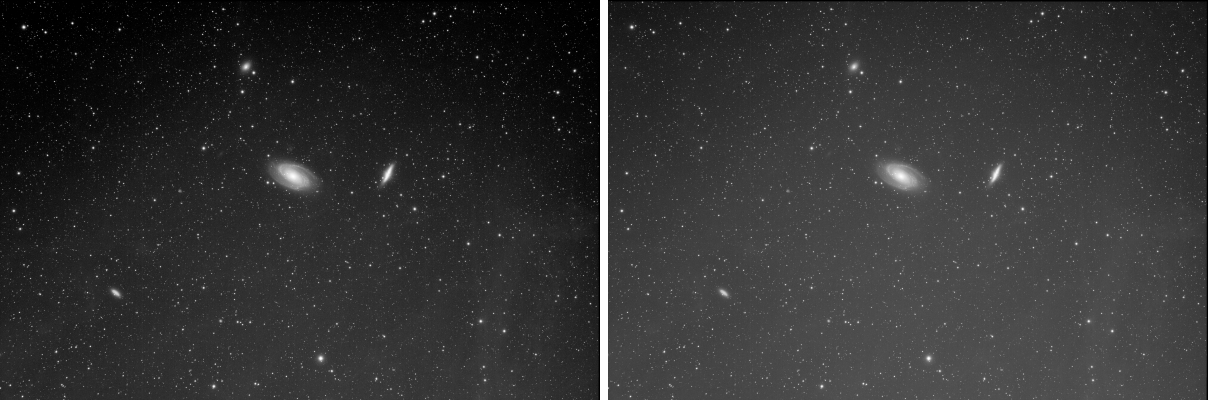
Local Normalization measures, for each registered frame, how its background and its brightness differ from a reference frame's across the field, and writes the maps that bring them to the reference's, pixel by pixel. Gradients that change during the night, a moon rising, light pollution moving with the target's altitude, a thin cloud, are taken out of the comparison between frames, so the frames' rejection and their combination work on what the frames have in common.
1Introduction
An integration's global normalization matches each frame to the reference with one offset and one scale for the whole frame. Real frames differ more than that: the sky's gradient turns as the field crosses the sky, and a frame taken near the horizon is brighter at one edge. Local Normalization fits, for each frame, two smooth maps across the field, a scale A and an offset B, so that A z + B, with z the frame's value, has the reference's background and brightness everywhere:
- the offset from the difference of the two backgrounds, at the scale chosen: structures smaller than it are kept, larger ones are matched;
- the scale from the PSF signal of the stars the frame shares with the reference;
- outliers, what the frame has and the reference does not, stars that differ, a plane, a satellite, are left out of the fit.
The maps are written as a .xnml file per frame, PixInsight's local normalization format, and, when
asked, the normalized frames themselves. The reference is a file, the best frame of the set, or the best frames
integrated.
Local Normalization is the pre-processing engine's own local normalization, with the parameters of PixInsight's LocalNormalization: a PixInsight icon of LocalNormalization opens here, and the panel saves one that PixInsight opens.
2Quick Start
- Choose .
- Add Files..., and choose the registered frames of one filter.
- Leave Reference image empty: the frame of the highest PSF signal weight is the reference. Or set Reference mode to integrate the best frames into one.
- Click Run. A
.xnmlfile is written next to each frame, or in the output folder.
3Interface & Parameters
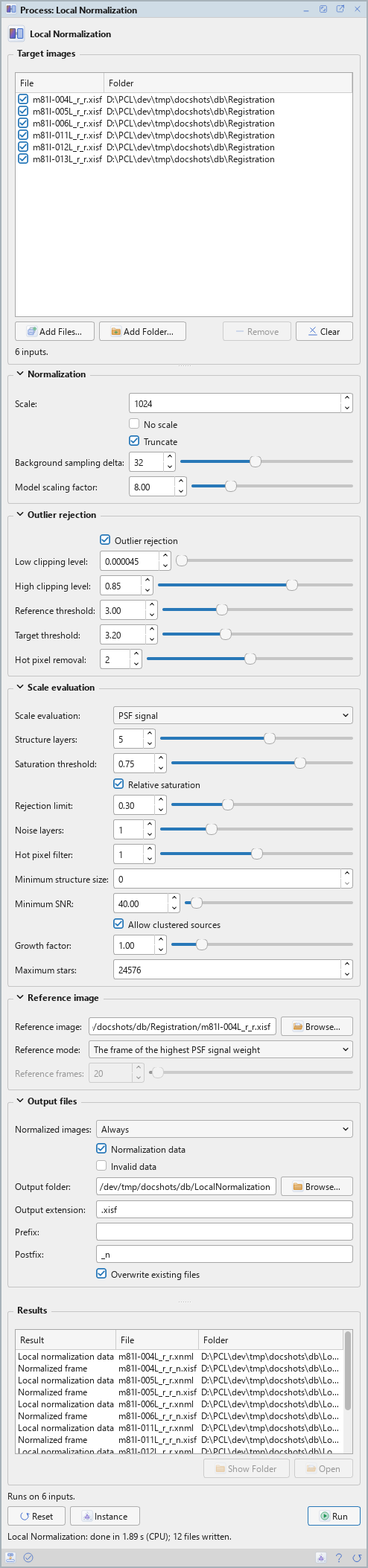
Local Normalization is a process that works on files: its panel lists the frames at the top and has five sections of settings, Normalization, Outlier rejection, Scale evaluation, Reference image and Output files, each of which folds away with the arrow beside its title. Settings that do not apply are grayed out. Under them are the results of the last run, the buttons and the system bar along the bottom. It has no Applies to and no live preview.
3.1Target Images
Target images: The registered frames to normalize, all of the reference's size. Each row shows a file and its folder, with a check box that keeps it in the run or leaves it out. Add Files... and Add Folder... add frames; Remove takes the selected rows away; Clear empties the list. A frame of another size is a warning in the Log: register it onto the reference first.
3.2Normalization
Scale: The size, in pixels, of the structures the normalization follows: larger is smoother and keeps more of each frame's own large structures. From 32 to 8192; 1024 by default. The nearest scale the engine supports is used, and the frames must be at least twice it each way; the Log gives the scale used and the size of the maps.
No scale: Off by default. Normalizes the offsets only: each frame's scale stays 1.
Truncate: On by default. The normalized frames are truncated to the range from 0 to 1.
Background sampling delta: The distance, in pixels, between the samples that fill the rejected pixels, from 8 to 64; 32 by default.
Model scaling factor: The maps' samples per scale length, from 1 to 32; 8 by default.
3.3Outlier Rejection
Outlier rejection: On by default. Leaves out of each frame's model what the reference does not have: stars that differ, satellites, planes.
Low clipping level: Samples at or below this are left out: black borders, dead pixels. 0.000045 by default.
High clipping level: Samples at or above this are left out: saturated stars. 0.85 by default.
Reference threshold: In standard deviations: what of the reference is significant. 3 by default.
Target threshold: In standard deviations: what of a frame is an outlier where the reference is not significant. 3.2 by default.
Hot pixel removal: The radius of the median filter applied to each frame before the rejection, from 0 to 4; 2 by default.
3.4Scale Evaluation
How each frame's scale is measured, from the stars it shares with the reference. These settings are grayed out with No scale.
Scale evaluation: PSF signal, LocalNormalization's default and the only method here.
Structure layers: The star detector's wavelet layers, from 1 to 8; 5 by default.
Saturation threshold: Stars with a peak above this are left out. 0.75 by default.
Relative saturation: On by default. The saturation threshold is relative to the frame's highest value.
Rejection limit: The limit of the robust Chauvenet rejection of the stars' flux ratios. 0.3 by default.
Noise layers: Wavelet layers left out of the star detection as noise, from 0 to 4; 1 by default.
Hot pixel filter: The radius of the median filter that keeps hot pixels from being detected as stars, from 0 to 2; 1 by default.
Minimum structure size: The smallest star detected, in pixels. 0, the default, is automatic.
Minimum SNR: Stars of a lower signal-to-noise ratio are left out. 40 by default.
Allow clustered sources: On by default. Stars close together are measured too.
Growth factor: The PSF fitting regions are grown by this factor, from 0.5 to 4; 1 by default.
Maximum stars: The most stars measured per frame. 24576 by default.
3.5Reference Image
Reference image: The registered image every frame is normalized to: one of the frames, or another file, a master say. Browse... chooses it. Empty, the default: chosen as the reference mode says.
Reference mode: When no reference image is given:
- The frame of the highest PSF signal weight: the default.
- The best frames integrated (as the automatic rules make it): the best frames by PSF signal weight averaged into one,
with their weights, additive normalization with scaling, and a rejection chosen by their number (percentile clipping
up to 6 frames, Winsorized sigma clipping up to 14, ESD beyond). It is written next to the
.xnmlfiles, asLN_Reference_<N>_best.xisf, and named in them. With fewer than three frames to integrate, the best frame is the reference.
Reference frames: With the integrated reference: the most frames it is made of, from 3 to 1000; 20 by default. A third of the frames at most, three at least.
3.6Output Files
Normalized images: Whether the normalized frames are written too: Never, Always, View execution only (none here), the default, or Global execution only. A run of this process is what PixInsight calls a global execution, so Always and Global execution only write them, and the other two do not. A normalized frame is 32-bit floating point, each sample but zero replaced by A z + B, with the postfix below.
Normalization data: On by default. Writes each frame's maps as a .xnml file named
after the frame. With this off and no normalized images, a run has nothing to write and does not start.
Invalid data: Off by default. A frame whose scale cannot be measured gets a .xnml
file tagged invalid, so an integration in PixInsight leaves it out; off, it gets none, and the Log says why.
Output folder: Where the .xnml files and the normalized frames are written. Empty,
the default: next to each frame. Browse... chooses a folder.
Output extension: The file format of the normalized frames: .xisf, the default, or
.fits.
Prefix: Text put before each normalized frame's name. Empty by default.
Postfix: Text put after each normalized frame's name: _n by default.
Overwrite existing files: Off by default: a file of the same name is kept, and the new one gets a
new name, with _1, _2... at the end. On, it is replaced.
3.7Run and Instance
Run: Normalizes the frames checked in the list. The Log gives the reference, the scale and the
size of the maps, each frame's scale, and a summary: how many frames were normalized, invalid or failed. The frames
themselves are only read. The results are listed under the settings: the .xnml files are listed, not
opened; Open, or a double click, opens a normalized frame or an integrated reference, and Show Folder
shows a file's folder.
Instance: Shows the process as the panel has it now, as text: the settings as a DSPX
process (.dsproc) or as a PixInsight process icon (.xpsm) of LocalNormalization, the list of
frames included, chosen under Format. Copy puts the text on the clipboard; Save... saves it as a
file and puts it on the Process Shelf.
Reset: Puts every setting back to its default and empties the list.
The system bar along the bottom of the panel has the same commands as small icons: at the left, drag and Run; at the right, Instance, Help (this page) and Reset. Dropped on the Process Shelf, the first icon keeps the process there as a row of its own, with its frames; applied from the shelf, it runs on them. With , the bar alone has them.
4Where the Normalization Data Go
The .xnml files are PixInsight's: PixInsight's ImageIntegration and DrizzleIntegration read them. In DSC
Studio, Integration does not read them yet, and Drizzle
normalizes locally when every one of its frames names a .xnml file, with maps it computes itself in the run.
A pre-processing session normalizes locally on its own, with nothing written in between.
With PixInsight compatibility mode on, in , the engine does LocalNormalization's work step by step on the full-resolution frames, as PixInsight does. Off, the default, it makes the same model from the samples the maps are made of only, and each frame's scale from the stars measured on it, which is much faster. Multiscale analysis, local scale corrections, global location normalization, the reference's own rejection, noise reduction and LocalNormalization's graphs are not offered.
5Usage Tips and Tricks
A large scale first. The default, 1024 pixels, matches the gradients without touching the nebulae. A smaller scale follows the sky more closely, but starts to match the frames' own large structures too.
A good reference. The reference's background is the one every frame gets. Choose a frame taken high in the sky, away from the moon, or let the process integrate the best frames: their average has less noise than any one of them.
Look before integrating. Set Normalized images to Always for one run, and blink a normalized frame against the reference: their backgrounds should match.
6Related Tools
Registration: the frames must be registered onto one reference first.
Drizzle: drizzles the frames with local normalization when they all have
.xnml data.
Integration: stacks the registered frames into a master.
Background Extraction: takes the gradients out of the master itself.