
Split CFA
A CFA image, or a list of raw frames, cut into its four cell components
Split CFA cuts a color filter array (CFA) image, a raw frame that is not debayered, into four images, one for each position in the 2 x 2 cell of the sensor's Bayer pattern. It works on the image it is applied to, or on a list of frames on disk, and Merge CFA puts the four back together.
1Introduction
A one-shot color sensor records one color at each pixel, in a repeating 2 x 2 cell. In a raw frame the colors are interleaved, so the image looks like a gray mosaic. Split CFA separates the four positions of the cell into four gray images, each half the size of the frame: all the pixels at even columns and rows, all those at even columns and odd rows, and so on. Each component then holds one color alone, and a correction that depends on the color can be made on it apart, for instance a measure of the noise of each color or a stack of one color.
The components keep the channels and sample type of the image, its display stretch, and its metadata, less the astrometric solution. The pixel size is doubled, since a component pixel covers a whole cell. The image does not change. Merge CFA of the four components gives the image back, bit for bit.
Split CFA is a process of PixInsight's of the same name, with its parameters. A PixInsight icon of SplitCFA opens here, and the panel saves one that PixInsight opens. The naming of the components by color is a setting of our own and is not written to it.
2Quick Start
- Open the raw frame and choose .
- Leave the settings as they are. The components will be named after the image, with
_CFAand the component's number. - Click Apply. Four new images arrive, such as
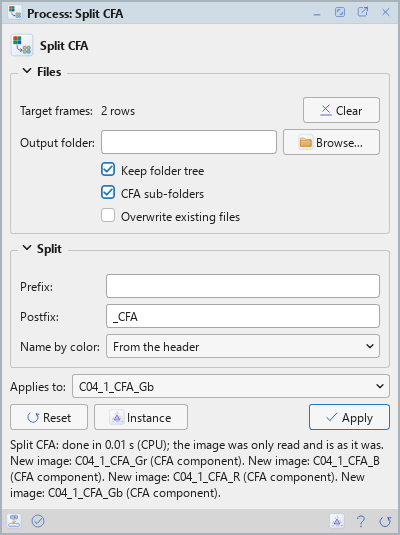
M31_CFA0toM31_CFA3. The lines under the buttons give the time, say that the frame is as it was, and list the new images, one a line.
To split many frames at once, add them to the Target frames table first: the files are then split into XISF files, and the open image is left alone.
3Interface & Parameters
The panel has two sections, Files and Split, then the buttons and the system bar along the bottom.
3.1Files
Target frames: The files to split, as a table of the path, whether the frame is enabled and its
folder. With none in the list, the image the process is applied to is split. Each enabled frame becomes four XISF files,
named <prefix><name><postfix><k>.xisf. The files are edited in the table. The first image of a frame is read, and the files keep
its sample type and metadata. A frame with an odd side is skipped with a warning in the Log.
Output folder: Where the files go. Empty, the default: the folder of each frame. The folder must exist.
Keep folder tree: Puts each file in its own sub-folder of the output folder, as the frame was found. On by default. It applies when an output folder is given.
CFA sub-folders: Puts each component in a sub-folder of its own: CFA0, CFA1, CFA2 and CFA3. On by default.
Overwrite existing files: Off by default: a file that exists is not replaced, and the new one gets _1, _2 and so on added to its name.
3.2Split
Prefix: Added in front of each file's name. Empty by default.
Postfix: Added to the image's or file's name, then the component's number. _CFA by
default: M31_CFA0 to M31_CFA3.
Name by color: How the components are named. It is a setting of DSPX and is ignored with the PixInsight compatibility mode on, in .
- From the header: by color, if the header says the Bayer pattern. The default.
- Numbers: 0 to 3.
- RGGB, BGGR, GRBG, GBRG: by color, with the pattern given.
By color, the components are named _R, _Gr (the green of the red rows), _Gb (the
green of the blue rows) and _B instead of 0 to 3, and the CFA keywords are left off them. The pattern of the
header is its BAYERPAT keyword, shifted by an odd XBAYROFF or YBAYROFF, or the XISF CFA property. Merge CFA's default name
removes either form of the postfix.
3.3Apply and Instance
Apply: Splits the image the process is applied to into four new images, or the frames of the table into files. The image does not change. The image must have an even width and height.
Instance: Shows the process as the panel has it now, as text: a DSPX process
(.dsproc) or a PixInsight process icon (.xpsm), chosen under Format. Copy puts
the text on the clipboard; Save... saves it as a file and puts it on the Process Shelf.
Reset: Puts every setting back to its default.
The system bar along the bottom has the same commands as small icons: at the left, drag to apply and Apply; at the right, Instance, Help (this page) and Reset.
4The Order of the Components
Component k holds the pixel at column 2x plus dx and row 2y plus dy of the image as its pixel (x, y), with dx equal to k divided by 2, dropping the remainder, and dy equal to the remainder of k divided by 2. So 0 is the even column of the even row, 1 the even column of the odd row, 2 the odd column of the even row and 3 the odd column of the odd row. For an RGGB sensor that is the red, the green of the blue rows, the green of the red rows and the blue.
5Usage Tips and Tricks
Many frames, one run. Put the frames of a night in the table and the components of every frame are written in one run, in sub-folders by component, ready for a stack of each color.
Names by color. When the camera's pattern is known, naming by color avoids having to remember which number is which green.
Back to a mosaic. Merge CFA with the Mark pattern setting writes the pattern to the merged image, so the debayer finds it.
6Related Tools
Merge CFA: puts the four components back into one image.
Debayer: turns a raw mosaic into a color image.
Channel Extraction: takes the channels of a color image apart, which is not the same as separating the positions of its mosaic.
Extract Ha and OIII (Dual Band): a script that cuts a raw frame taken through a dual-band filter (L-Ultimate, L-eXtreme and the like) into its Bayer positions as this process does, and makes the Ha image from the red position and the OIII image from the green and blue ones.