
Subframe Studio
A set of frames measured, looked at and sorted into the ones to keep and the ones to leave out
Subframe Studio is a window for a set of frames: it measures each one, shows them one after another or side by side, and lets us keep the good ones and leave out the bad ones, by hand or by a rule. It is where we judge the frames of a night before they are stacked, and it hands its choices back to a pre-processing session in one step that can be undone.
1Introduction
Before frames are stacked, someone has to say which are good. A frame with trailed stars, a passing cloud or a satellite trail costs more in the stack than it adds. Subframe Studio puts the numbers and the pictures side by side. Each frame is measured as the pre-processing session measures it: the full width at half maximum of the stars, their eccentricity, the number of stars, the noise, the median, the PSF signal weight and the PSF signal to noise ratio. The measures are shared with the session, so a frame measured in one is not measured again in the other.
A frame can be kept or left out by hand, or by an approval expression, a rule written with the measures as variables, as in SubframeSelector. The weights that each kept frame will have in the integration are set by a weighting expression. Every frame that is left out says why: the rule that left it out, or us.
The window opens from , where it appears with the other pre-processing processes, or from the Frame Selection page of a pre-processing session, which hands it the frames of its analysis, its choices by hand and its rules. Used alone it works on any set of FITS, XISF or camera raw files.
2Quick Start
- Choose , and click Add Frames... to choose the files. They are measured at once.
- Step through the frames with the arrow keys, or press Blink to see them in turn. Zoom with the wheel at the cursor and drag to move.
- Press A to keep a frame and R to leave it out, or type an Approval expression and let the rule decide.
- Under Export..., write the selection as a CSV table, or the kept files as a list. In a session, click Use in Session to give the choices back to it.
3Interface & Parameters
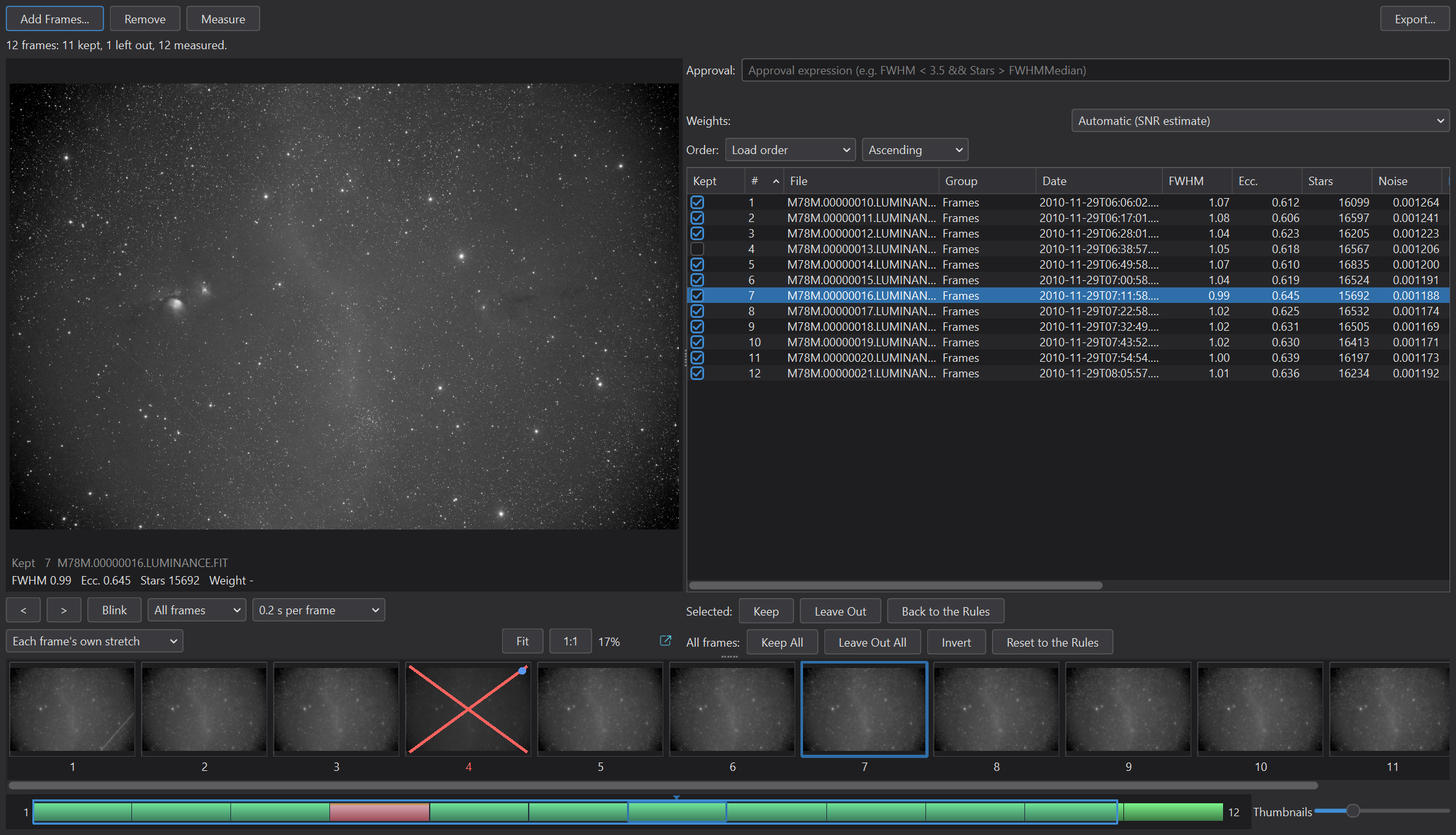
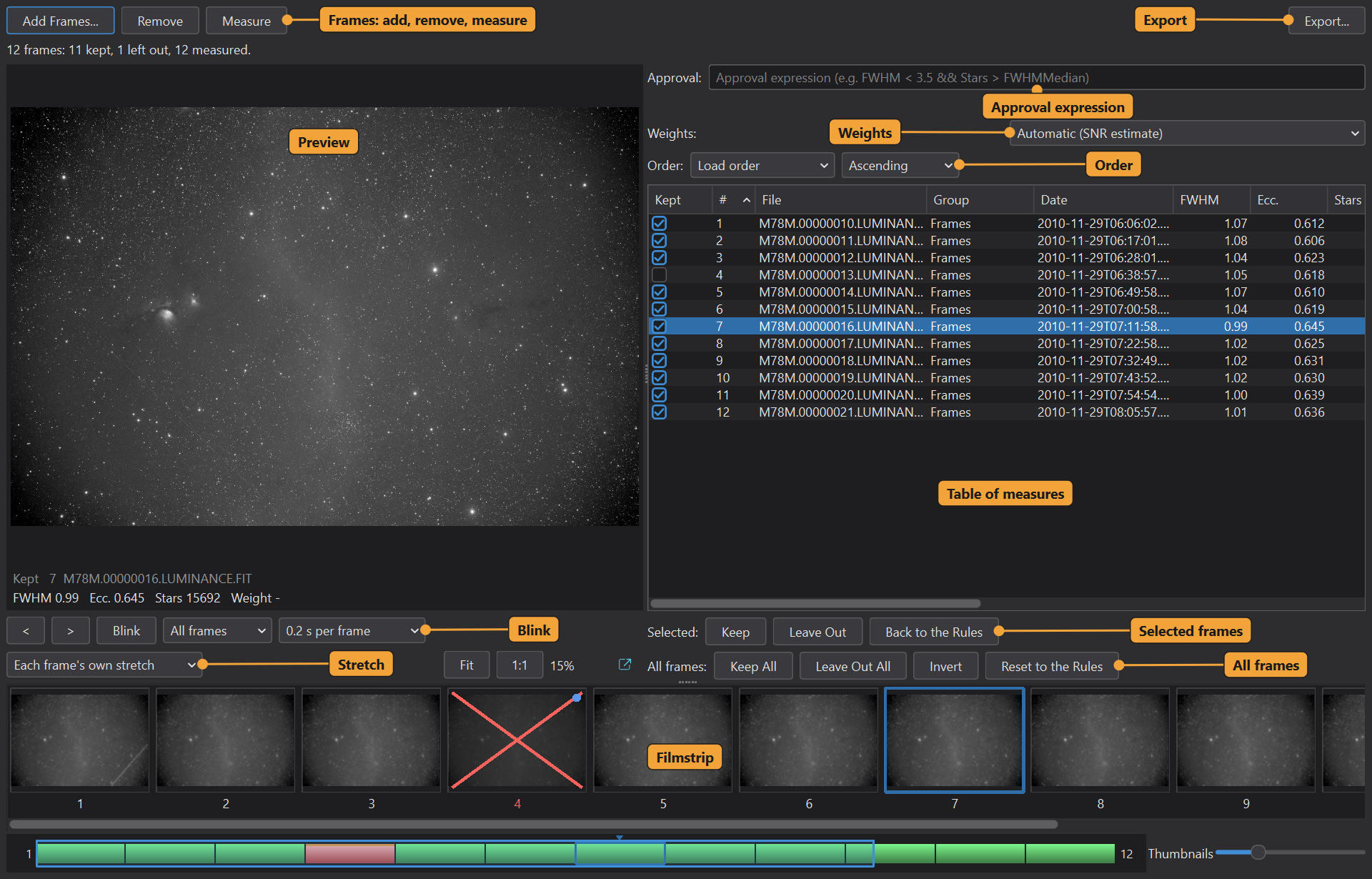
The window has the buttons along the top, the table of frames with its measures, the preview of the frame in front with the blink and zoom controls, the filmstrip with its overview, and the selection controls. A line under the table counts the frames: how many are kept, how many are left out and how many are measured.
3.1The Frames
Add Frames...: Adds FITS, XISF or camera raw files to the set. They are measured at once.
Remove: Takes the selected frames out of the set. The files stay where they are.
Measure: Measures the frames not measured yet. Stop ends a run. A frame that cannot be measured says so.
Order: The order of the table, the filmstrip, the blink and the arrows: Load order, Acquisition time, Filename, Weight, or any of the measures, Ascending or Descending. A click on a column header chooses it too. Frames without a value come last. The choice is remembered.
The table has the columns Kept, File, Group, Date, the measures (FWHM, Ecc., Stars, Noise, Median, PSF signal, PSF SNR, SNR, Residual), Weight and Why. The box in the Kept column decides by hand. The measures are:
- FWHM: the stars' full width at half maximum, in pixels, the median of the PSF fits.
- Ecc.: the stars' eccentricity, 0 for round and toward 1 for elongated.
- Stars: the number of stars detected.
- Noise: the noise estimate, in the file's units, from 0 to 1.
- Median: the frame's median, from 0 to 1.
- PSF signal: the PSF signal weight, the default weight of the integration.
- PSF SNR: the PSF signal to noise ratio.
- SNR: the SNR estimate, SubframeSelector's SNR weight.
- Residual: the stars' fit residual.
3.2The Preview and the Blink
The preview shows the frame in front, stretched. The frames are reduced for it to about 1000 pixels and kept linear, and the stretch is applied when a frame is shown. The wheel zooms at the cursor, a drag moves the image, Fit shows the whole frame (a double click does it too) and 1:1 shows one screen pixel for each pixel of the frame. The zoom and the place stay while the frames change, the blink included. The arrow keys, Left and Right, go to the previous and the next frame.
Blink: Steps through the frames in turn. A list chooses which: All frames, Kept or Left out. A second list chooses how long each frame stays, from seconds per frame to Full steam ahead, as fast as the screen can follow.
Each frame's own stretch: Stretches each frame by its own statistics. Off, One stretch for all frames shows them all through the same stretch, so differences of brightness between them are visible. The choice is a button that switches between the two.
3.3The Filmstrip
Every frame appears as a thumbnail, with the current frame framed and the frames left out crossed out. The wheel scrolls the strip, and Ctrl and the wheel zoom the thumbnails; a slider sets their size too. Under the strip an overview shows all of it at once, kept frames, frames left out, the current frame and the part in view, and can be dragged to scroll.
3.4The Selection
Approval: An approval expression, written with the measures as variables, as in SubframeSelector. The frames it does not approve are left out, and the Why column says so.
Weights: A weighting expression: how much each kept frame counts in an integration.
By hand, with the frames selected in the table:
Keep: Keeps the selected frames, whatever the rules say (A).
Leave Out: Leaves the selected frames out (R).
Back to the Rules: Takes back our choice for the selected frames: the approval expression decides.
For all frames:
Keep All: Keeps every frame, whatever the rules say.
Leave Out All: Leaves every frame out. A note says so when all frames are left out, with the buttons that take it back.
Invert: Keeps the frames that are left out, and leaves out the ones that are kept.
Reset to the Rules: Takes back every choice of ours: the approval expression decides.
3.5Export and the Session
Export...: Writes the selection as a CSV table, or the kept files as a list in a text file.
Use in Session: When the window was opened from a pre-processing session: gives the session our choices by hand, the approval expression and the weights, in one change that the session can undo. The session is the authority: the window never writes to it by itself.
4Usage Tips and Tricks
Blink with one stretch. To find a frame with a cloud or a gradient, blink the kept frames with One stretch for all frames. A frame that is brighter or darker than the others stands out.
Sort by FWHM. Order the table by FWHM, Descending, and the worst frames of the night are at the top. Look at them in the preview before deciding.
Rules for the bulk, hands for the rest. Let an approval expression leave out the clearly bad frames, then use Keep and Leave Out for the borderline ones. Reset to the Rules goes back to the rule when we change our mind.
Why tells us what happened. Each frame that is left out says whether the rule did it or we did.
5Related Tools
Integration: stacks the kept frames, with the weights the window sets.
Registration: aligns the frames before they are stacked.
Calibration: calibrates the frames, before they are measured here.
Local Normalization: another step of a night's work on the frames.