
Superbias
A low-noise bias model made from a master bias
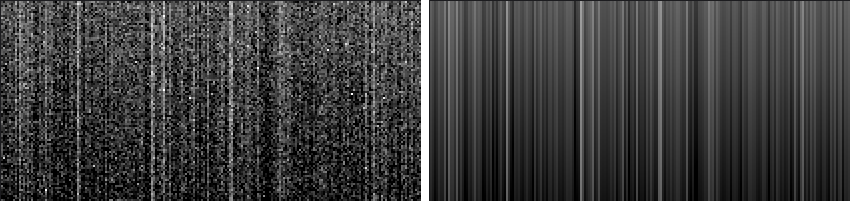
Superbias makes a low-noise model of the bias from a master bias: its large-scale structure, plus the trimmed mean of each column, or of each row, or of both. The model has the pattern of the sensor without the random noise of the master bias, so calibrating with it does not add that noise to every frame. The master bias is not changed; the model arrives as a new image.
1Introduction
The bias of a sensor has two parts that matter: a smooth structure across the whole frame, and a pattern of columns or rows that is the same in every frame. The master bias also holds random noise that is left after averaging a limited number of bias frames, and subtracting it from every light frame writes that noise into every one. A superbias keeps the two real parts and leaves the noise out.
The large-scale structure is taken from the master bias with a multiscale transform of a number of layers: the multiscale median transform by default, or the starlet transform. The columns, and the rows, are then modeled as the trimmed mean of each line of the master bias, with the large-scale structure taken out first, so that the model is the sum of the two. A trimmed mean leaves out the lowest and highest values of each line, so the odd hot pixel does not mark its column.
Superbias follows PixInsight's Superbias by its parameters, and a PixInsight icon of that process opens here. Its result is the model as a 32-bit floating point image cut to the range 0 to 1. Calibrate with the model as the master bias in Calibration.
2Quick Start
- Open the master bias and choose .
- Leave the settings as they are for a sensor with a vertical pattern: Columns is on. Turn Rows on too if the sensor has a horizontal pattern.
- Click Apply. The model arrives in a new tab, named after the master bias with
_superbiasat the end. - Save it, and use it as the master bias of the calibration.
3Interface & Parameters
The panel has one section, Superbias, then the image the process applies to, the buttons and the system bar along the bottom.
3.1Superbias
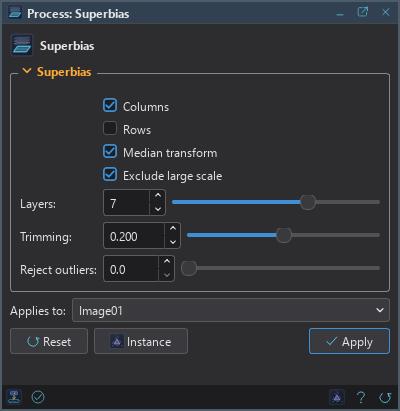
Columns: Models the vertical pattern: the trimmed mean of each column. On by default.
Rows: Models the horizontal pattern: the trimmed mean of each row. Off by default. With Columns on too, two images are made.
Median transform: Takes the large-scale structure from the multiscale median transform; off, from the starlet transform. On by default.
Exclude large scale: Takes the large-scale structure out of the master bias before the columns and rows are measured. On by default.
Layers: The number of layers of the multiscale transform, from 1 to 10, 7 by default. The larger, the larger the structure it keeps.
Trimming: The fraction of the lowest and the highest values of each column or row that is left out of its mean, from 0 to 0.4, 0.2 by default.
Reject outliers: Samples farther than this many sigma from the bias's large-scale structure, such as hot pixels and cosmic rays, are left out of the column and row means. From 0 to 10, 0 by default, which is off. It is a setting of DSPX and is ignored with the PixInsight compatibility mode on, in .
3.2Apply and Instance
Applies to: The master bias, chosen in a list of the open images. It shows the image in front, and follows it as we bring other images to the front. Picking another image in the list makes the panel work on that one without bringing it to the front, and Follow Active, the small button that appears beside the list, makes the panel follow the image in front again.
Apply: Makes the superbias of the image named in Applies to. The image is only read. With Columns
only, or Rows only, one image arrives, named with _superbias at the end; with both, two arrive, with
_superbias_v for the columns and _superbias_h for the rows. Each takes the master bias's
metadata.
Instance: Shows the process as the panel has it now, as text: a DSPX process
(.dsproc) or a PixInsight process icon (.xpsm), chosen under Format. Copy puts
the text on the clipboard; Save... saves it as a file and puts it on the Process Shelf.
Reset: Puts every setting back to its default.
The system bar along the bottom has the same commands as small icons: at the left, drag to apply and Apply; at the right, Instance, Help (this page) and Reset.
4Usage Tips and Tricks
A good master bias first. The model is only as good as the pattern in the master bias. More bias frames give a cleaner pattern to model.
Columns or rows, by looking. Stretch the master bias hard. Vertical stripes call for Columns, horizontal ones for Rows; a sensor with neither needs no superbias.
Hot pixels in the master bias. Trimming leaves out the extremes of each line. If a column is still marked by a defect, Reject outliers leaves it out of the mean altogether.
5Related Tools
Calibration: uses the superbias as the master bias of the calibration.
Integration: makes the master bias from the bias frames.
Defect Map: repairs defective pixels of an image.
Canon Banding Reduction: removes row and column banding from light frames.