
Astrometry
Where the image points, and what the sky can tell us about it
Astrometry is knowing where every pixel of an image lies on the sky. DSPX finds that out with Plate Solve, from the stars alone if need be, and writes it into the image as its astrometric solution. The processes that need the sky read the solution: a survey cut to our field, the glow of the bright stars, the true colors of the stars, a finding chart, a mosaic, and a color and flux calibration from the stars' spectra. This chapter explains how solving works, how blind solving finds an image with no hint at all, which catalog files the program uses and how to build the index files, which processes depend on a solution, and what the program connects to on the network.
12.1Plate Solving
finds the sky position of the image in front. It compares the stars it detects with the stars of the Gaia DR3 catalog, matches them, and fits the position, scale and rotation of the image and a distortion model that is accurate from the center to the corners. Plate Solve's page describes every setting of its panel; this section explains how a solve goes and what it leaves in the image.
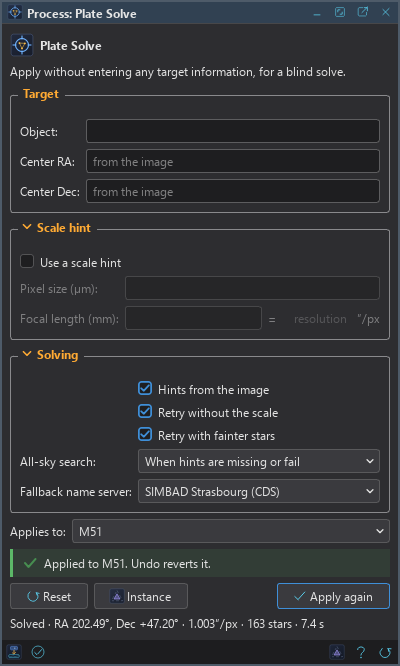
12.1.1A First Solve
- Open the image, preferably a stacked master, and choose .
- Give a hint if we have one: an object name, the center, or the pixel size and the focal length. With Hints from the image on, the panel reads what the image's header already says.
- Click Apply.
- Read the line under the panel: "Solved", the center, the scale in arcseconds per pixel, the stars matched and the time. Its tooltip holds the full solution. The Log has the details of the run.
A solve does not change the pixels. It writes the solution into the image's metadata as one history step, which we undo as any other (Undo, Redo and History).
12.1.2Where the Hints Come From
Plate Solve takes its hints from the panel first, and then, with Hints from the image on, from the image's metadata:
- an existing solution;
- the coordinates RA and DEC (in degrees or in hours, minutes and seconds), or OBJCTRA and OBJCTDEC;
- the observation center and object properties of XISF files;
- the OBJECT name, looked up in a built-in catalog of well over fourteen thousand names (the Messier, NGC and IC objects, the names of the bright stars and more);
- the scale, from FOCALLEN and XPIXSZ, or from an existing solution.
The center is only a hint when both Center RA and Center Dec are given: one alone, or a value out of range, is said on a line under the fields and gives no center. An empty pair means no hint. The scale hint is either the pixel size and the focal length or the resolution they give, which we may type directly.
The catalog stars are moved to the date of the image by their proper motions. The date is DATE-AVG, else the middle of the start and the end of the observation, else the start. An image without a date is solved against the catalog's own positions. The Log says which date was used.
12.1.3When a Solve Does Not Succeed
Plate Solve tries again in the ways its settings allow: with fainter stars, without the scale hint (a reducer or binning that the header does not show makes a scale hint wrong), and, with the all-sky search on, from the stars alone (Blind Solving). A solve that still fails ends with one line that says why, and the image is as it was. The usual reasons are an image with too few stars, a hint that is far off, a field that needs an index file we have not built, or no catalog files and no network.
12.1.4What the Solution Is
The solution is written as PixInsight writes it, so a solved image opens there and keeps its solution when it comes back: the standard astrometric solution block with its surface spline distortion model, the catalog (Gaia DR3), the center keywords (RA, DEC, OBJCTRA, OBJCTDEC), FOCALLEN and XPIXSZ, and, for FITS files, the WCS keywords of the linear part (CTYPE, CRPIX, CRVAL, CD, CDELT, CROTA). A FITS file keeps only the linear part: FITS has no place for the distortion model. The solution survives the formats that can hold it (Metadata).
Programs that read the solution are the processes of this chapter's fourth section and the Siril scripts, which convert between pixels and sky coordinates through it (Scripts and Python).
12.1.5Plate Solving First, When a Process Asks
Survey Overlay, Photometric Glow Subtraction, Catalog Star Color, Finding Chart and the calibration processes work through the image's solution. Applied to an image without one, such a process asks "Plate solve it first?". Yes runs Plate Solve with the settings of its panel, or its defaults, and then runs the process when the solve succeeds. No stops, and the process says what is missing. The Log records that Plate Solve ran first. A guided run offers the same (Guided Processing).
12.2Blind Solving
Blind solving finds an image that has no hint at all: no coordinates, no focal length, no pixel size, no object name. DSPX does it from local files only. It looks at patterns of four stars, which look the same at any position, rotation and scale, and finds the same patterns in index files made from the catalog; the candidate it finds is then checked against every star it can see before it is believed. Plate Solve calls this the all-sky search.
12.2.1The All-Sky Search Setting
Plate Solve's All-sky search setting has three values:
- Off: only the hints are used. An image without a center is not solved, and the message adds that the all-sky search may be turned on.
- When hints are missing or fail: the default. The hints are tried first, with their own retries. Without a center, or when the hinted solve fails, the all-sky search finds the image, and its center and scale become the hints.
- Always: the search first, whatever the hints, and the hinted solve only if it fails.
A partial hint narrows the search: a scale from the header is trusted to within a factor of two (binning, a reducer or a Barlow may be in the way), a focal length alone limits the pixel size to a few micrometers, and a pixel size alone limits the focal length. Retry without the scale keeps its meaning: a scale hint may be wrong, so a search narrowed by one that fails is tried once more at any scale.
The search stops after a time limit, 60 seconds in all, when it does not find the image. On the way the Log says "All-sky search: searching 16 index files", and, when it succeeds, the band, the evidence for the match and the number of index stars matched; the final solution is then refined by Plate Solve's own engine exactly as a hinted solve would be.
12.2.2Index Files
The search needs index files of the catalog, with the extension .dscquad, one per band. A band holds the patterns whose
widest pair of stars lies in a range of angles, so bands cover different field sizes. The files are built into three sets:
| Set | Fields it finds | Needs the catalog files to | Size on disk |
|---|---|---|---|
| Wide | 1.5 degrees and up | G 15 | about 85 MB |
| Standard | 0.2 to 4 degrees | G 17.65 | about 1.3 GB |
| Fine | 0.1 to 0.5 degrees | G 17.65 | 573 MB around catalogued objects; 2.8 GB for the whole sky |
Wide finds frames made with short focal lengths, Standard the ordinary frames of a telescope, and Fine the narrow fields of a long focal length. Fine comes in two forms. Around catalogued objects (0.5 degrees), the default, is built only around the Messier, NGC, IC and named-star positions, which is where small fields are pointed; it solves a small frame pointed within about half a degree of one of them. Whole sky solves any pointing and is five times larger. Index files do not make a hinted solve any better: they only let the program find an image that has no hint.
12.2.3Building the Index Files
DSPX builds the index files itself, from the Gaia catalog files, on our computer; they are never downloaded. They need the catalog files (Catalog Files): a set the files cannot build is listed with the reason, "needs the catalog files to G 17.65", and with no catalog files of Gaia DR3 the button is disabled.
- Open . The group All-sky search lists each set with its size.
- Click Build Index Files.... The Build Index Files dialog opens.
- Check the sets to build. Each line shows the size on disk and an estimate of the time, which follows the number of processors of the computer. The Fine line has the choice between around catalogued objects and the whole sky.
- Choose the destination (below). The dialog shows the folder and the space free on its disk.
- Click Build.
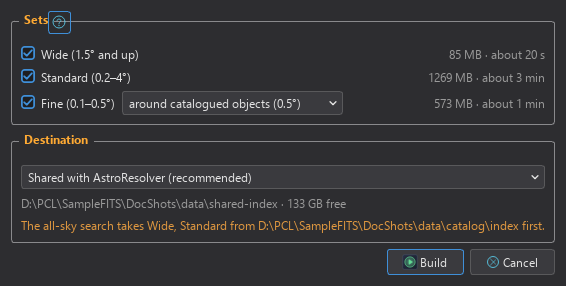
Destination: Where the files go:
- Shared with AstroResolver (recommended): a folder that DSPX and Deep Sky Colors' AstroResolver module for PixInsight both read, so one build serves both programs. It is the default.
- DSPX's own folder: a folder of the program's own.
- A catalog folder's index folder: the
indexfolder inside a catalog folder. It is listed last and written only when we choose it, because a folder of catalog files may already hold a build we want to keep.
The dialog also warns when an earlier folder of the search order holds the same sets ("The all-sky search takes Wide, Standard from ... first"): files built here would not be used while that folder has them. It warns when the disk has too little space, and when another program is writing into the folder (Build is disabled until it finishes). A set already in the destination shows as built; building it again asks "Build it again and replace it?", and No replaces nothing.
The build runs in the background, one at a time, and the program stays responsive. The dialog shows a progress bar for each set, where it is ("Reading the catalog files", "Band 5 of 6"), and Cancel. Closing the dialog or Preferences does not stop it: Preferences > Astrometry then shows "Building Standard: band 5 of 6" beside the button, which opens the dialog again. Quitting the program during a build asks whether to stop it. A canceled or failed build leaves nothing of the set that was being built; a set being replaced keeps its files; sets finished before stay. The Log has a line when the build starts, one for each set and one at the end. Plate Solve uses the new files from its next solve, with no restart.
12.2.4Where the Search Looks
The all-sky search looks in the index folder of each catalog folder, in the order of the catalog service, and then in the folder shared with
AstroResolver, which it only reads. A band is taken from the first folder that has it. A file that is not complete, that cannot be
read, or that sits in a folder another program is writing into, is not used. Under All-sky search, Preferences
shows a line for each set ("Wide (1.5° and up) · 85 MB", or "not found") and, only when they apply, "Also found: AstroResolver's set (not
needed)", the files not used and why, and the folders. The (?) next to the group lists the folders in order, the shared one marked
"read only".
12.2.5Camera Lenses and Wide Fields
An image taken with a camera lens, from about 5 to 60 degrees across, has a projection and distortion that a single tangent plane holds poorly. When the search does not find the whole frame, it looks again at the stars of the central half, and then of the central 35 percent, where the projection is near enough to a plane. The part's center is the frame's center. The solution is then refined from the search's own transform: Plate Solve fits the matched stars with a map that includes a cubic term for the lens's distortion, grows it until it covers the frame, and checks that the matched stars reach as far from the center as the detected ones do. A projection that a plane cannot hold is refused rather than solved wrong. The Log says "Found in the frame's central part" when this path is used.
12.2.6Solving a Whole Night
The pre-processing session solves the images it needs with the same search. It solves the registration reference with the all-sky search when its header has no center (narrowed by FOCALLEN and XPIXSZ when they are there), and gives the center and scale to the masters it solves next. The session's report names the stage that solved each file: its header's hints, the registration reference's hints, another file's hints, or the all-sky search (Pre-processing).
12.3Catalog Files
Plate Solve compares stars with a catalog. DSPX can read two sources: the program's own catalog files, built from ESA's Gaia DR3, and ESA's Gaia archive on the network. chooses between them and shows what was found.
12.3.1The Files
DSPX's catalog files have the extension .dscstar. Each holds the stars of Gaia DR3 in a range of magnitudes, stored for fast
lookups in a tile for each patch of the sky, and every star keeps its position, proper motion, G magnitude, BP-RP color and a flag byte. The
files only add stars to each other: their magnitude ranges do not overlap. Three base files cover the stars from the brightest
to G 17.65, about 243 million stars in 2.2 GB. The program reads the files in the folder chosen in Preferences first, and then in the
program's own catalog folder. The star lists the program gives to any process are always moved to the epoch asked for.
The base files are downloaded from Deep Sky Colors' server with Get Catalog Files... in Preferences > Astrometry (below), into the catalog folder. They are not part of the program's folder. Without them nothing stops working: Plate Solve and the other processes that need stars use the online catalog, which needs the network, and with neither the process says where it looked and what to do.
12.3.2Preferences > Astrometry
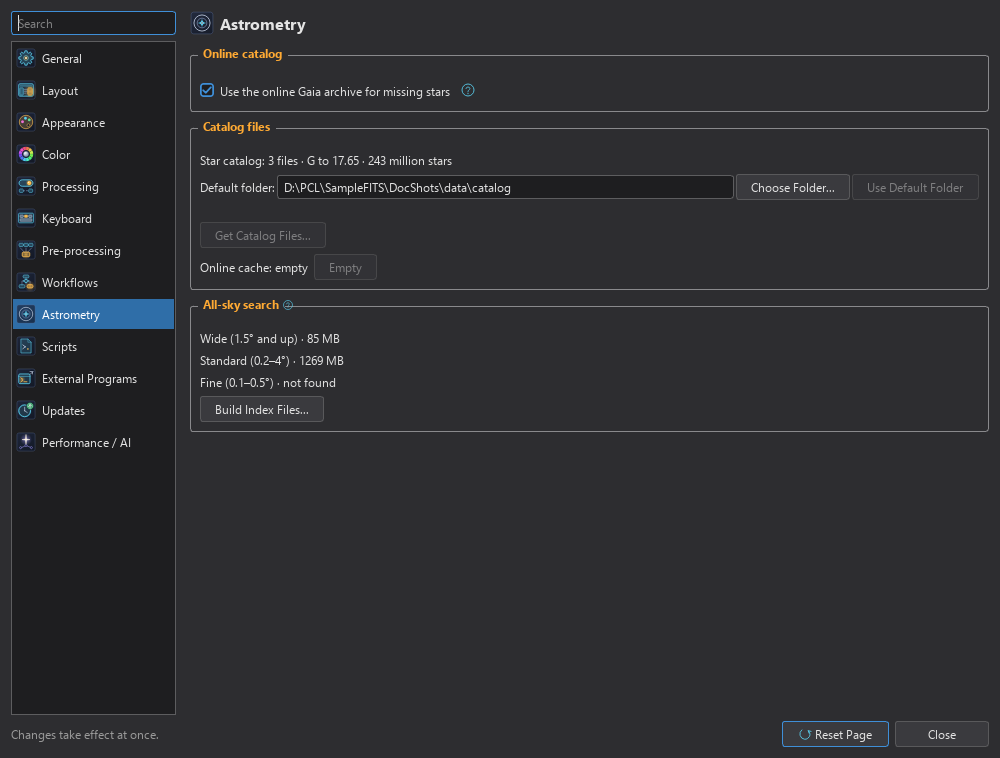
Use the online Gaia archive for missing stars: On by default. When the catalog files do not hold every star that a field needs, the program asks ESA's archive for the missing stars (see Network Connections). Off, only the catalog files and what the cache holds are used. The (?) next to it says what is sent and where.
Star catalog: The line at the top of Catalog files says whether the catalog is here. "Star catalog: missing" means no catalog file was found in the folder below it, and plate solving uses the online catalog. With the files here it gives their size, for example "Star catalog: 3 files · G to 17.65 · 243 million stars": how many files, the faintest magnitude they reach and their stars (a number the files do not give is left out). Its tooltip lists each file with its range of magnitudes and its number of stars. After a download that stopped before its end, the line ends with "download not finished".
Catalog files: The folder in use, always shown as a path: Default folder: and the program's own catalog folder until we choose another, Folder: and our choice after that. Choose Folder... picks a folder and Use Default Folder goes back to the program's own; it is on only while a folder is chosen. A chosen folder that is gone is shown with "This folder does not exist." and the line above says "Star catalog: missing in this folder". The status line and the folder always describe the same folder, and both change at once after a download, a new folder or Use Default Folder.
Get Catalog Files...: Under the folder, after a row of space. It is disabled when the catalog is already here; it is enabled again when a download did not finish, to continue it. It opens the window Get Catalog Files, which downloads the base files into the catalog folder: the folder chosen in Catalog files, or the program's own catalog folder when none is chosen. Opening the window asks the server for the list of files, signed by Deep Sky Colors, and nothing else is sent; the status line says "Asking for the list of files..." meanwhile. The window then shows:
- a table with a row for each file, its Size and its State, Present (a file of that name and size is in the folder) or To download;
- the folder, the size still to download and the free space of its drive. When the drive has less room than the files need, the window says so and Download stays off;
- the credit that goes with the files, when the list has one (Catalogs and Surveys);
- a status line, "All the catalog files are here." when nothing is missing.
Nothing is downloaded until we click Download. Then the files not in the folder are fetched one after the other over https, a bar shows the progress and the status line the file being fetched, and the button reads Cancel while it goes. The Log records the start and the end. A download that stops, because we canceled, the connection broke or the computer was switched off, continues where it stopped the next time, from a partial file in the folder. A file is kept only when its size and SHA-256 are those of the signed list; one that does not match is deleted, fetched once more from the start, and if it still does not match the download stops and says so. A file already in the folder with the right size is left alone. When the last file is in, the Preferences page shows the files and the plate solving uses them from its next run. We can close the window while it is idle; closing it during a download cancels it.
Offline, or when the server does not answer, the window says "No answer from the server." and Download stays off; the same line goes to the Log. It says so too when the server answers with something else, or when the list or its signature is not accepted, and in each case nothing is changed on the computer. The online catalog works as before.
Download Catalog Files Again...: Right-click the Star catalog line to download every file again,
for example when a file may be damaged. It is on when the catalog is here. It asks once: "Download the catalog again? The files here are
replaced when the new ones are complete." With Yes, the window Download Catalog Files Again opens and the
download starts as soon as the list of files arrives, with the same checks. The new files go to a folder .download inside the
catalog folder. The old files stay in use until every new file is complete and verified; then each new file replaces its old one. A
download that stops leaves the old files as they were, and continues the next time from what was already fetched. The drive needs room
for a second copy of the files while it runs.
Online cache: Says how many fields the cache holds ("Online cache: 12 fields") or "empty", with Empty to delete them from this computer. Every answer from the archive is kept, so a field is asked for only once, and the cache answers without the network whether the online catalog is on or not.
All-sky search: The index sets found, and Build Index Files... (see Blind Solving).
12.3.3How the Program Chooses the Stars
For each cone it needs, the catalog service uses the files when they hold every star that was asked for, from the brightest down without a gap. Otherwise it asks the online catalog, whose answer replaces the files' answer for that cone, so no star is counted twice. With neither available, the program uses the files' stars up to their limit, or says where it looked and what to do.
12.3.4The Bright Stars Gaia Lacks
Gaia DR3 loses most of the stars brighter than G 3 to 4: in Orion's belt, Alnilam and Alnitak are missing. The program adds them to every answer from a table of the Hipparcos stars brighter than V 5 that is compiled into the program, 1,620 stars. Their positions are moved to the epoch by their proper motions. A Hipparcos star is left out when the answer has a Gaia star within 8 arcseconds and one magnitude of it. So every process that queries the catalog, Plate Solve, the astrometric processes and the scripts, gets these stars; nothing is downloaded for them. The Log says how many were added.
12.3.5Spectra
Spectrophotometric Color Calibration and Spectrophotometric Flux Calibration compare stars with their Gaia spectra. The spectra are
kept in files with the extension .dscspec, which the program reads from the same folders as the catalog files, so there is nothing
to set. Without them Spectrophotometric Color Calibration still runs, using for each catalog star a black body at the temperature its
BP-RP color gives; the panel and the Log say so. Spectrophotometric Flux Calibration needs the spectra and says so when they
are missing.
The spectra file is downloaded with the base files, from Get Catalog Files... under : its window lists it next to the catalog files, with its size, and downloads it into the catalog folder when we click Download. It is large (about 3 GB), so it is a separate row we can leave for later; the two Spectrophotometric calibrations use it as soon as it is there.
12.3.6Tools on the Command Line
The command-line tool dsw_catalog next to the program inspects catalog files, queries them, solves an image, and builds
and checks catalog and index files (The dsw Tools). It does the same work as the
program's pages and is for those who want to script it.
12.4Processes That Use the Solution
The processes below work through the image's astrometric solution. Each one's page describes its settings and results.
| Process | What it does with the sky |
|---|---|
| Survey Overlay | Fetches a professional sky survey for the field of our image from CDS's hips2fits service, as a new image pixel-matched to ours or as a wide context image. It has a list of 34 surveys, and any HiPS survey may be typed. |
| Photometric Glow Subtraction | Removes the wide glow that bright stars spread over the image. It takes each star's position and brightness from the catalog, including stars just outside the frame. |
| Catalog Star Color | Gives every star the color it would have in a broadband exposure, from the catalog's BP-RP index through a simulated RGB exposure, and leaves the rest of the image as it was. |
| Finding Chart | Draws a chart of the sky around the image, as a new image, with catalog stars, the grid, the field outline and the names of bright stars and objects. |
| Mosaic | Puts the panes of a mosaic together from their solutions alone. It works on files and solves the panes that are not solved. |
| Spectrophotometric Color Calibration | Balances the colors of the image from the spectra of its stars, through our filters and sensor. |
| Spectrophotometric Flux Calibration | Writes the scale that turns pixel values into physical flux into the image's properties; the pixels do not change. |
12.4.1What They Share
- The solution. Each reads the solution Plate Solve writes (or the one an image already carries). An image without one is offered Plate Solve first.
- The epoch. The image's date is its epoch, as for Plate Solve: DATE-AVG, else the middle of the start and the end, else the start, and January 2000 when the image says nothing. The catalog stars are moved to it by their proper motions. The Log says which date was used.
- The catalog. One cone per run, from the catalog files when they hold the stars, otherwise the online cache or the archive. The Log shows the cone.
- PixInsight's parameters. The settings are those of the PixInsight modules of the same names, so a process icon from there opens here (PixInsight Process Icons).
- New images. Survey Overlay, Finding Chart, the star map of Catalog Star Color and the glow of Photometric Glow Subtraction come out as new images, named after the target (New Images and Names).
12.4.2Differences From PixInsight
These processes follow their PixInsight modules closely; where they differ, it is because DSPX has no counterpart of the part they use.
- The target is the whole image: there are no previews to restrict Survey Overlay to.
- Survey Overlay's new image takes the target's solution only, not its other keywords.
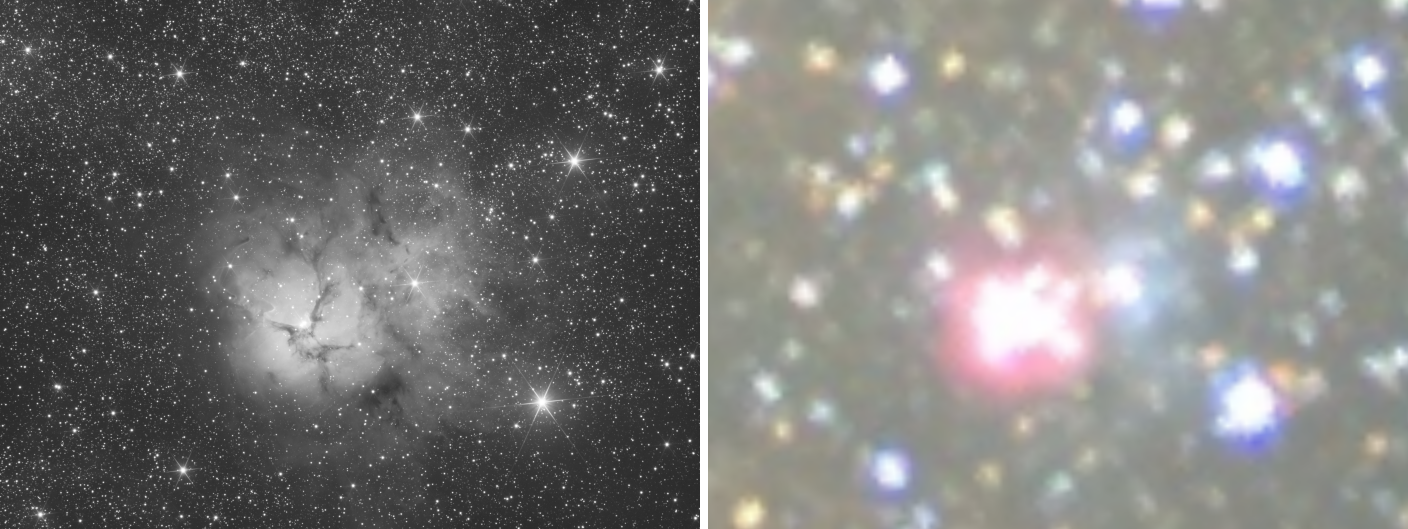
- Catalog Star Color finds no stellar spectra in DSPX's catalog, so it colors every star from its BP-RP color. A grayscale image is never turned into RGB by changing its channels; every choice but "Do not process" makes an RGB copy as a new image.
- Photometric Glow Subtraction's PSF files have Browse... buttons and it saves a PSF file and the glow image.
12.5Network Connections
DSPX connects to the network only for the things below. The astrometric ones happen when a process that needs them runs; the license server and the update server are the program's own and are described in Getting Started. The connections of the astrometric processes are written to the Log with their address, status, size and time. All the connections use https, follow a redirect only to another https address, and check what they get before they use it.
| To | For | What is sent |
|---|---|---|
| ESA's Gaia archive | Plate Solve, the astrometric processes and the scripts, for the stars of a field the catalog files do not hold | The center, radius and magnitude limit of the field. Nothing else. |
| SIMBAD (Strasbourg, then Harvard) | An object name that Plate Solve is given and the built-in catalog of names does not have | The name. |
| CDS's hips2fits service | Survey Overlay's survey cutouts | The survey, the size in pixels and where the cutout points. Nothing else about the image. |
| Deep Sky Colors' server (catalog files) | Get Catalog Files...: the list of files when we open its window, and the files when we click Download. Download Catalog Files Again...: the list and the files after we answer Yes | The request for the signed list and for each file. Nothing about us, our computer or our images. |
| Deep Sky Colors' server (updates) | The check for a newer version of DSPX, and the installer when we choose Install (Updates) | The request for a small signed file. No version, no system, no identifier. |
| Deep Sky Colors' license server | Starting the trial, entering a license, deactivating this computer and Validate Now (What is sent) | What that section lists, and nothing else. |
The scripts' Python and Siril's scripts repository are downloaded only after we agree (Scripts and Python), and RC Astro's program may use the network by itself (RC Astro's Tools).
12.5.1The Gaia Archive
The archive answers a field at most 50,000 rows at a time. The program asks for fewer than that and treats an answer that fills the limit as cut short, never as complete: a crowded field is asked in several bands of declination, each divided again while the answer is cut, and a field with too many stars asks for a brighter magnitude limit. An archive that is busy is asked again, up to twice more, and a query that it cannot answer in its time is asked again in two, four or eight bands of declination. Every answer is kept in the cache, so a field is asked for once. The online catalog can be turned off in Preferences > Astrometry; the cache answers either way.
12.5.2hips2fits
Survey Overlay requests a cutout from CDS's hips2fits service, and its mirror when the first is not answering. A request larger than 1000 pixels is made in tiles of up to 1000 pixels, four at a time, because the service is shared by everyone. The program keeps the last four cutouts, so a request made before is not sent again. A pixel-matched image is fetched at the coarser of our scale and the survey's, up to 6000 pixels; a context image is always 5000 pixels.
12.5.3Integrity
An answer from the archive is used only when it is complete and has exactly the columns asked for; otherwise nothing of it is kept. Each file of the online cache has its SHA-256 recorded in the cache's index and checked before the file is used; a file that does not match is removed and fetched again. Every tile of a catalog file carries a checksum.
12.5.4What Starts by Itself
Nothing that uses the network starts without a process that asks for it. In a guided run, a preview that would use the network, such as Survey Overlay's, is not started until we ask. The catalog files are downloaded only by Get Catalog Files..., after we click Download (its window asks for the list of files when it opens), and by Download Catalog Files Again..., after we answer Yes; the index files are never downloaded: they are built from the catalog files.