
AstroResolver for PixInsight


Welcome to AstroResolver
AstroResolver finds exactly where an image points on the sky and writes a complete astrometric solution into it, distortion model included. Annotation, finding charts, color calibration and every other astrometry-aware process in PixInsight can use it right away.
No metadata needed. Most images arrive with nothing useful: no coordinates, no focal length, no pixel size, no scale. AstroResolver needs none of it. We give it whatever we know:
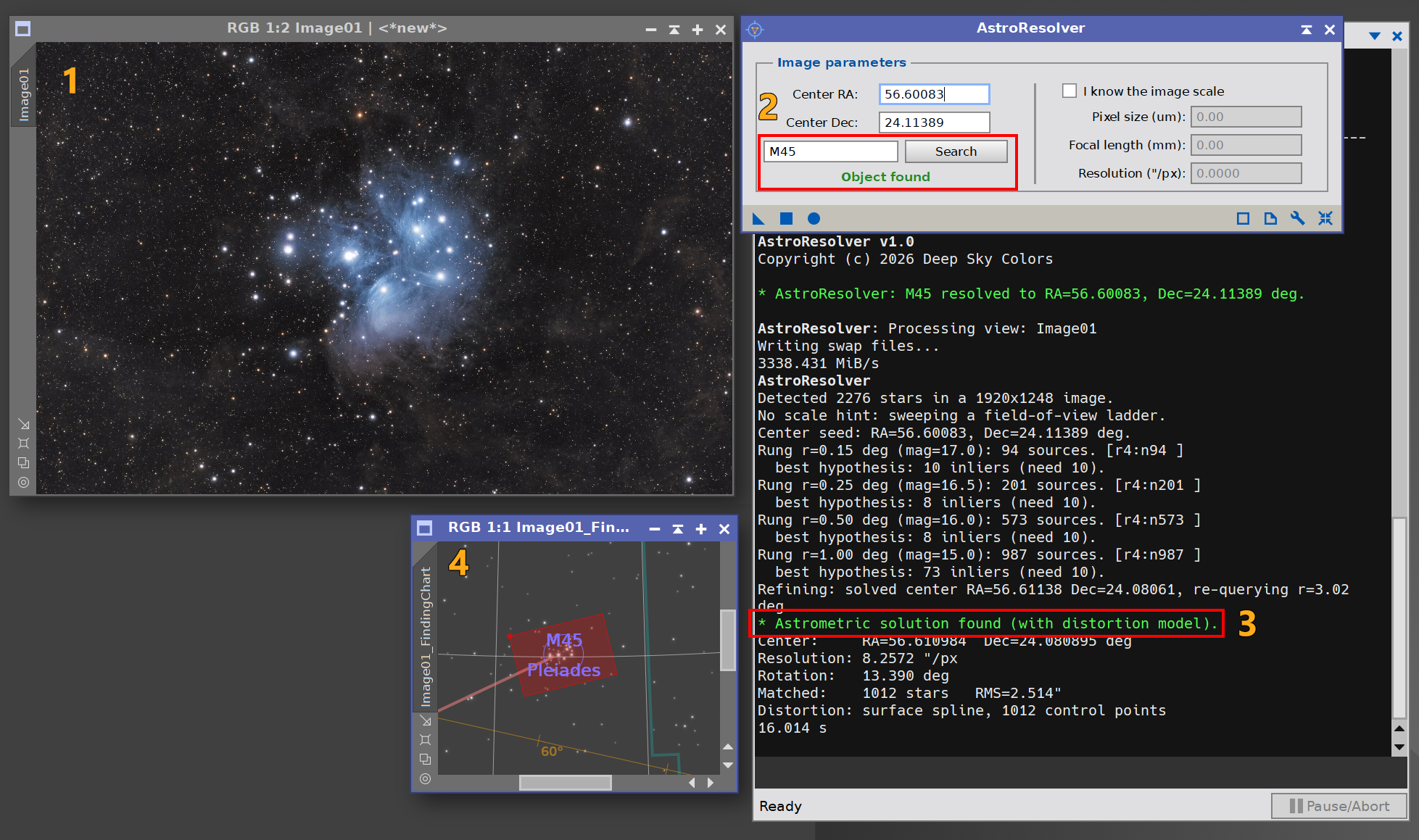
- A name. Type
M31,NGC 7000orHorsehead Nebulaand click Solve. A built-in catalog of about 14,400 objects resolves it instantly, with no internet connection; any other designation is looked up online. - A rough position. Any point inside the frame will do; it doesn’t need to be the center.
- Nothing. Leave everything empty and click Solve. AstroResolver solves blind, from the stars alone.
Seconds, not minutes. A blind solve typically finishes in less than 10 seconds, star detection and the full solution included. The blind search finds the field in milliseconds, using index files AstroResolver builds once from the Gaia catalog already in your PixInsight (nothing to download).
Fast, then right. Many blind solvers stop at the first match, speed is their quality measure. AstroResolver treats that match as a starting point and spends a few more seconds, usually between 2 and 10 seconds, turning it into a solution worth measuring with, offering a subpixel accuracy that most blind solvers do not compute:
- A full distortion model, so the solution holds from the center to the corners, not just near the middle. Other solvers offer less accurate distortion models.
- Hundreds to thousands of Gaia stars across the whole frame, not just the indexed brighter ones, for residuals of a few tenths of an arcsecond.
- An independent confirmation: a second, separate solve must agree before anything is written to the image.
Solves what others can’t. Images with an unknown scale, objects off center, wide-angle lens fields, extremely small scale, and frames with no metadata at all. When even that isn’t enough, Manual solve fits a solution from a few stars we identify by hand.
Requires PixInsight with the Gaia DR3 catalog configured. Windows, macOS and Linux.
A jpeg of M1 downloaded from the Internet:
Our blind solver can be done within one second, but our goal is not just speed.
A final 2~10 secs adjustment provides a much more precise solutions than those just trying to beat the clock.
Try it, it’s free
AstroResolver is free and fully functional. There is no trial period and nothing expires: every feature, including the distortion model, is available to everyone, forever.
The free version shows a small advertisement banner at the bottom of the interface, usually promoting other Deep Sky Colors tools for PixInsight. The banner is a single clickable image; it never interrupts our work and it makes no attempt to track us, not even if we click on the banner. Registering AstroResolver removes the banner.
Installing it, in three steps
To install and start using AstroResolver:
1. Add this repository to PixInsight:
Where do I add it?
- Open PixInsight and go to RESOURCES > Updates > Manage Update Repositories.
- Click Add, and enter the address above exactly.
- Click OK to save it, then OK again to close the window.
2. Go to RESOURCES > Updates > Check for Updates. AstroResolver appears already selected. Click Apply and restart when PixInsight asks.
3. You’re done. To run the process: PROCESS > DeepSkyColors > AstroResolver
AstroResolver is available for all platforms: Windows, Linux, and macOS (x64 and arm64). PixInsight 1.9.4 or later is required for the macOS arm64 version. PixInsight 1.9.5 is fully supported on all platforms.
Register your copy, use it forever
AstroResolver is free to use for personal use. Individuals can still register their copy, which will remove the ad banner. If you wish to use AstroResolver for commercial, business, or organizational purposes, please contact us to discuss appropriate licensing options.You can install and use your registered copy of AstroResolver on any machine you also have PixInsight installed, regardless of operating system (your registration is valid for any and all offered platforms) or number of installations, and you can use it for as long as you want (lifetime license). Just click on the "Buy AstroResolver" button. You'll be redirected to PayPal.
NOTE: After you make your purchase, you should receive an email from us, usually within 15 minutes. If, after 30 minutes (but not before that) you still haven't received our message, please check your spam folder. If still nothing, contact us.
AstroResolver Full Documentation
AstroResolver's full documentation is accessible from within AstroResolver itself - we just need to click on the Documentation button in AstroResolver. We have also made the same documentation available online, here:







Credits
AstroResolver was developed using the PixInsight Class Library. Any product derived from the PCL, including AstroResolver, must reproduce the following acknowledgment:
This product is based on software from the PixInsight project, developed by Pleiades Astrophoto and its contributors (http://pixinsight.com/).
The above statement refers to our use of the PCL to develop AstroResolver only. AstroResolver is developed independently, without any relation to or specific contributions from Pleiades Astrophoto.