
DynamicDraw for PixInsight

DynamicDraw will not make our astroimages look better, but it’s a great complement to have!
For annotating, highlighting, drawing arrows, adding to charts, and more!
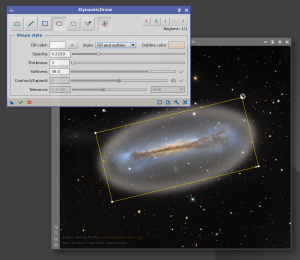
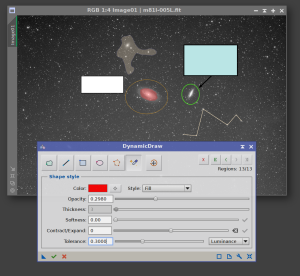
 Welcome to DynamicDraw
* DynamicDraw is part of the PS DarkRoom Suite bundle.
Welcome to DynamicDraw! A a PixInsight process module for drawing colored shapes directly onto an image. We trace shapes by hand — a freehand stroke, a straight line, a rectangle, an ellipse, a polygon, or a magic-wand flood fill — and DynamicDraw composites our chosen color onto the target view at the position and shape we drew. It is a painting tool, not a mask generator: the pixels we draw land on the image itself. Of course, we can paint on an image that will be used as a mask.
Every shape carries its own properties: color, opacity, a fill, an outline, or both (with adjustable thickness), and an optional softness that adds a soft edge without shrinking the shape. We pick colors with a full RGB color picker, or sample them straight from the image with the eyedropper. What we draw is rendered live on the image, exactly as it will be applied.
Try it for free
DynamicDraw is not free, but you can try it for 30 days, fully functional. Every feature is available to everyone.
To use DynamicDraw after the trial period, you need to get your forever license below. No subscription fees! Your copy is yours to keep and use forever. You would also receive free upgrades within the major version you purchased.
Installing it, in three steps
To install and start using DynamicDraw:
1. Add this repository to PixInsight:
Where do I add it?
- Open PixInsight and go to RESOURCES > Updates > Manage Update Repositories.
- Click Add, and enter the address above exactly.
- Click OK to save it, then OK again to close the window.
2. Go to RESOURCES > Updates > Check for Updates. DynamicDraw appears already selected, so click Apply and restart when PixInsight asks.
3. You’re done. To run the process: PROCESS > DeepSkyColors > DynamicDraw
DynamicDraw is available for all platforms: Windows, Linux, and macOS (x64 and arm64). PixInsight 1.9.4 or later is required for the macOS arm64 version. PixInsight 1.9.5 is fully supported on all platforms.
Register your copy, use it forever
DynamicDraw can be registered for personal use under a paid license. If you wish to use DynamicDraw for commercial, business, or organizational purposes, please contact us to discuss appropriate licensing options.
You can install and use your registered copy of DynamicDraw on any machine you also have PixInsight installed, regardless of operating system (your registration is valid for any and all platforms) or number of installations, and you can use it for as long as you want (lifetime license). Just click on the "Buy DynamicDraw" button. You'll be redirected to PayPal.
NOTE: After you make your purchase, you should receive an email from us, usually within 15 minutes. If, after 15 minutes (but not before that) you still haven't received our message, please check your spam folder. If still nothing, contact us.
DynamicDraw Full Documentation
DynamicDraw's full documentation is accessible from within DynamicDraw itself - we just need to click on the Documentation button in DynamicDraw. We have also made the same documentation available online, here:
Credits
DynamicDraw was developed using the PixInsight Class Library. Any product derived from the PCL, including DynamicDraw, must reproduce the following acknowledgment:
This product is based on software from the PixInsight project, developed by Pleiades Astrophoto and its contributors (http://pixinsight.com/).
The above statement refers to our use of the PCL to develop DynamicDraw only. DynamicDraw is developed independently, without any relation to or specific contributions from Pleiades Astrophoto.