
SpotHealing for PixInsight
 Welcome to SpotHealing
* SpotHealing is part of the PS DarkRoom Suite bundle.
SpotHealing is a PixInsight process module for removing unwanted spots and artifacts by painting over them. Wherever we drag the brush, instead of painting a color, SpotHealing reconstructs the area underneath: it estimates the local background from the surrounding pixels and fills the painted region so the blemish disappears and the result blends seamlessly into its surroundings.This makes it ideal for the everyday nuisances of astrophotography — satellite and aircraft trails, dust motes, hot pixels, residual stars, plate defects, and other localized intrusions — without the manual matching of a clone stamp. The fill follows the local gradient, matches the surrounding noise, and can even repopulate stars if we want to, so a patch over a busy starfield doesn't read as an obvious hole.
SpotHealing is a dynamic tool: we paint directly on the image and see each correction immediately. Every stroke is a discrete, undoable step, and the complete sequence is serialized into the process instance — so it can be saved, dragged to a process icon, and re-applied later.
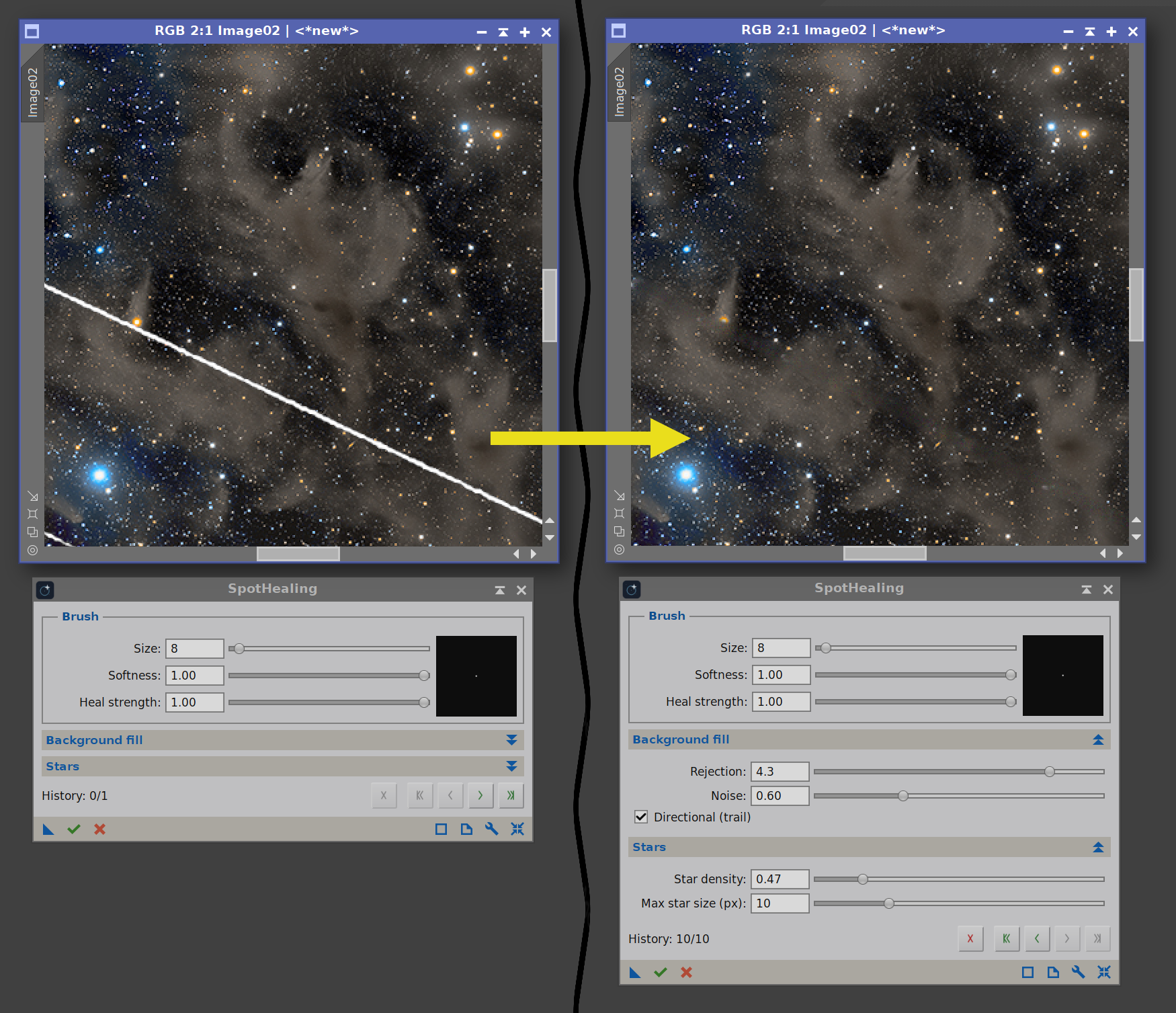
Removing strong satellite trails, easily.
Try it for free
SpotHealing is not free, but you can try it for 30 days, fully functional. Every feature is available to everyone.
To use SpotHealing after the trial period, you need to get your forever license below. No subscription fees! Your copy is yours to keep and use forever. You would also receive free upgrades within the major version you purchased.
Installing it, in three steps
Every PixInsight process made by Deep Sky Colors is installed through DSC Hub (DSC = Deep Sky Colors), our free PixInsight process. One address gets you the hub, and the hub gets you the rest.
1. Add this repository to PixInsight:
Where do I add it?
- Open PixInsight and go to RESOURCES > Updates > Manage Update Repositories.
- Click Add, and enter the address above exactly.
- Click OK to save it, then OK again to close the window.
2. Go to RESOURCES > Updates > Check for Updates. DSC Hub appears already selected, so click Apply and restart when PixInsight asks.
3. Open PROCESS > DeepSkyColors > DSCHub. You are now looking at every process we make, with its version, what it does and what changed in its latest release. Select SpotHealing, click Download and install, and restart. It appears under PROCESS > DeepSkyColors.
DSC Hub is free, it installs only what you select, and it leaves the rest of your PixInsight setup alone.
Prefer to add one repository per process? SpotHealing still has its own: https://repo.deepskycolors.com/SpotHealing/








Register your copy, use it forever
SpotHealing can be registered for personal use under a paid license. If you wish to use SpotHealing for commercial, business, or organizational purposes, please contact us to discuss appropriate licensing options.You can install and use your registered copy of SpotHealing on any machine you also have PixInsight installed, regardless of operating system (your registration is valid for any and all offered platforms) or number of installations, and you can use it for as long as you want (lifetime license). Just click on the "Buy SpotHealing" button. You'll be redirected to PayPal.
NOTE: After you make your purchase, you should receive an email from us, usually within 15 minutes. If, after 15 minutes (but not before that) you still haven't received our message, please check your spam folder. If still nothing, contact us.
SpotHealing Full Documentation
SpotHealing's full documentation is accessible from within SpotHealing itself - we just need to click on the Documentation button in SpotHealing. We have also made the same documentation available online, here:
Credits
SpotHealing was developed using the PixInsight Class Library. Any product derived from the PCL, including SpotHealing, must reproduce the following acknowledgment:
This product is based on software from the PixInsight project, developed by Pleiades Astrophoto and its contributors (http://pixinsight.com/).
The above statement refers to our use of the PCL to develop SpotHealing only. SpotHealing is developed independently, without any relation to or specific contributions from Pleiades Astrophoto.