
DSC Hub
 This is DSC Hub
 ONE REPOSITORY FOR EVERYTHING
Why DSC Hub?
PixInsight’s repository system is all-or-nothing for every repository URL. At Deep Sky Colors we offer 15 different modules – and more are coming!! – and each needs its own repository URL. If you’re only interested in, say, 7 processes, you’d need to add 7 different URLs. And every process you try later means another URL to add, and another to remove when you are done with it.
We could also offer a single URL where ALL OUR PROCESSES are checked for updates, as other vendors have done, but then you’d be notified about updates for all of our (15 now) processes, not just the 7 (using our example) you use. Too much noise.
This is what led us to develop DSC Hub: the same convenience with none of those limitations. It works for our own processes only, not for PixInsight’s or anyone else’s, so it does not replace PixInsight’s repository system. It replaces it for Deep Sky Colors processes.
With DSC Hub, you only need one repo URL for all of Deep Sky Colors modules:
https://repo.deepskycolors.com/
See next section “Downloading and installing DSC Hub” for instructions. This will install DSC Hub, and with DSC Hub installed, run PROCESS > DeepSkyColors > DSCHub to see the modules we offer, which ones you have, which ones have an update waiting, and what changed in each one. DSC Hub can download and install them when you say so. It never installs or changes anything without your confirmation.
You do not need to run DSC Hub to be notified of updates. DSC Hub checks automatically every time you start PixInsight.
- No noise: You are only ever told about updates for the processes you have installed, never about the rest. The list itself can be set to show only what you have, and announcements of brand new processes can be turned off. A single PixInsight repository URL cannot do any of this.
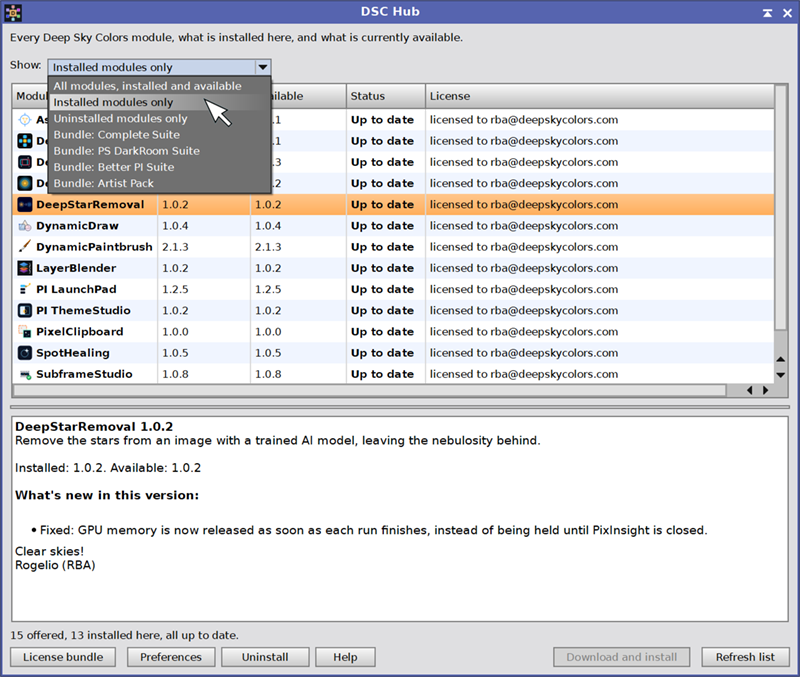
- Never wonder: The module list shows the installed version, the available version, the license status and a description of every Deep Sky Colors module.
- Fast and easy: One-click download and install, with an optional restart of PixInsight when the install is done.
- Just like always: Notices at startup when an update is available or a new module has been added, both of which can be turned down in Preferences.
- Fast bundle licensing: License a whole bundle in one step. Those who purchase a bundle (click here to see the bundles we offer) can license all modules at once, with a single key. Without DSC Hub, each module would require its own key and registration.
- Private: Your data stays with you. DSC Hub sends nothing about you. It reads catalog info from our server and does not talk back: no telemetry, no analytics, no account.
- Safe: PixInsight never accepts a module without a matching signature, regardless of how it is installed. In addition, DSC Hub verifies the integrity and authorship of downloaded catalogs and packages even before handing the package to PixInsight, to make sure nothing tampered with them between our servers and your computer.
- Staying informed is your choice: You can choose to have brand new processes listed or not, as they come out. Installing them is up to you, and until you do, their updates are never announced.
Downloading and installing DSC Hub
To download and install DSC Hub:
- Open PixInsight and add this URL:
https://repo.deepskycolors.com/
to your list of PixInsight repositories ( RESOURCES menu > Updates > Manage Repositories > Add ).
- With the URL in place, do RESOURCES > Updates > Check for Updates. DSC Hub appears as a candidate for installation, already selected. Click Apply. PixInsight installs it when PixInsight restarts.
- After the restart, if you already had some DeepSkyColor processes installed and some are not the latest version, you may see a notification open in PixInsight alerting you about possible updates: follow the prompts. Otherwise, PROCESS > DeepSkyColors > DSCHub opens the Deep Sky Colors catalog: every process, with its version, what it does, and what is new in its latest release.
- You can select one or more processes, list only the processes in a bundle, and other options. Once the selection of module(s) is done, click Download and install.
- When the download is done, DSCHub offers to restart PixInsight. Restart it, and all the downloaded processes will be available under PROCESS > DeepSkyColors, and possibly also in other categories.
DSC Hub Documentation
DSC Hub’s full documentation is accessible from within DSC Hub itself – we just need to open the DSC Hub Help button, and it will open in PixInsight’s documentation browser. We have also made the same documentation available online, here, so you can see everything DSC Hub does:
DSC Hub was developed using the PixInsight Class Library. Any product derived from the PCL, including DSC Hub, must reproduce the following acknowledgment:
This product is based on software from the PixInsight project, developed by Pleiades Astrophoto and its contributors (http://pixinsight.com/).
The above statement refers to our use of the PCL to develop DSC Hub only. DSC Hub is developed independently, without any relation to or specific contributions from Pleiades Astrophoto.