
PI SettingsEditor
 This is PI SettingsEditor
PI SettingsEditor (we call it PISE) is a free, handy tool for anyone who uses PixInsight. It gives us a real GUI for editing nearly all of PixInsight’s internal settings and installed processes. For Windows, Linux, and soon, also for macOS.
In short, it finds all the core-NNN-pxi.settings files, and it starts by letting us edit the latest it finds. Anyone who has ever opened PixInsight’s core-NNN-pxi.settings file in a text editor, has probably regretted it immediately. PI Settings Editor removes the sweat, and provides several useful tools to navigate the file, easily. It also allows us to edit the list of updates to our PixInsight installation, and it can clean the leftovers left by uninstalled third party processes, including the binaries, documentation, and more.
Developers will find this very useful, especially for cleaning up their project’s leftovers to test clean installs, for example. Regular users should probably use PI SettingsEditor only for the Unused modules and Health Check features.
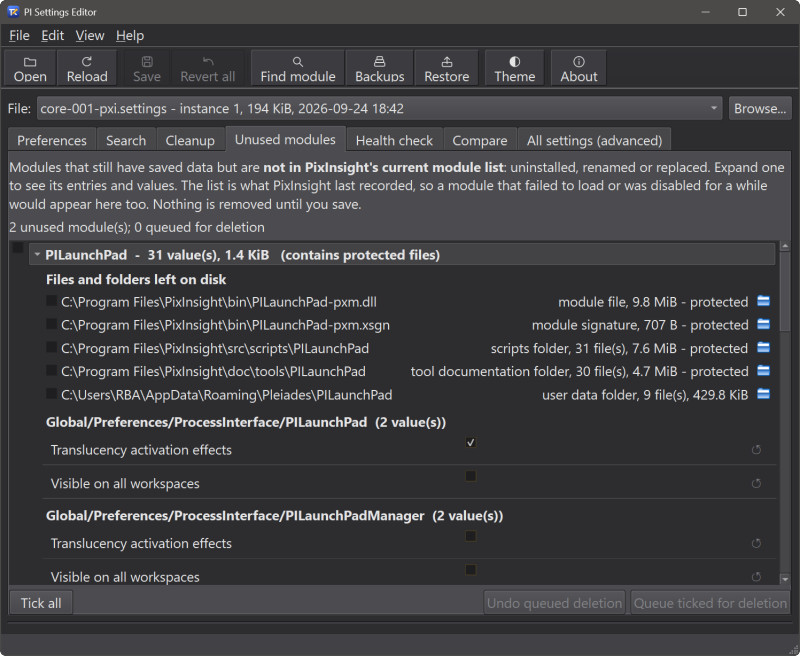
- Unused modules: Settings and files left behind by modules that are no longer installed. Each one expands to show its entries and values. Additionally, PISE scans for additional data left by those “ghost” processes. A whole module’s data can be queued for deletion at once.
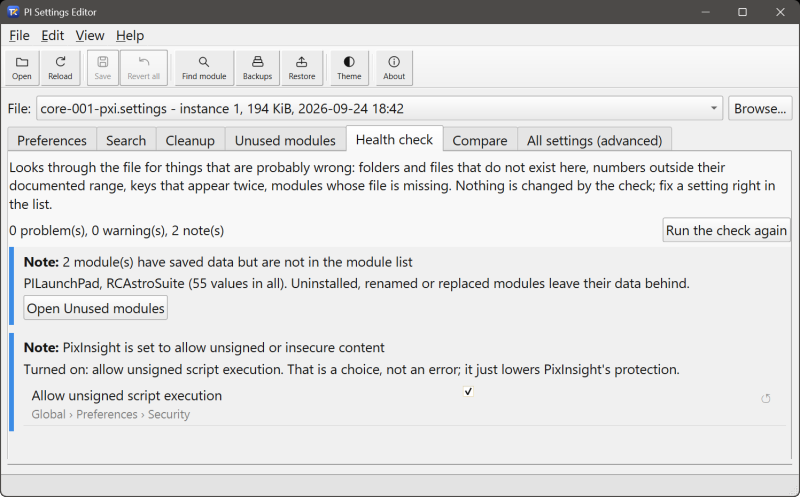
- Health check: It looks for settings that are probably wrong: a folder or file that does not exist on this computer, a number outside its documented range, an option value the editor does not recognize, more worker threads than the computer has processors, a registered module whose file is missing, a duplicated key, or a setting that allows unsigned content. Nothing is changed by the check itself; each finding shows the setting as an editable row.
For all other options, refer to PISE’s User’s Guide below.
Every uninstalled PixInsight module or script leaves stuff behind, forever.
PISE will find it and let you clean it up, if you want.
Free Download
To download PI SettingsEditor, pick the installer for your system below. Current version is 0.1.3, released on October 1, 2026
- Click to download: PI SettingsEditor 0.1.3 for Windows (x64)
(SHA256: ec7f86552508e1fd2766d1bddc65551a5fdb829c7a926621f191dd6f6a381d93)
Download the package for your Linux distro. All packages are x64 (Intel/AMD).
- Click to download: PI Settings 0.1.3 for Linux (x64)
(SHA256: 17d4c392779c51d6992ae2b7ab51e193d993701d1b5d79a9d6571980f432f9fa)
Run from a terminal (or double click in your file manager):
sudo apt install ./pise-settings-editor_0.1.3_amd64.deb
- Click to download: PI Settings 0.1.3 for Linux (x64)
(SHA256: 38d6f507d96ab5b4dd85f77e6da3e6d34affea41d47c16e80b1f93ff0573acab)
Unpack it and run./install.sh
The macOS version of PI SettingsEditor is already built and tested. We are waiting on Apple for our Developer Certificate and other formalities until we offer the installer for download. Otherwise, you would be downloading a package that macOS refuses to run.
- PI SettingsEditor for Apple Silicon (arm64) – coming soon
- PI SettingsEditor for Intel (x64) – coming soon
Health Check reports anything that might not be right in PixInsight’s internal settings, and why.
PI SettingsEditor User’s Guide
PI SettingsEditor’s full documentation is accessible from within PI SettingsEditor itself – we just need to open the PI SettingsEditor Help menu, click on the User’s Guide menu option, and it will open in your default browser. We have also made the same documentation available online, here, so you can see everything PI SettingsEditor has to offer: