
PI LaunchPad for PixInsight
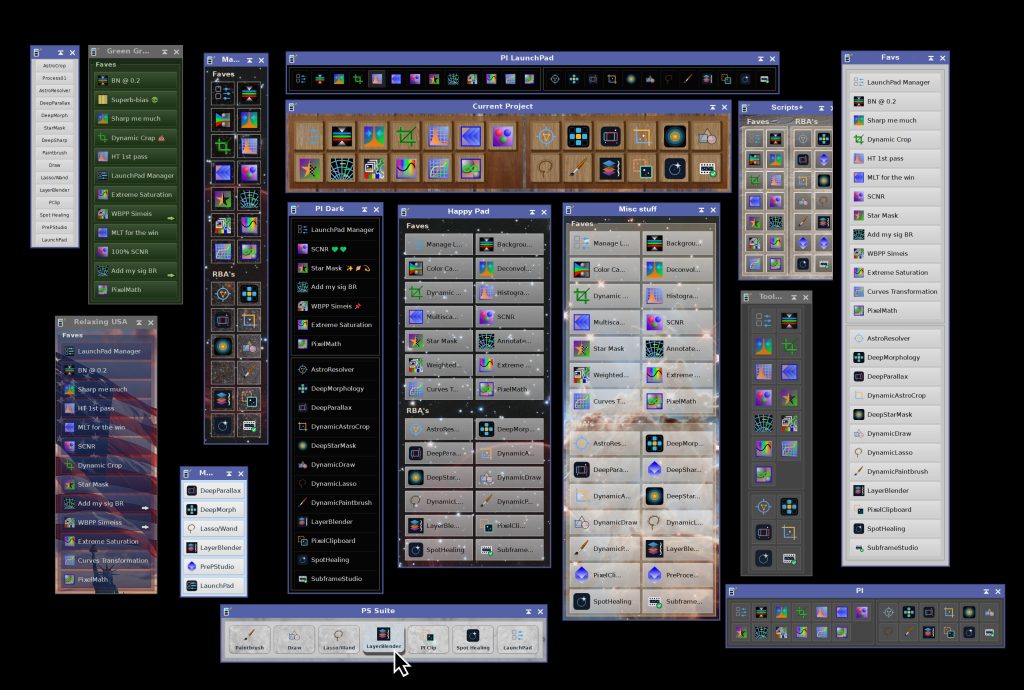
Want your launchpads to blend in, or to stand out? You can design them however you want!
Or use and edit any of the 28 themes included.
 Welcome to PI LaunchPad!
* PI LaunchPad is part of the Artist Pack bundle.
PI LaunchPad turns the processes, scripts and files we use most in PixInsight into one-click buttons, laid out exactly the way we work. Each button holds a complete, stored definition of what it launches, with every parameter you tuned. For example, once a process icon is on our launchpad, we can delete the original from the workspace and the button keeps working. No more hunting through menus, and no more workspaces cluttered with process icons you keep around just in case.
- 28 theme styles included, that shape every visual aspect of a launchpad, or create your own.
- Full theme control: colors, gradients, textures, fonts, sizes, 3D effects and more, so a launchpad can blend into PixInsight or stand out from it.
- Organize your buttons: name them, arrange them into titled groups, add separators and drag buttons into place.
- Automatic launch at startup: our launchpad(s) appear automatically every time we start PixInsight’s, exactly where and how we left them.
- Custom icons for any button.
- Up to ten launchpads at once, placed anywhere on the desktop and shown or hidden as needed.
- Save and share: save any launchpad or theme to a file, or export your whole setup as a single process icon that rebuilds every launchpad on another computer.
What can we add to a launchpad as a one-click action button?
- Process icons from our workspace, with all their parameters.
- Processes with default values from a list of all installed processes.
- Process icon files (
.xpsm), including whole collections in a single step. - Scripts, including script icons saved in process icon files.
- Images, setting an automatic thumbnail as the button icon.
- Any other file PixInsight can open.
Placing process icons on the workspace is a proven way to work, and PI LaunchPad builds on this rather than replacing it: any icon we already use can become a button in one step. What PI LaunchPad adds the most is order and permanence. Our tools stay organized in named groups, stay visible above our image windows, can be placed anywhere on the desktop (not limited to PixInsight’s workspace), and are there every time we start PixInsight, with no project or icon file to reload.
Try it for free
PI LaunchPad is not free, but you can try it for 30 days, fully functional. Every feature is available to everyone.
After the trial period PI LaunchPad continues working, and we can still manage all our launchpads, but only the first five buttons of the main launchpad work. To remove this limitation, you need to get your forever license below. No subscription fees: your copy is yours to keep and use forever. You would also receive free upgrades within the major version you purchased.
Installing it, in three steps
To install and start using PI LaunchPad:
1. Add this repository to PixInsight:
Where do I add it?
- Open PixInsight and go to RESOURCES > Updates > Manage Update Repositories.
- Click Add, and enter the address above exactly.
- Click OK to save it, then OK again to close the window.
2. Go to RESOURCES > Updates > Check for Updates. PI LaunchPad appears already selected,. Click Apply and restart when PixInsight asks.
3. You’re done. To open the process: PROCESS > DeepSkyColors > PILaunchPad
PI LaunchPad is available for all platforms: Windows, Linux, and macOS (x64 and arm64). PixInsight 1.9.4 or later is required for the macOS arm64 version. PixInsight 1.9.5 is fully supported on all platforms.
Free texture pack
82 images for button textures and launchpad skins: brick, concrete, fabric, marble, metal, rocketc, plus planetary and Hubble images. Unzip it anywhere; the Theme Editor browses to any folder.
Download the texture pack (ZIP, 9.5 MB)
Textures: Poly Haven and ambientCG (CC0). Hubble and planetary images: ESA/Hubble, CC BY 4.0.








Register your copy, use it forever
PI LaunchPad can be registered for personal use under a paid license. If you wish to use PI LaunchPad for commercial, business, or organizational purposes, please contact us to discuss appropriate licensing options.
No subscriptions, all free v1.xx updates. Your copy is yours and once registered, it will never be deactivated. You can install and use it on any machine you have also installed PixInsight, for any of the available operating systems (your registration is valid for all offered platforms) or number of installations, as long as they are for you to use.
NOTE: After you make your purchase, you should receive an email from us, usually within 15 minutes. If, after 30 minutes you still haven’t received our message, please check your spam folder. If still nothing, contact us.
PI LaunchPad Documentation
PI LaunchPad’s full documentation is accessible from within PI LaunchPad itself – we just need to click on the Documentation button in PI LaunchPad and it will appear in PixInsight’s Documentation browser. We have also made the same documentation available online, here:
Credits
PI LaunchPad was developed using the PixInsight Class Library. Any product derived from the PCL, including PI LaunchPad, must reproduce the following acknowledgment:
This product is based on software from the PixInsight project, developed by Pleiades Astrophoto and its contributors (http://pixinsight.com/).
The above statement refers to our use of the PCL to develop PI LaunchPad only. PI LaunchPad is developed independently, without any relation to or contributions from Pleiades Astrophoto.