
DynamicAstroCrop for PixInsight
Welcome to DynamicAstroCrop
DynamicAstroCrop performs the most common geometric operations on an image — cropping, resampling, and reorientation — while preserving and transforming the astrometric solution of the image. The result keeps a valid WCS instead of losing it.
This matters because PixInsight's standard geometry processes (DynamicCrop, Resample, IntegerResample, Rotation, FastRotation) delete the astrometric solution when they run: they warn that the astrometric metadata will be discarded, and they discard it. On a plate-solved image, that means every downstream tool that needs a WCS — annotation, finding charts, catalog cross-matching — stops working the moment we crop or resize the frame. Re-solving afterwards is possible, but it is slow, it is not always reliable, and it should not be necessary.
DynamicAstroCrop closes that gap. When we crop, resample, or reorient a solved image, it recomputes the astrometric solution for the new geometry and writes it back, so the transformed image is still solved. When the image carries no astrometric solution, the tool simply behaves as a normal crop, resample, or reorientation.
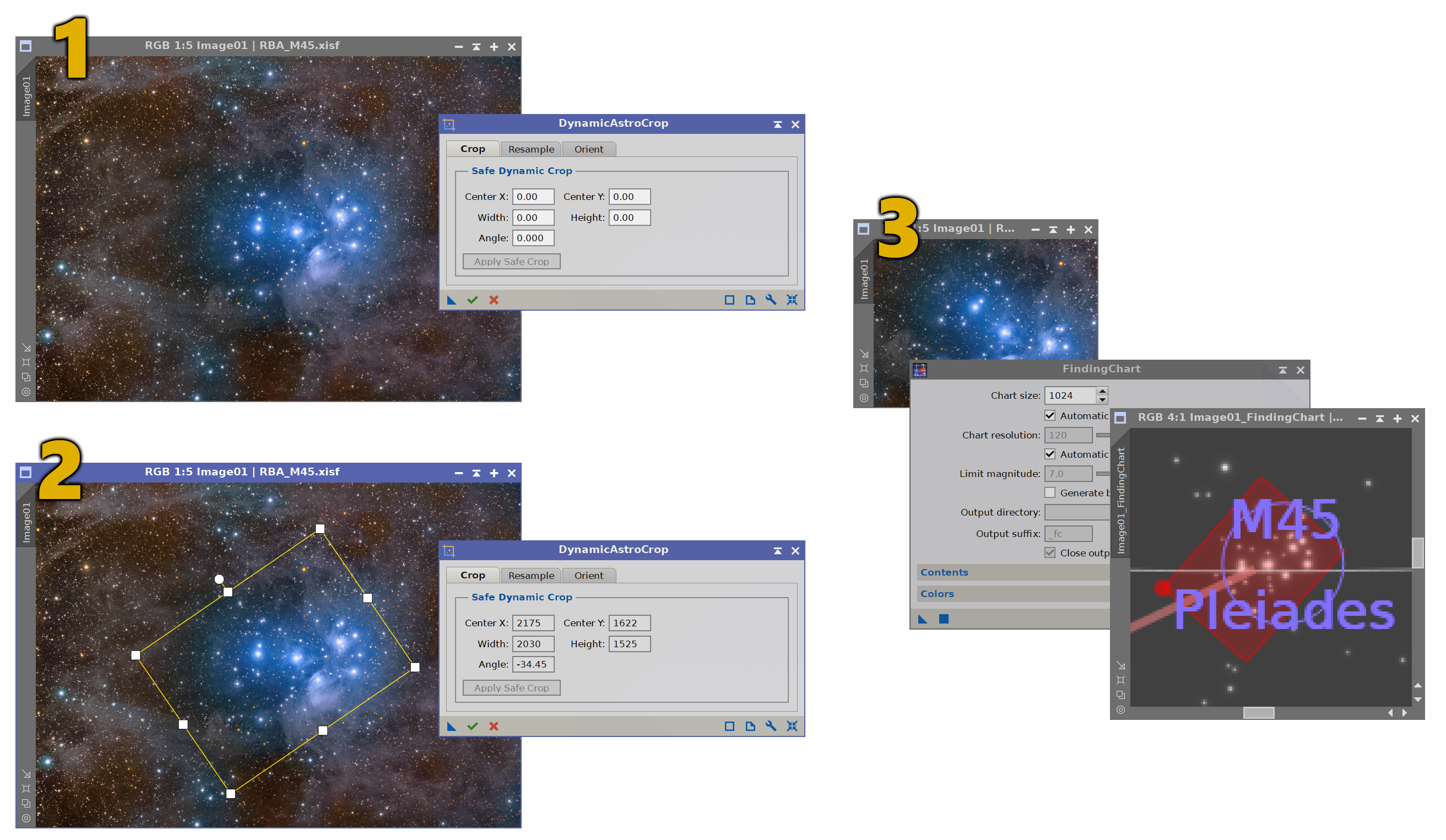
A plate-solved image (1) cropped to a rotated rectangle (2). The cropped result (3) still carries a valid WCS (FindingChart lands cleanly).
100% free
DynamicAstroCrop is free and fully functional. There is no trial period and nothing expires: every feature is available to everyone, forever.
The free version shows a small advertisement banner at the bottom of the interface, usually promoting other Deep Sky Colors tools. The banner is a single clickable image; it never interrupts our work and it makes no attempt to track us. If we click on the banner, DynamicAstroCrop opens our default browser with the direct destination link, without saving nor tracking any information about the click at all. Registering DynamicAstroCrop removes the banner.
Installing it, in three steps
Every PixInsight process made by Deep Sky Colors is installed through DSC Hub (DSC = Deep Sky Colors), our free PixInsight process. One address gets you the hub, and the hub gets you the rest.
1. Add this repository to PixInsight:
Where do I add it?
- Open PixInsight and go to RESOURCES > Updates > Manage Update Repositories.
- Click Add, and enter the address above exactly.
- Click OK to save it, then OK again to close the window.
2. Go to RESOURCES > Updates > Check for Updates. DSC Hub appears already selected, so click Apply and restart when PixInsight asks.
3. Open PROCESS > DeepSkyColors > DSCHub. You are now looking at every process we make, with its version, what it does and what changed in its latest release. Select DynamicAstroCrop, click Download and install, and restart. It appears under PROCESS > DeepSkyColors.
DSC Hub is free, it installs only what you select, and it leaves the rest of your PixInsight setup alone.
Prefer to add one repository per process? DynamicAstroCrop still has its own: https://repo.deepskycolors.com/DynamicAstroCrop/
Register your copy, use it forever
DynamicAstroCrop is free to use for personal use. Individuals can still register their copy, which will remove the ad banner. If you wish to use DynamicAstroCrop for commercial, business, or organizational purposes, please contact us to discuss appropriate licensing options.You can install and use your registered copy of DynamicAstroCrop on any machine you also have PixInsight installed, regardless of operating system (your registration is valid for any and all offered platforms) or number of installations, and you can use it for as long as you want (lifetime license). Just click on the "Buy DynamicAstroCrop" button. You'll be redirected to PayPal.
NOTE: After you make your purchase, you should receive an email from us, usually within 15 minutes. If, after 30 minutes (but not before that) you still haven't received our message, please check your spam folder. If still nothing, contact us.
DynamicAstroCrop Full Documentation
DynamicAstroCrop's full documentation is accessible from within DynamicAstroCrop itself - we just need to click on the Documentation button in DynamicAstroCrop. We have also made the same documentation available online, here:










Credits
DynamicAstroCrop was developed using the PixInsight Class Library. Any product derived from the PCL, including DynamicAstroCrop, must reproduce the following acknowledgment:
This product is based on software from the PixInsight project, developed by Pleiades Astrophoto and its contributors (http://pixinsight.com/).
The above statement refers to our use of the PCL to develop DynamicAstroCrop only. DynamicAstroCrop is developed independently, without any relation to or specific contributions from Pleiades Astrophoto.