
DynamicDraw for PixInsight

DynamicDraw will not make our astroimages look better, but it’s a great complement to have!
For annotating, highlighting, drawing arrows, adding to charts, and more!
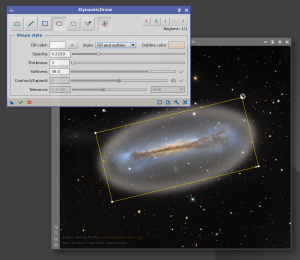
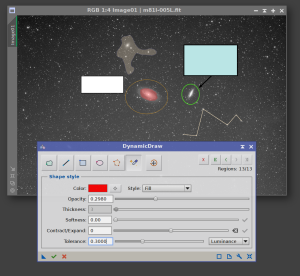
Welcome to DynamicDraw
Welcome to DynamicDraw! A a PixInsight process module for drawing colored shapes directly onto an image. We trace shapes by hand — a freehand stroke, a straight line, a rectangle, an ellipse, a polygon, or a magic-wand flood fill — and DynamicDraw composites our chosen color onto the target view at the position and shape we drew. It is a painting tool, not a mask generator: the pixels we draw land on the image itself. Of course, we can paint on an image that will be used as a mask.
Every shape carries its own properties: color, opacity, a fill, an outline, or both (with adjustable thickness), and an optional softness that adds a soft edge without shrinking the shape. We pick colors with a full RGB color picker, or sample them straight from the image with the eyedropper. What we draw is rendered live on the image, exactly as it will be applied.
Try it for free
DynamicDraw is not free (almost!), but you can try a 100% functional copy for 30 days. If you want to use it after that, it's a one-time payment of just 4.99 US$. Your purchase also gives you a lifetime license to use your registered copy of DynamicDraw forever, plus free v1.xx upgrades. No subscription fees, no sudden forced re-registration.DynamicDraw is only distributed via a PixInsight repository (easiest and safest way to install new PixInsight modules). All we need to do to install our trial copy is add the DynamicDraw repository to our PixInsight installation:
If you need instructions to add the repository URL to PixInsight, click here
With the repository URL in place, we now do RESOURCES > Updates > Check for Updates. The DynamicDraw process will appear as a candidate for installation, automatically selected. We click Apply.
After that, PixInsight will inform us that the install will happen once we restart PixInsight. We do that, and DynamicDraw will be under PROCESS > DeepSkyColors and PROCESS > Painting.
Register your copy, use it forever
DynamicDraw can be registered for personal use under a paid license. If you wish to use DynamicDraw for commercial, business, or organizational purposes, please contact us to discuss appropriate licensing options.
You can install and use your registered copy of DynamicDraw on any machine you also have PixInsight installed, regardless of operating system (your registration is valid for any and all platforms) or number of installations, and you can use it for as long as you want (lifetime license). Just click on the "Buy DynamicDraw" button. You'll be redirected to PayPal.
NOTE: After you make your purchase, you should receive an email from us, usually within 15 minutes. If, after 15 minutes (but not before that) you still haven't received our message, please check your spam folder. If still nothing, contact us.
DynamicDraw Full Documentation
DynamicDraw's full documentation is accessible from within DynamicDraw itself - we just need to click on the Documentation button in DynamicDraw. We have also made the same documentation available online, here:
Credits
DynamicDraw was developed using the PixInsight Class Library. Any product derived from the PCL, including DynamicDraw, must reproduce the following acknowledgment:
This product is based on software from the PixInsight project, developed by Pleiades Astrophoto and its contributors (http://pixinsight.com/).
The above statement refers to our use of the PCL to develop DynamicDraw only. DynamicDraw is developed independently, without any relation to or specific contributions from Pleiades Astrophoto.