
SubframeStudio for PixInsight

Welcome to SubframeStudio!
* SubframeStudio is part of the Better PI Suite bundle.
SubframeStudio is a PixInsight process module for the job every deep-sky project starts with, deciding which subframes are worth keeping.
What makes SubframeStudio stand out from similar processes is that it brings the two halves of frame selection into a single, interactive surface: the visual side, where we flip through frames and see the differences with our own eyes, zooming in, etc. and the measured side, where numbers and thresholds do the sorting objectively. We can lean on either as much as we like, so novice users can select the valid frames interactively, and only dive into more complex approval and weighting methods (including full support of SubframeSelector’s expressions) when we have the know-how to use them effectively.
SubframeStudio supports a wide range of criteria, grouping, auto-defect detection (trails, clouds, tracking, …), a full timeline, and many, many more features. Also, it will interact nicely with a process that we should be launching by August or September 2026, PreProcessingStudio – a modern, dynamic and powerful PixInsight process (not a script) that aims at doing everything WBPP does and more, better, easier, and faster.
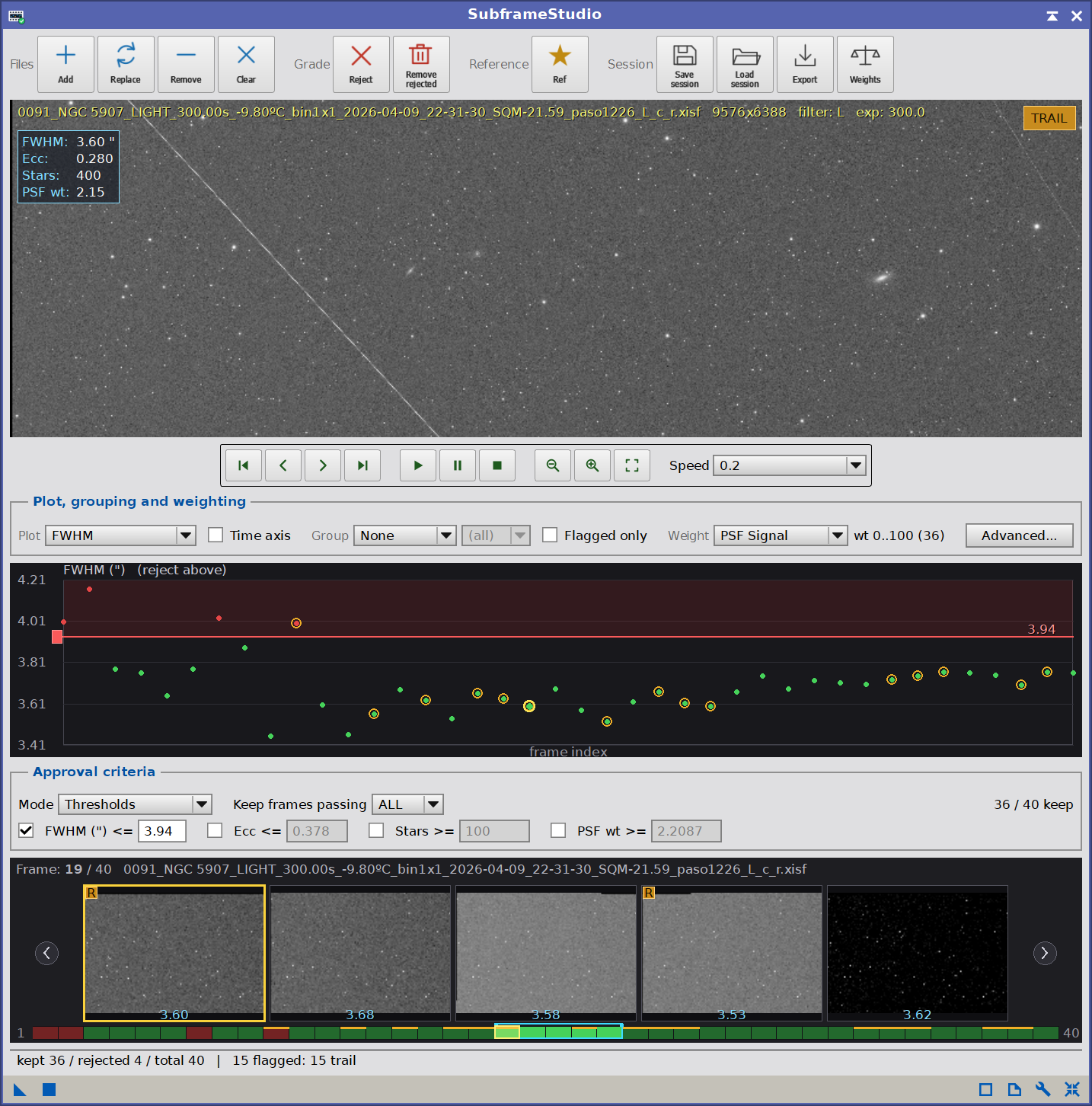
The SubframeStudio cockpit:
The cockpit: action toolbar, a zoomable/pannable live preview with a transport bar,
the plot controls, the metric plot, the approval criteria panel and the filmstrip navigator timeline at the bottom.
Try it for free
SubframeStudio is not free, but you can try it for 30 days, fully functional. Every feature is available to everyone.
To use SubframeStudio after the trial period, you need to get your forever license below. No subscription fees! Your copy is yours to keep and use forever. You would also receive free upgrades within the major version you purchased.
Installing it, in three steps
Every PixInsight process made by Deep Sky Colors is installed through DSC Hub (DSC = Deep Sky Colors), our free PixInsight process. One address gets you the hub, and the hub gets you the rest.
1. Add this repository to PixInsight:
Where do I add it?
- Open PixInsight and go to RESOURCES > Updates > Manage Update Repositories.
- Click Add, and enter the address above exactly.
- Click OK to save it, then OK again to close the window.
2. Go to RESOURCES > Updates > Check for Updates. DSC Hub appears already selected, so click Apply and restart when PixInsight asks.
3. Open PROCESS > DeepSkyColors > DSCHub. You are now looking at every process we make, with its version, what it does and what changed in its latest release. Select SubframeStudio, click Download and install, and restart. It appears under PROCESS > DeepSkyColors.
DSC Hub is free, it installs only what you select, and it leaves the rest of your PixInsight setup alone.
Prefer to add one repository per process? SubframeStudio still has its own: https://repo.deepskycolors.com/SubframeStudio/
The Advanced window
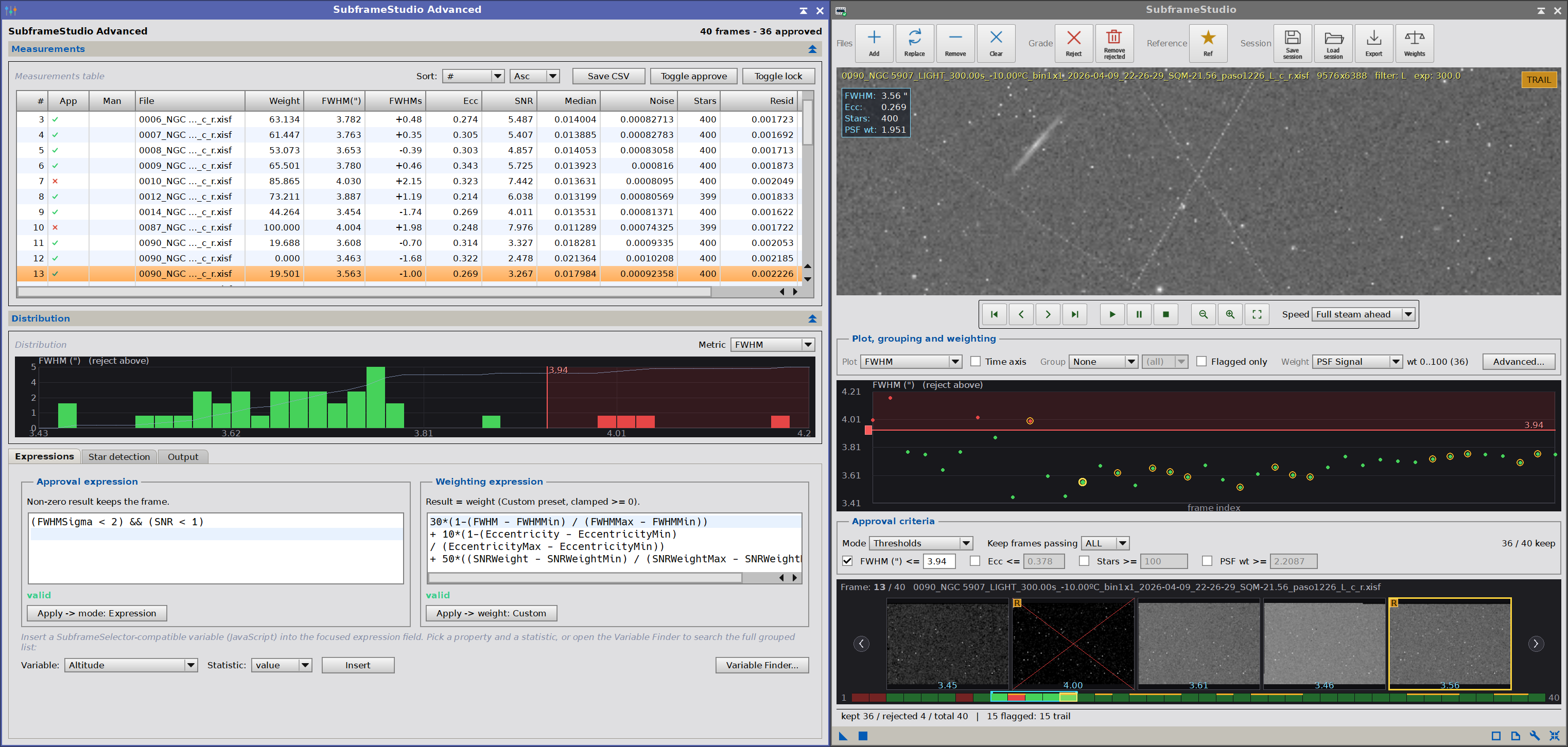
As we interact with the Measurements table, Distribution histogram and the Expressions,
the main window updates all pertinent information, currently selected image, etc.
Register your copy, use it forever
SubframeStudio can be registered for personal use under a paid license. If you wish to use SubframeStudio for commercial, business, or organizational purposes, please contact us to discuss appropriate licensing options.
No subscriptions, all free v1.xx updates. Your copy is yours and once registered, it will never be deactivated. You can install and use it on any machine you have also installed PixInsight, for any of the available operating systems (your registration is valid for all offered platforms) or number of installations, as long as they are for you to use.
NOTE: After you make your purchase, you should receive an email from us, usually within 15 minutes. If, after 30 minutes you still haven’t received our message, please check your spam folder. If still nothing, contact us.










SubframeStudio Documentation
SubframeStudio’s full documentation is accessible from within SubframeStudio itself – we just need to click on the Documentation button in SubframeStudio, and it will appear in the PixInsight’s Documentation browser . We have also made the same documentation available online, here:
Credits
SubframeStudio was developed using the PixInsight Class Library. Any product derived from the PCL, including SubframeStudio, must reproduce the following acknowledgment:
This product is based on software from the PixInsight project, developed by Pleiades Astrophoto and its contributors (http://pixinsight.com/).
The above statement refers to our use of the PCL to develop SubframeStudio only. SubframeStudio is developed independently, without any relation to or contributions from Pleiades Astrophoto.