
DynamicAstroCrop for PixInsight
 Welcome to DynamicAstroCrop
* DynamicAstroCrop is part of the Better Pixels Suite bundle.
DynamicAstroCrop performs the most common geometric operations on an image — cropping, resampling, and reorientation — while preserving and transforming the astrometric solution of the image. The result keeps a valid WCS instead of losing it.
This matters because PixInsight’s standard geometry processes (DynamicCrop, Resample, IntegerResample, Rotation, FastRotation) delete the astrometric solution when they run: they warn that the astrometric metadata will be discarded, and they discard it. On a plate-solved image, that means every downstream tool that needs a WCS — annotation, finding charts, catalog cross-matching — stops working the moment we crop or resize the frame. Re-solving afterwards is possible, but it is slow, it is not always reliable, and it should not be necessary.
DynamicAstroCrop closes that gap. When we crop, resample, or reorient a solved image, it recomputes the astrometric solution for the new geometry and writes it back, so the transformed image is still solved. When the image carries no astrometric solution, the tool simply behaves as a normal crop, resample, or reorientation.
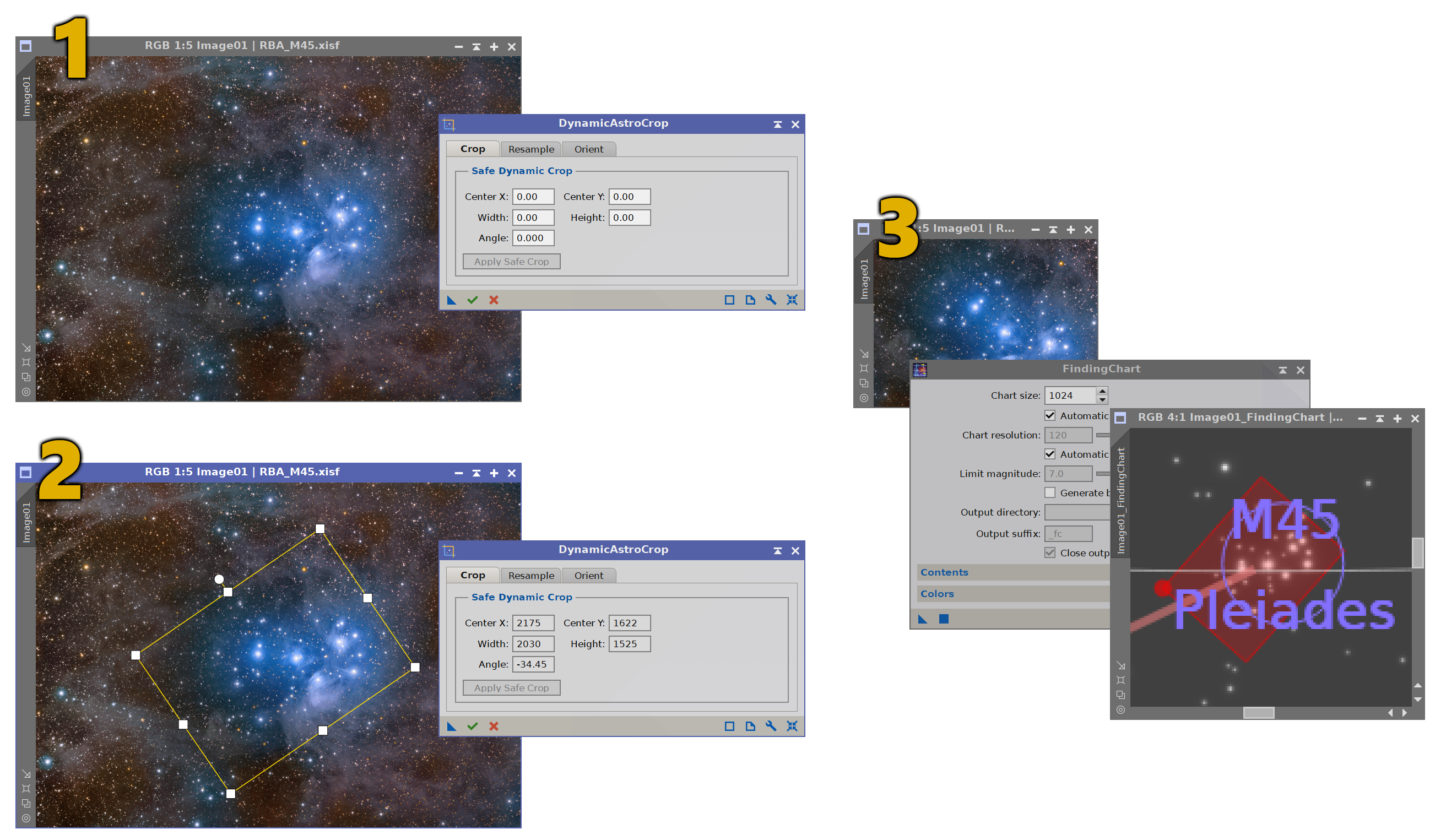
A plate-solved image (1) cropped to a rotated rectangle (2). The cropped result (3) still carries a valid WCS (FindingChart lands cleanly).
100% free
DynamicAstroCrop is free and fully functional. There is no trial period and nothing expires: every feature is available to everyone, forever.
Installing it, in three steps
To install and start using DynamicAstroCrop:
1. Add this repository to PixInsight:
Where do I add it?
- Open PixInsight and go to RESOURCES > Updates > Manage Update Repositories.
- Click Add, and enter the address above exactly.
- Click OK to save it, then OK again to close the window.
2. Go to RESOURCES > Updates > Check for Updates. DynamicAstroCrop appears already selected. Click Apply and restart when PixInsight asks.
3. You’re done. To run the process: PROCESS > DeepSkyColors > DynamicAstroCrop.
DynamicAstroCrop is available for all platforms: Windows, Linux, and macOS (x64 and arm64). PixInsight 1.9.4 or later is required for the macOS arm64 version. PixInsight 1.9.5 is fully supported on all platforms.
DynamicAstroCrop Full Documentation
DynamicAstroCrop's full documentation is accessible from within DynamicAstroCrop itself - we just need to click on the Documentation button in DynamicAstroCrop. We have also made the same documentation available online, here:


Credits
DynamicAstroCrop was developed using the PixInsight Class Library. Any product derived from the PCL, including DynamicAstroCrop, must reproduce the following acknowledgment:
This product is based on software from the PixInsight project, developed by Pleiades Astrophoto and its contributors (http://pixinsight.com/).
The above statement refers to our use of the PCL to develop DynamicAstroCrop only. DynamicAstroCrop is developed independently, without any relation to or specific contributions from Pleiades Astrophoto.